What if the first conversion fix isn’t a redesign, but a clearer view of where visitors lose confidence? Traffic may be reaching your website while too few people enquire, subscribe or buy. These website conversion rate optimization tips offer a practical starting point: identify the friction before deciding what to change.
Improvement is difficult when the problem could sit anywhere in the journey, from a landing page to a form or checkout. Isolated design changes can also feel like guesswork without a meaningful baseline or a clear way to assess their impact. A structured approach grounds each decision in evidence.
Use this practical 2026 checklist to define a specific conversion goal, establish a baseline and pinpoint the steps that deserve attention first. You’ll learn how to prioritise improvements using visitor evidence and business value, then evaluate changes without mistaking correlation for causation. Thoughtful UX/UI, testing and strategy can work together to make each improvement more purposeful.
Attracting visitors is only part of the job. A website also needs to help the right people take a valuable next step, and that action will vary by page and business objective. A service page may aim to generate a qualified enquiry, whilst a product page may be designed to complete a purchase. Define the event first so your analysis has a clear purpose.
Conversion rate is the number of conversions divided by eligible visitors, multiplied by 100. For example, if a service page receives 400 eligible visitors and generates 12 completed, qualified enquiry forms, its illustrative conversion rate is (12 ÷ 400) × 100 = 3%. These figures are hypothetical, not a benchmark. The denominator should reflect the audience relevant to the goal, rather than being chosen simply because it produces a higher percentage. For a broader overview of the concept and its calculation, see What is Conversion Rate Optimization?
Separate completed outcomes from signals that may help explain visitor behaviour. A button click, product view or cart addition can reveal interest, but it doesn’t necessarily show that the business objective has been met. Treat these as supporting measures, not as equivalents to a completed enquiry or sale.
Match the goal to the way the page contributes to your business. For a service business, measure completed forms, booked consultations or enquiries that meet your qualification criteria, rather than every form start. For e-commerce, count completed purchases as the primary outcome; cart additions and product views can help show where shoppers pause. On content-led pages, a subscription may be a supporting goal unless growing the subscriber base is the objective itself.
Write down what counts before reviewing results. For example, decide whether a service enquiry must include particular project details to qualify. A consistent definition makes the rate more useful and prevents a rise in low-intent actions from looking like progress.
Record the conversion event, measurement period, relevant page and audience before making changes. Keep those boundaries consistent when comparing performance, and check that the event is recorded reliably when the intended outcome is completed. If a form submission is counted at the start rather than after successful completion, the baseline may overstate results.
Conversion rate is calculated as conversions divided by eligible visitors, multiplied by 100. The appropriate result depends on the goal, page and audience being measured. Treat it as a working measure, not a universal benchmark. Note any changes to the page, campaign or measurement setup during the period, so later comparisons have useful context. These website conversion rate optimization tips begin with a sound definition because better measurement starts with knowing exactly what success means.
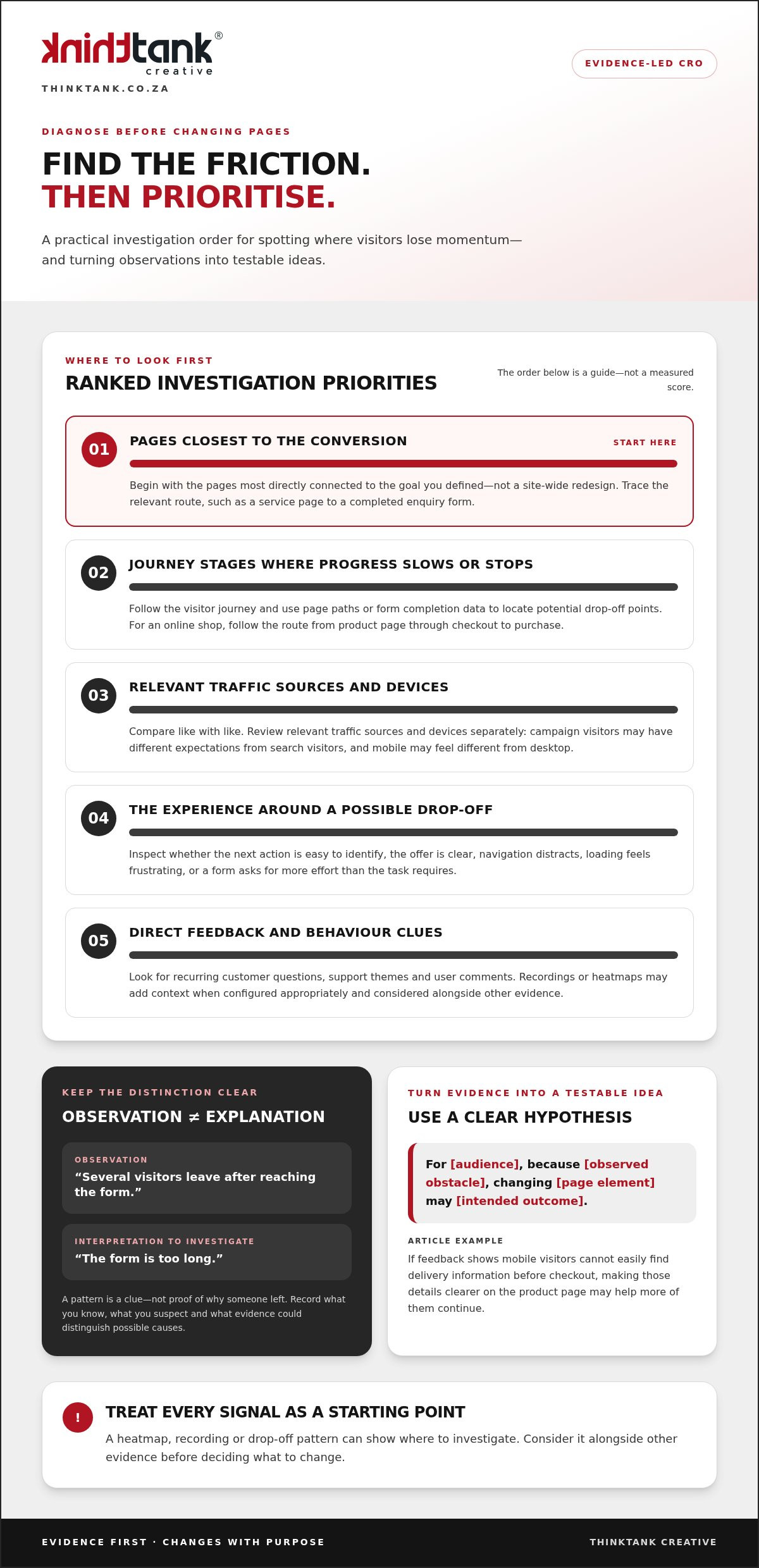
Start with the pages closest to the conversion you defined, not a site-wide redesign. Trace the visitor journey from a relevant landing page to the intended action, then look for stages where progress slows or stops. A service business might examine the route from a service page to a completed enquiry form; an online shop could follow the path from a product page through checkout to purchase.
Compare like with like. Review relevant traffic sources and devices separately, since visitors arriving from a campaign may have different expectations from those arriving through search, and a mobile journey may feel different from a desktop one. Look for patterns across comparable audiences rather than assuming one group’s behaviour represents everyone. HubSpot’s Guide to CRO also explores how research and analysis can inform improvements.
Review page paths and form completion data to locate potential drop-off points. Then inspect the experience around those steps. Is the next action easy to identify? Does the page explain the offer clearly? Is navigation distracting, is the loading experience frustrating, or does the form ask for more effort than the task requires? Treat each as a possible cause to investigate, not a proven explanation.
Direct feedback can add context to the numbers. Note questions raised by customers, recurring support themes and comments from people using the site. Recordings or heatmaps may help reveal where visitors pause or interact, provided they’re configured appropriately and considered alongside other evidence. A pattern in a visualisation is a clue to investigate, not proof of why someone left.
Keep observations separate from interpretations. “Several visitors leave after reaching the form” is an observation; “the form is too long” is an interpretation to investigate. Write down what you know, what you suspect and what evidence would help distinguish between possible causes. This makes uncertainty visible instead of turning a design preference into a finding.
Next, express the proposed change and expected outcome in one sentence: For [audience], because [observed obstacle], changing [page element] may [intended outcome]. For example, if feedback shows that mobile visitors can’t easily find delivery information before checkout, a hypothesis could be that making those details clearer on the product page will help more of them continue. The observation grounds the idea; the expected outcome gives you something to evaluate.
Keep diagnosis practical: identify the relevant page, compare audience patterns, collect behavioural and customer evidence, then state what remains uncertain before proposing a change. For broader principles to assess clarity and ease of use, explore this website user experience guide. When research points to improvements across UX/UI, development and testing, a collaborative website design and development process can bring those elements together. These website conversion rate optimization tips turn observations into focused questions, rather than guesswork dressed up as a redesign.
Not every conversion problem needs the same response. A clear usability issue may call for a quick fix; an uncertain page change may need a controlled comparison; and evidence of friction across several connected steps could justify a broader redesign. Choose the smallest method that can answer the question responsibly, taking account of the evidence, implementation capacity and risk to important journeys.
A/B testing compares two versions of a page or element, such as alternative headlines. Multivariate testing examines combinations of elements, such as headline and button variations together. It can help explore interactions between changes, but requires enough suitable traffic and a clear measurement plan. Neither approach turns an assumption into a reliable conclusion automatically.
Use qualitative research, such as reviewing customer questions or gathering direct feedback, to explore why visitors may struggle. It can reveal confusion or unmet needs, but doesn’t measure the size of a conversion effect. Use controlled comparisons when tracking is dependable and traffic can support a meaningful evaluation. If the sample is small, treat results cautiously; changes made at the same time make it harder to identify what influenced the outcome.
Quick usability fixes suit clear issues with limited implementation effort, such as correcting a broken link or clarifying an ambiguous instruction. A controlled test is more appropriate when you have competing solutions and can compare them fairly. A redesign involves greater effort and risk, so look for evidence that the problem is broader than one isolated element before committing to it.
Prioritise issues affecting important journeys, especially when several evidence sources point to the same obstacle. Then record the practical considerations beside each idea. A simple comparison can keep decisions transparent:
Idea: Clarify the next step on a key service page. Impact rationale: The change relates directly to the enquiry journey. Confidence: Strong if visitor feedback and page data support the same issue. Effort: Low if copy alone needs adjustment. Measurement readiness: Ready if completed enquiries are recorded consistently.
Idea: Rework several journey stages. Impact rationale: Potentially broad, but the cause may be unclear. Confidence: Lower until further research. Effort: Higher if design and development changes are required. Measurement readiness: Confirm that each important step can be assessed before implementation.
These labels help organise decisions; they aren’t proof that an idea will work. Record dependencies, such as content approval or development capacity, and state what remains uncertain. The best next step may be more research rather than a test.
Use these website conversion rate optimization tips as a decision framework, not a scoring formula. Evidence-led prioritisation can also shape a considered website design and development approach, bringing UX/UI, coding and testing into the same process.
Turn your diagnosis into a focused page review. Before changing anything, decide which page you’re assessing, the action it should support and the audience it serves. This keeps the checks relevant, whether you’re reviewing a service enquiry page, an online shop or a content journey. Follow the steps below, then record what you find before choosing an improvement.
On a landing page, explain who the offer is for and what it helps them do before asking for an enquiry. Keep form fields relevant to the next business conversation; unnecessary questions can add effort without helping you respond usefully. Explain what happens when the visitor submits the form, then check the confirmation message after a successful enquiry. It should acknowledge receipt and make the next step clear, without implying a response time you can’t guarantee.
For an online shop, review whether product information answers likely questions, whether purchase steps are understandable and where uncertainty could arise before checkout is complete. For content, make the value of a subscription or download clear, including what the visitor can expect after signing up. If a form starts a follow-up journey, align the page promise with that communication; these lead generation strategies offer further context on connecting website actions with follow-up.
A checklist helps reveal opportunities, but it can’t promise a particular conversion lift. Results depend on the page, audience and change, so evaluate outcomes against the goal you set and retain useful learnings even when an edit doesn’t perform as expected. These website conversion rate optimization tips work best as a disciplined review, not a guarantee. To put considered UX/UI, development and testing into practice, explore ThinkTank’s website design and development.
Make conversion learning part of how your website is planned, built and maintained, rather than treating it as a round of isolated visual changes. A documented goal gives everyone a shared reference point: research can explore visitor needs, strategy can clarify the page’s role, and UX/UI design can shape an experience around the intended action. Coding and testing then bring that experience to life and help identify issues before launch.
This joined-up workflow matters because a promising design idea still needs to work in practice. A form may look straightforward but prove awkward to complete; a page may communicate the offer clearly on one screen size and less effectively on another. Testing before launch helps uncover practical issues, whilst observations after launch can inform future revisions. Measurement is a learning cycle, not a promise that any particular change will increase conversions.
Begin with the audience, conversion goal and evidence behind the project. Carry those priorities through UX/UI, coding and testing, so each stage supports a coherent visitor journey. Before launch, review whether key actions work as intended and whether the page communicates the offer clearly. After launch, use observed behaviour and feedback to identify questions for the next improvement cycle, rather than assuming the first version is final.
ThinkTank Creative is a South African agency founded in 2001. Its collaborative website design and development process brings together UX/UI design, coding, testing, launch, training and support. ThinkTank provides ongoing service after project completion, helping businesses maintain and develop their websites as their needs evolve. The aim is to connect research, strategy and implementation, not to treat conversion as a single design decision.
Start with a focused discussion about your website objectives, intended audience and current conversion challenges. Bring the observations you’ve gathered, the page or journey you want to improve and any practical requirements that could shape the work. This creates a useful foundation for deciding how research, design and development can support your priorities.
ThinkTank discusses project needs and timelines before providing an estimated cost, so you can consider the proposed work in context. If you’re ready to explore a considered way forward, start a conversation with ThinkTank Creative about your website goals. These website conversion rate optimization tips are most valuable when they lead to a repeatable process: define what matters, build thoughtfully, test carefully and keep learning from what happens next.
Progress doesn’t require changing everything at once. Choose one meaningful question about your website, gather the evidence that can answer it, and use what you learn to guide the next decision. This steady rhythm keeps improvement connected to real visitor needs and gives each change a purpose beyond appearance alone.
Use these website conversion rate optimization tips as a starting point, then adapt the process to your goals, audience and available resources. A thoughtful conversation can help bring those priorities into focus and shape a practical way forward for your website.
Start a conversation with ThinkTank Creative about your website objectives and conversion challenges. The next improvement can begin with one well-framed question.
A good rate is one that supports your business objective, not simply one that matches a generic benchmark. For example, a service page may attract fewer but better-qualified enquiries, whilst a shop may generate more orders with different values. Review conversion trends alongside lead quality or purchase value, and compare similar audiences and periods. A percentage can show direction, but it can’t tell you on its own whether the results are commercially worthwhile.
Divide relevant conversions by eligible visitors or sessions, then multiply by 100. For example, if 8 completed enquiries come from 200 eligible sessions, the illustrative rate is 4%. Decide whether you’re measuring visitors or sessions and keep that denominator consistent. Also check for duplicate event records, such as one person’s completed enquiry being counted more than once, as this can distort comparisons.
There’s no universal test duration; it depends on traffic, how often the conversion happens, the design of the comparison and the certainty you need. Before starting, define how you’ll evaluate the result and avoid stopping as soon as one version appears ahead. Consider whether the test includes the usual pattern of visitor activity for your business. If the available data is limited, treat the outcome as directional rather than conclusive.
Yes. A small business can begin with a practical question, such as whether visitors understand what information to include in an enquiry. Review the responses you receive, note where people ask for clarification and make a focused improvement to the relevant page. These website conversion rate optimization tips don’t require an elaborate testing programme to get started. Track whether the change addresses the problem, and keep learning before investing in broader work.
SEO and conversion rate optimisation influence different parts of the same journey. SEO helps people discover pages that match their search; the page experience then needs to meet their expectations and make a relevant next action clear. For instance, if a searcher wants information about a service, a page focused on a different offer may attract a visit but not support an enquiry. Stronger search visibility doesn’t automatically mean more conversions.
No. If the issue is limited to one page, a targeted change to its wording, layout or enquiry process may be a more proportionate starting point. A broader redesign may make sense if problems affect several connected pages or reflect deeper usability issues. Decide based on the scope of the evidence and the work involved, rather than assuming a complete rebuild is the only route to a better visitor experience.


