A social media content calendar should do more than mark dates. It brings together what you’ll post, where and when it will appear, and the details needed to prepare each piece of content. Learning how to create a social media content calendar starts with organising your ideas around your audience, goals and capacity to publish consistently.
If social media planning often feels like a scramble, a clear calendar can organise your ideas without making content feel rigid. It helps you see what’s coming, balance different post types and leave room to respond when priorities shift.
This guide explains what to include in your calendar and how it differs from a broader content plan. You’ll set goals, choose platforms and a realistic posting frequency, then schedule posts and track performance to refine your approach over time.
Key Takeaways
- Set clear, measurable social media goals before turning ideas into scheduled posts.
- Focus on platforms where your audience is active and you can publish quality content consistently.
- Choose a posting rhythm that fits your resources, then refine it using audience behaviour.
- Give each calendar entry the practical details needed to prepare, review and publish the content.
- Track performance against your goals and use the results to shape your next round of posts.
What is a Social Media Content Calendar?
A social media content calendar sets out what you’ll publish, where and when. A content plan establishes strategy and themes, while an editorial calendar maps broader priorities across months or quarters. Learning how to create a social media content calendar means connecting audience needs and clear goals with practical publishing details.
Set SMART social media goals: specific, measurable, achievable, relevant and time-bound. Choose content pillars, such as product education, customer stories and useful advice, to give posts recurring themes.
- Start with audience behaviour. Identify who you want to reach, what they need and which platforms they use. For younger consumers aged 18-25, TikTok or Instagram may be more effective than Facebook. Use audience insights, comments and engagement patterns to guide platform choices, rather than assuming every channel deserves equal attention.
- Choose platforms you can serve well. Select 2-3 platforms where potential customers are active and you can publish quality content consistently. Consider each format: a short video, carousel or written update may communicate the same idea differently. Focusing your efforts makes it easier to maintain a coherent workflow and review engagement meaningfully.
- Set a realistic publishing rhythm. Use audience activity and available time to decide how often to post on each platform. Start with a schedule your team can sustain, then compare posting times and engagement. If LinkedIn brings relevant interactions but another platform stays quiet, focus more effort on the audience showing interest.
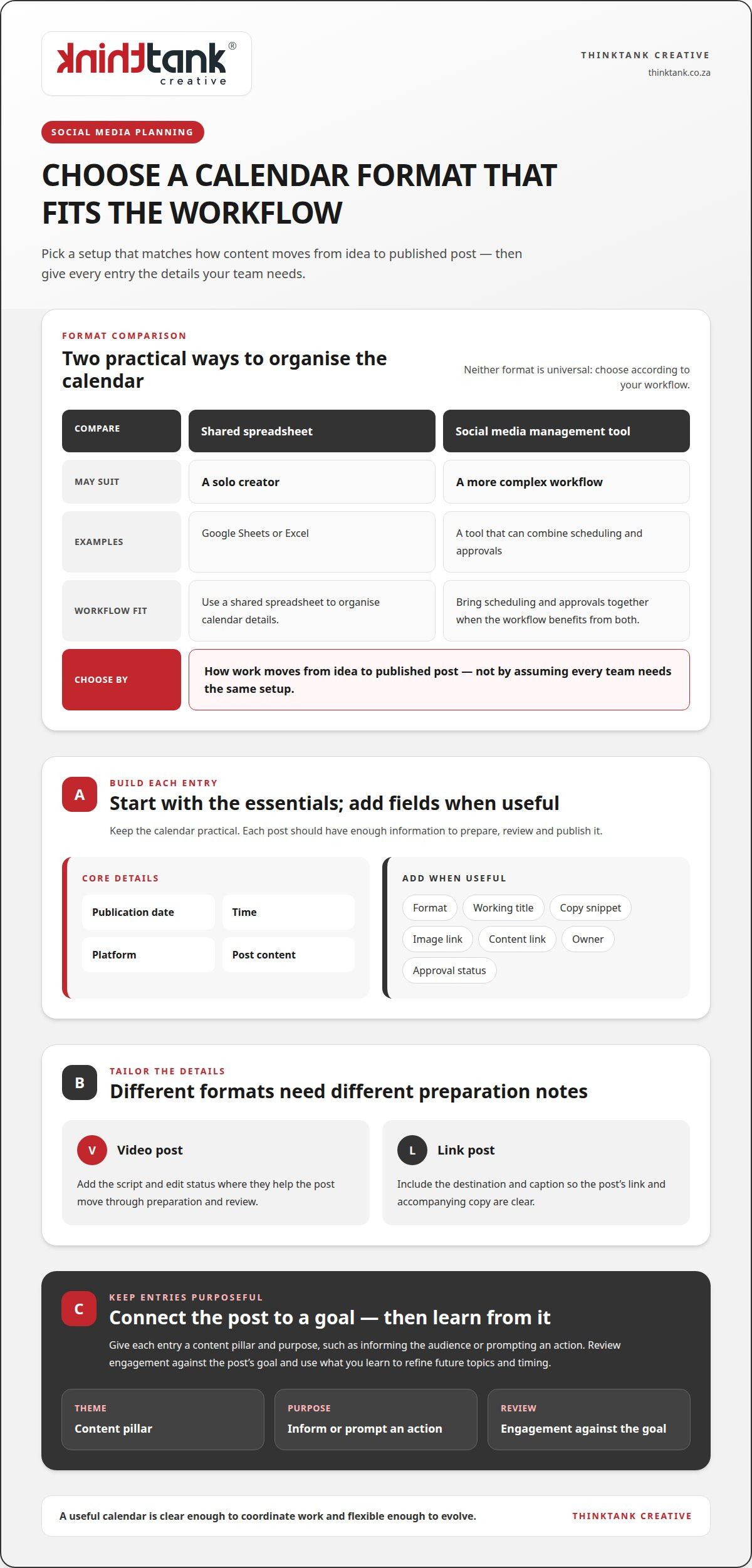
- Choose a template that supports decisions. Organise the calendar in Google Sheets, Excel or a social media management tool. A shared spreadsheet may suit a solo creator, while a more complex workflow may benefit from a tool that combines scheduling and approvals. Choose based on how work moves from idea to published post.
- Customise the fields. Start with publication date, time, platform and post content. Add fields for format, working title, copy snippet, image link, content link, owner and approval status when useful. A video post might need a script and edit status, while a link post needs its destination and caption.
- Connect ideas to goals and review. Give each entry a content pillar and purpose, such as informing the audience or prompting an action. Keep the template flexible enough to accommodate changing priorities. Review engagement against each post’s goal, then use what you learn to refine future topics and timing. That’s how to create a social media content calendar that can evolve with your audience.
Benefits of planning social media content
Planning gives you room to coordinate campaigns, prepare graphics and meet deadlines. But planning too far ahead can leave messages out of step with changing priorities, audience concerns or event details. Keep entries further out flexible.
- Use the calendar to coordinate work. Assign each campaign post a purpose, format, owner and deadline. For example, a launch announcement may need a caption, product graphics and a review before publication. Recording these dependencies together helps the team spot missing assets early, rather than discovering them on launch day. Add notes when a post relies on input from another team.
Plan around key dates and events
Mark relevant holidays, industry events and business milestones in the calendar, then connect each date to an audience need. A seasonal campaign might require advance graphics, an announcement and a follow-up post. Check event details and business priorities as publication approaches, and avoid filling every key date with promotional content. Leave room for timely updates if circumstances change.
Allow lead time for campaigns
Begin planning six to eight weeks before an anchor moment, such as a launch or event. Work backwards from publication, mapping idea development, copy, graphics, review and scheduling. This gives contributors clear deadlines and reveals dependencies early. Make campaign themes visible in advance, but keep final wording adaptable if audience needs or plans shift.
- Record useful campaign notes. Add the campaign objective, intended audience, key message, required assets and approval status to relevant calendar entries. For a launch, notes might identify a teaser, announcement and follow-up, each with its own purpose. These details show collaborators how individual posts support the wider campaign and reduce repeated conversations about responsibilities and next steps.
- Keep the plan flexible and useful. Schedule at least a month ahead where practical, while reviewing the calendar regularly for changes. Treat far-off entries as themes or placeholders, not locked copy. A local event, updated business priority or audience response may call for a change. A clear review point helps protect deadlines without forcing unsuitable content into the schedule. For support aligning campaigns and content, explore social media campaign planning.
Turn each approved calendar entry into a publish-ready post, then measure its performance against a clear objective. A consistent workflow helps keep posts across channels accurate, timely and aligned with campaign goals.
Add posts and publishing slots
Assign each post a publication date, time, channel, format and status. For example, a teaser reel can be scheduled for Monday at 10:00, followed by a launch announcement on Tuesday at 11:00. Add the final copy and creative asset to each slot, and leave enough time for review before publishing. Check that planned posts don’t compete for attention or repeat the same message across channels.
Upload the calendar to publishing software
Transfer calendar entries into your chosen publishing software, using its import option if the template supports it. Match each field carefully: put publication time in the schedule, copy in the caption, and the correct asset with its post. Preview queued content before confirming it, checking the channel, date, time and formatting. A media calendar template remains a useful shared reference throughout the workflow.
- Hand approved posts off clearly. Mark posts as approved only after copy and creative are ready, then make the publishing responsibility visible. Keep approval steps lean, since each extra layer can slow delivery. Set an approval workflow with a 24-hour feedback period so contributors know when to respond. If feedback arrives late, update the slot rather than publishing content that hasn’t received approval.
- Track results against the post’s purpose. Record the measure that matches each objective, such as engagement for a conversation post or visits for a launch announcement. In one campaign example, the goal was 100 visits to the launch page during launch week; posts brought 80 visits the following Monday. That comparison shows the gap clearly and gives the next review a practical starting point.
- Use performance to refine the next schedule. Review results by post, format and channel, then note what earned attention or prompted action. Compare similar posts rather than drawing conclusions from a single result. For instance, if a video and a carousel supported the same campaign, assess both against the same goal. Carry useful observations into the next calendar and adjust future slots, creative or messaging accordingly.
Setting posting frequency
Choose a publishing rhythm that suits audience interest, platform behaviour and available resources. Treat platform recommendations as a starting point, then use your own results to shape future posts.
- Set a sustainable baseline. Decide how much time your team can give to planning, creating, reviewing and publishing. A solo marketer might begin with fewer, stronger posts rather than commit to daily content across several channels. Allow time to produce captions and creative assets, not just to publish. Document the rhythm in your calendar so collaborators can plan around it.
- Use platform guidance as a reference. Suggested starting frequencies include 3-5 Instagram posts per week, 5-7 Reels per week and 7-15 Stories per week. Other recommendations include 10-20 X posts per week, 5-10 Threads posts per day and 5-7 TikTok posts per week. Google Business Profile has a suggested range of 1-3 posts per week, whilst YouTube has 1-2. These are examples, not a universal rule.
- Match frequency to audience interest. Review when people interact with your posts, which formats attract meaningful responses and what questions appear in comments. If LinkedIn generates useful conversations but X posts receive little engagement, prioritise the channel that reaches your audience. A few relevant LinkedIn posts each week may serve that audience better than numerous posts that go unseen elsewhere.
- Set a test period and measure consistently. Record the chosen frequency for each platform in your calendar, then track engagement against each post’s purpose. Compare similar formats and topics over the same review period. If posting more often coincides with weaker responses or strained production, adjust the schedule. If a cadence supports interaction and remains manageable, keep it.
- Build a balanced weekly pattern. Give each slot a role, such as education, conversation or promotion, instead of repeating one format. For example, a weekly schedule could pair a practical advice post with a customer question and a product update. Vary captions and creative formats to give followers reasons to engage. Leave room for timely updates rather than filling every slot in advance.
- Revisit the schedule with collaborators. Share the planned cadence with everyone responsible for writing, design and approvals. Check whether each person can manage the workflow before committing to additional posts. Record changes and the reason for them, such as shifting audience interest or a campaign requirement. This helps the team make deliberate adjustments instead of increasing frequency without a clear purpose.
What a social media content calendar includes
Build each calendar entry to move a post from idea to publication without losing its purpose. A useful template combines scheduling details with the creative and practical information needed for consistent delivery.
- Record the publishing essentials. Give every post a publication date, time and platform. Add a working title and content type, such as an Instagram carousel or LinkedIn article. These fields help collaborators scan the schedule quickly and distinguish posts with similar themes. Include the intended audience or campaign where it helps explain why a post belongs in that slot.
- Make the creative easy to find. Add the draft caption, copy snippet and links to final visual assets. For an Instagram carousel, note the image sequence and where the caption will appear; for a LinkedIn update, attach the relevant graphic or document. Use clear, consistent asset names so the person preparing a post can match the right file to its calendar entry.
- Track status and ownership. Include a status such as idea, in progress, awaiting approval, approved or published. Assign an owner for the caption, visual or final scheduling task when several people contribute. For example, a designer can see which graphic needs review, while the publisher can identify approved posts ready to go.
- Connect each post to its purpose. Add a content pillar, campaign name and objective where these details guide the work. A customer tip might support an education theme, while a launch post serves a campaign objective. This context helps the team assess whether the calendar has a coherent mix rather than a sequence of unrelated updates.
- Customise the template to the workflow. Start with essential columns, then add fields only when they meet a practical need. A small team may need dates, platforms, captions, visuals and status; a collaborative campaign may also need approval notes and content links. A crowded template can hide deadlines, so remove unused fields and group related details together.
- Keep the calendar usable as plans evolve. Use a shared spreadsheet or publishing tool as the current source of truth, and update a post’s status when it changes. A postponed LinkedIn announcement should show its revised date; an Instagram visual awaiting approval should remain marked as in progress. Review entries regularly to keep the planned schedule consistent with published content.
For a calendar that connects content, creative and publishing needs, develop a social media content strategy with considered support.
ThinkTank Creative helps businesses turn social media ideas into a considered, consistent publishing approach. Its Social Media Marketing service supports planning, content development and campaign coordination, giving each post a clear role in your wider communication.
Consider this support when maintaining a calendar alongside daily business demands becomes difficult, or when your content needs stronger alignment with your brand. Creative design can shape visual assets, while Logo and Corporate Identity Design can help create a cohesive identity across social channels. For a broader digital experience, Website Design and Development can connect social content with a well-designed online destination.
Bring your goals, audience and current ideas together, then contact ThinkTank Creative to discuss social media marketing support.
Make your next idea count
A calendar becomes more valuable when it helps your team make better decisions, not simply fill available dates. Treat each new idea as a chance to learn what your audience responds to and sharpen the direction of future content. Learning how to create a social media content calendar is an ongoing process as your priorities and audience interests evolve.
Choose one upcoming idea and give it a clear purpose before it enters your workflow. As you develop the content, keep your brand’s wider communication in view, so each post contributes to a recognisable, considered presence. Small, deliberate refinements can help your approach grow alongside the business.
If you’d like a collaborative partner to strengthen your social media approach, contact ThinkTank Creative. Take the next step with confidence and build a calendar that gives your ideas room to develop.
Frequently Asked Questions
How do I create a content calendar template?
Start with a blank spreadsheet and build columns around your team’s decisions. Include a campaign or content theme, draft owner, review date, publication slot and final destination link. For example, a post promoting a downloadable guide needs a destination link and someone responsible for checking it. Test the template with a small batch of planned content, then remove fields that don’t help anyone take action.
How many posts per week should I publish on each platform?
Use platform suggestions as a practical starting point, then adjust to your audience and production capacity. Current examples include 3-5 Instagram posts, 5-7 TikTok posts, 10-20 X posts and 1-2 YouTube posts per week. Threads guidance suggests 5-10 posts per day, whilst Google Business Profile suggests 1-3 weekly. These are not mandatory quotas; the useful frequency is one your team can sustain and assess.
What’s the difference between a content calendar and an editorial calendar?
A content calendar manages individual deliverables, while an editorial calendar sets broader themes and priorities across months or quarters. For example, an editorial calendar might mark a seasonal campaign for a quarter; the content calendar then assigns its posts, formats and publishing slots. Keeping both views helps teams connect long-term direction with the practical work due each week, without treating every future post as final copy.
What is a social media content calendar and what should it include?
A social media content calendar is a working schedule for planned posts across selected platforms. Include each post’s date, publishing time, format, working title, draft copy and relevant asset or destination link. A campaign tag and status can clarify context, while an owner field shows who will move the post forward. For a community question, for instance, note the response prompt and who will monitor replies.
What steps are involved in creating a social media content calendar?
First define your audience and the outcome each platform should support. Choose content themes, select suitable channels and set a realistic publishing rhythm. Then build a template, add post ideas and production details, assign owners, and schedule approved work. After publishing, compare results with the original objective and use what you learn to adjust the next cycle. For example, a campaign focused on page visits needs a link and a measure related to visits.
How often should you post on each social media platform?
There isn’t one frequency that suits every account; audience behaviour and available resources should guide it. For example, suggested ranges include 5-7 Instagram Reels and 7-15 Instagram Stories per week, alongside the platform’s other posts. Treat each format separately, since Stories and feed posts serve different purposes. Review whether the cadence supports useful interactions, and change it if production becomes difficult to sustain or audience responses shift.
How do you choose the best social media platforms for your audience?
Choose platforms where your intended audience is active and your team can create content suited to their expectations. Use existing enquiries, customer conversations and engagement patterns to identify where people already interact. For instance, a business whose audience engages with professional advice might test LinkedIn content before committing effort to several channels. Focus on a manageable selection, then assess the quality of responses rather than judging a platform by activity alone.
What tools and templates can you use to plan a social media content calendar?
Google Sheets and Excel work well for shared schedules, while social media management tools can support a more integrated publishing workflow. Choose based on how your team drafts, reviews and schedules posts. A spreadsheet may suit a small team that needs clear ownership; a tool may help when posts pass through several approval stages. Whichever you choose, keep one current calendar and make changes visible to everyone involved.


