An on-page SEO checklist for 2026 is a practical set of checks for making each page clear, useful and easy for search engines to understand. Start with one descriptive H1, use headings in a logical order, and place your main keyword naturally in the opening 100 words. Then refine the page title, images, internal links and answers to common questions.
It’s easy to focus on keywords, but a well-optimised page must also answer the reader’s needs and make information easy to navigate. Repeating a phrase in every heading won’t make the content more useful.
Use this checklist to improve keyword placement, write clearer titles, add descriptive image details and connect related pages. You’ll also learn how to structure FAQ content so people and AI-powered search experiences can identify direct, relevant answers.
An on-page SEO checklist for 2026 checks whether a page answers one search need clearly. It covers the keyword, content, headings, readability and mobile experience. Begin by identifying the reader’s intent, then make the page’s central answer easy to find. For example, a page about wedding flowers should explain arrangements, ordering or delivery, according to its purpose.
Use the primary keyword naturally in the opening 100 words, then add relevant terms where they help explain the topic. Avoid repeating the exact phrase in every paragraph or inserting keywords into unrelated headings. Google Search can surface pages that match a query, so write for the task behind the search, not just the wording.
Give the page one clear H1, followed by H2 headings for main sections and H3 headings for supporting topics. Keep the sequence logical: an H2 should not jump straight to an H4. A heading such as “Choosing seasonal wedding flowers” tells readers more than a string of search terms. Each heading should introduce useful content beneath it.
Readable content uses plain language, descriptive subheadings and a format suited to the task. A step-by-step guide needs ordered instructions; a comparison may be clearer with labelled differences. On mobile, check that text is legible, buttons are easy to use and visitors don’t need to scroll sideways. These checks help readers find the information they came for.
Google Search Console and PageSpeed Insights are free tools for reviewing search performance and page experience. Paid SEO platforms charge subscription fees that vary by product, plan and billing terms, so there’s no standard South African price.
Keyword stuffing, copied or thin content, cloaking and manipulative links can undermine search visibility or trigger spam systems. Keep wording accurate, publish original material and make each page serve a distinct reader need. Don’t repeat phrases or hide text to influence rankings.
Build topical clusters by linking a main guide to focused supporting pages. For example, a wedding-flower guide could link to pages about seasonal varieties, bouquet care and venue arrangements. Publish new articles when they address a genuine content gap, and refresh existing pages when details, examples or reader needs change. Prioritise meaningful improvements over cosmetic edits, while preserving each page’s purpose.
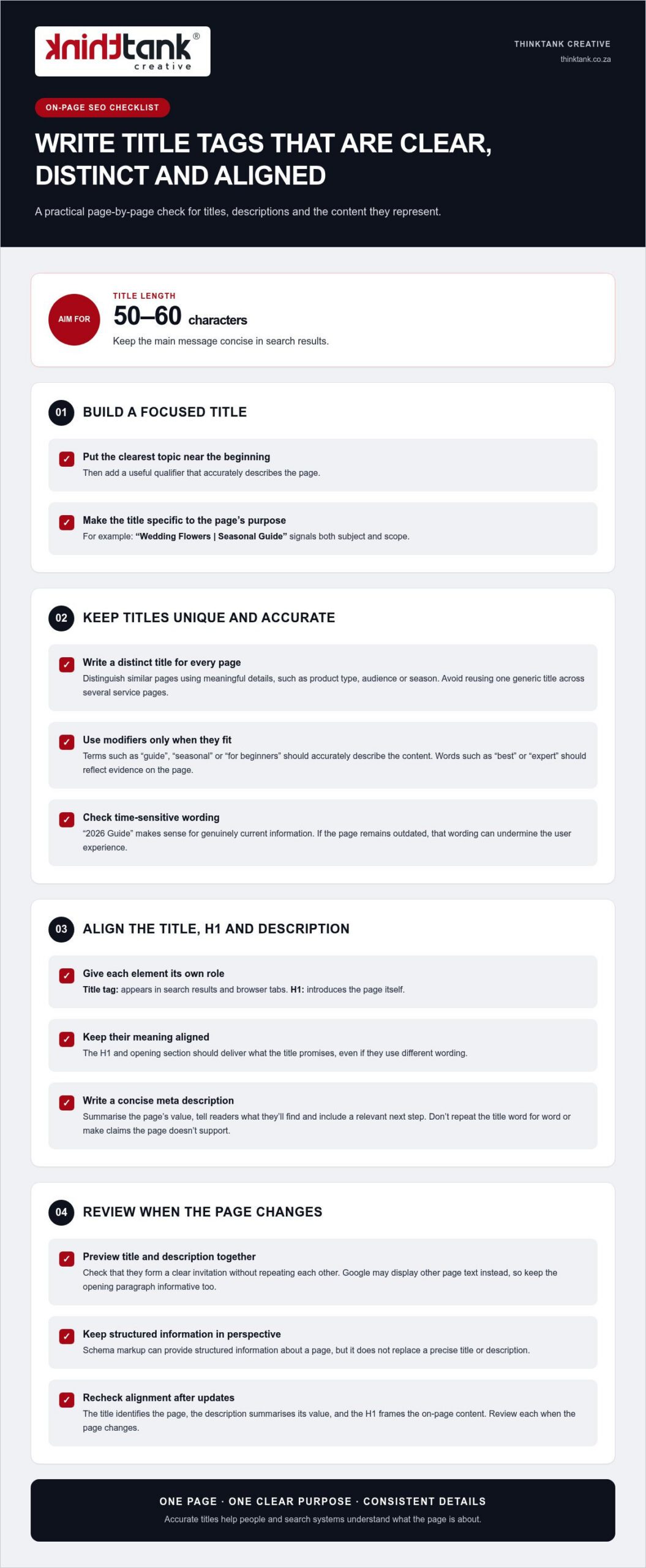
Give every page a distinct title tag that describes its specific purpose. Aim for 50-60 characters, which helps keep the main message concise in search results. Put the clearest topic near the beginning, then add a useful qualifier. For example, “Wedding Flowers | Seasonal Guide” signals both subject and scope. Don’t reuse one generic title across several service pages.
A title tag and an H1 serve related, but different, roles. The title tag appears in search results and browser tabs; the H1 introduces the page itself. Keep their meaning aligned, whilst allowing different wording. If the title promises a seasonal flower guide, the H1 and opening section should deliver that guide, not shift to unrelated wedding planning advice.
Write the meta description as a concise summary of the page’s value. Tell readers what they’ll find, then include a relevant next step, such as comparing seasonal arrangements. Don’t repeat the title word for word or make claims the page doesn’t support. Google may display other page text instead, so make the opening paragraph informative too.
Modifiers can clarify a page’s scope, but they don’t create authority by themselves. “2026 Guide” makes sense for genuinely current information; it can undermine user experience if the page remains outdated. Likewise, “best” or “expert” should reflect evidence within the content, not serve as decoration. Check titles during each content refresh and remove qualifiers that no longer fit.
Schema markup can provide structured information about a page, but it doesn’t replace a precise title or description. Keep each element focused: the title identifies the page, the description summarises its value, and the H1 frames the on-page content. Review their alignment whenever the page changes, because consistent details make its subject clearer to people and search systems.
For a coordinated review of page titles and search visibility, explore SEO planning and page optimisation as part of your wider content process.
Links help visitors find related pages and give search engines context about your site’s structure. A useful internal link points to a genuinely relevant next step, such as linking an accounting services page to a guide to bookkeeping. This supports navigation and can distribute page authority across related content. Link to help readers, not just to influence ranking signals.
When publishing new content, add links to 2-5 relevant pages on your site. Choose destinations that deepen the subject or help readers act on what they’ve learnt. Use descriptive anchor text, such as “small business tax services”, rather than vague wording like “click here”. Clear anchors set expectations and make the connection between pages easier to understand.
Review your site’s navigation as well as links within page copy. Important pages should be reachable within 3 clicks from the homepage, where practical. Look for orphan pages that have no internal links pointing to them; visitors and search engines may struggle to discover these pages. A simple site map or crawl can reveal broken links, repeated destinations and pages buried too deeply.
External links can support a claim by taking readers to a useful, authoritative source. For example, a South African business explaining tax terminology could link to relevant information on the South African Revenue Service website. Choose a source that directly supports the statement, and make sure the surrounding explanation is clear without requiring a visit. Don’t add external links simply to appear comprehensive.
Keep URLs short, descriptive and relevant to the destination. A slug such as /small-business-tax is easier to interpret than an opaque identifier or a string of query parameters. Aim for fewer than 75 characters, and avoid changing a working URL without a clear reason. If a permanent URL change is necessary, use a 301 redirect; use a 302 redirect for a temporary change.
Assess links in context. A product page, service explanation and supporting article may each need different onward links. Reviewing them helps preserve useful pathways as content changes, while removing irrelevant links that distract readers or obscure the page’s purpose.
Optimise each visual for its role on the page, not just its file size. A product photograph needs enough detail to show texture, while a small decorative icon can use fewer resources. Choose suitable formats and dimensions before publishing, then preview the page on desktop and mobile. This balances visual quality with loading performance and ensures each asset suits its intended display.
WebP images are described as 25 to 35 per cent smaller than JPEG files at equivalent quality. Convert suitable files to WebP, then compare the result with the original to ensure important details remain clear. Keep a high-quality source file separately if your team may need to edit or repurpose the visual later. Check that the converted file displays correctly across the page before publishing it.
Give each file a descriptive name that reflects its subject. For example, use cape-town-wedding-bouquet.webp instead of IMG_2048.webp. Add concise alt text that explains the image’s relevant information, such as “white proteas and greenery in a bridal bouquet”. Avoid stuffing keywords into the description or repeating nearby copy. For a purely decorative visual, use empty alt text so assistive technology can skip it.
Lazy loading can defer off-screen visuals until visitors approach them, reducing the initial work required to load a long page. Don’t apply it indiscriminately to the main visual shown when the page opens, as that element may be central to the first view. Test on a phone, where slower connections can make delays more noticeable, and check that deferred content appears as visitors scroll.
Search engines need access to image files to understand them. Review your robots directives and page settings to make sure they don’t block important resources. If a visual carries essential information, include that information in nearby text too. This gives readers another way to understand the content if the file fails to load.
For video, choose a clear poster frame and provide a descriptive title and supporting text. A short explanation beside a product demonstration, for example, tells visitors what they’ll learn before playback. Check that video fits narrow screens without obscuring page content. Keep media relevant to the page’s purpose, then review the complete page after each optimisation.
Before publishing, open the page on a mobile device and check image clarity, loading behaviour, alt text and surrounding copy. A final review can catch missing visuals, misleading descriptions and oversized files before they affect the visitor experience.
For a South African audience, use South African English and make the page’s geographic scope clear. If a business serves customers nationally, say so when it helps answer the reader’s question. Include local details only when they genuinely affect the information, such as delivery coverage, service availability or regional requirements.
Build FAQ content around questions readers actually ask. Use customer enquiries, search queries and gaps in existing page explanations to find them. Start with a concise answer, then add context and a practical example. For instance, a question about choosing a local service should explain relevant factors, such as the work required, coverage and customer support.
Don’t make readers scroll through 1,000 words before reaching the answer. Put the response beside its question, then explain key terms and exceptions in plain language. For an unfamiliar concept, provide a one-to-three-sentence explanation before expanding on technical detail. This format helps the reader understand the subject and gives search engines clearer passages to interpret.
AI search rewards clarity, not a special phrase repeated across every answer. Identify the main subject, explain how it relates to the reader’s question and use consistent names. For example, a page about a South African tax consultant should identify the service and explain which tax question it addresses. Accurate, self-contained sections make information easier to interpret across search formats.
Schema markup adds machine-readable context to page content. FAQ schema can describe question-and-answer content, while local schema can describe a business with a physical location. Use markup only when it accurately reflects visible page information. Structured data helps search engines understand page elements, but it doesn’t guarantee a rich result or inclusion in an AI-generated answer.
Review FAQ content whenever you make a substantive page update. Remove questions that no longer fit, correct outdated examples and check that each answer is complete when read on its own. A technical review should also confirm that search engines can access the page and that its markup matches the content visitors see.
Use this final test before publishing: can a reader find the direct answer, understand the key term and see what to do next? If any step is unclear, revise the question or response. For a considered approach to search visibility and useful page content, plan your SEO content strategy.
Google Search Console and PageSpeed Insights are free tools for reviewing search performance and page experience. Paid SEO platforms charge subscription fees that vary by product, plan and billing terms, so there’s no standard South African price.
ThinkTank Creative can help turn these on-page checks into a coherent website experience with custom Website Design and Development. Consider this support when page structure, content presentation or mobile usability needs attention across your site, not just on one page. Creative design can bring visual elements into alignment with your brand, while Logo and Corporate Identity Design helps establish a consistent identity across digital touchpoints.
A well-considered website connects how pages look with how visitors navigate and use them. It provides a practical foundation for clear content structures and useful page layouts as your website evolves.
Planning website improvements? Contact ThinkTank Creative or visit thinktank.co.za to discuss your next steps.
Turn the on-page SEO checklist for 2026 into an ongoing way of working. As your business changes, revisit how your pages serve customers, and let their questions guide what you improve next. A useful page is not a one-off task; it’s part of a wider digital experience that should grow with your goals.
ThinkTank Creative brings Website Design and Development, Social Media Marketing and creative design together to support your wider online presence. If you’re strengthening your website or aligning its content with your marketing, consider how these elements can work together around a clear direction.
Contact ThinkTank Creative to discuss where you’d like to take your digital presence next. A considered next step can help you build with purpose and move forward with confidence.
An on-page SEO checklist is a page-by-page review of the elements that help visitors and search engines understand a website. It covers content relevance, page titles, headings, links, images and technical usability. For example, reviewing a product page means checking whether its details answer likely customer questions, not just whether it includes a target phrase. Use the checklist to identify specific edits and prioritise pages that matter to your audience.
A practical 2026 checklist should cover search intent, original content, page metadata, heading structure, internal links, descriptive image details, mobile usability and page performance. Add a final review for broken links and outdated information. For a South African service page, check that the described service and geographic coverage reflect the business accurately. This keeps optimisation aligned with the actual offer, rather than publishing claims or details the page cannot support.
Write a unique title tag for each page, aiming for 50-60 characters, and make its subject clear to potential visitors. A page about bookkeeping for small businesses should say so, rather than use a broad title such as “Our Services”. Write a concise meta description that previews the page’s actual value and matches its content. Google may generate a different search-result snippet, so make the page copy useful on its own.
Give a page one clear H1, then use H2 and H3 headings to show how its ideas relate. Choose a short, descriptive URL that reflects the destination, such as a slug about bookkeeping services. Add internal links where readers may need a relevant next step, using anchor text that describes the destination. For instance, an article about cash flow could link naturally to a related business finance guide, rather than an unrelated sales page.
Resize images to suit their display area, compress them and use WebP where it preserves the required quality. WebP files are described as 25 to 35 per cent smaller than JPEG at equivalent quality. Write alt text for meaningful images, such as identifying the subject of a product photograph; leave decorative images without descriptive text. Check loading performance against Core Web Vitals: good thresholds include LCP at 2.5 seconds or less and INP at 200 milliseconds or less.
Place the primary keyword naturally within the opening 100 words, then use related language where it helps explain the subject. There is no keyword-density target in this checklist: forcing a phrase into every heading can make copy awkward and less useful. For a page about bookkeeping, mention the service where it fits, then cover connected questions such as record keeping or monthly reporting only when they match the page’s purpose.
Answer the reader’s main question directly, then add the context needed to understand the response. A useful structure is question, direct answer, supporting explanation and relevant example. For a question about choosing an accounting system, state the decision factors first, then explain how business needs affect the choice. Clear, self-contained passages can help search systems interpret a page, but no format guarantees a featured snippet or AI Overview appearance.
Choose structured data that accurately describes the page. FAQ schema can mark up visible question-and-answer content, while local schema can describe a business with a physical location. Keep marked-up details consistent with what readers see, and validate the implementation for technical errors. Schema helps search engines interpret content, but it doesn’t guarantee enhanced search results. Choose types based on the page’s real purpose, not just their potential visibility.


