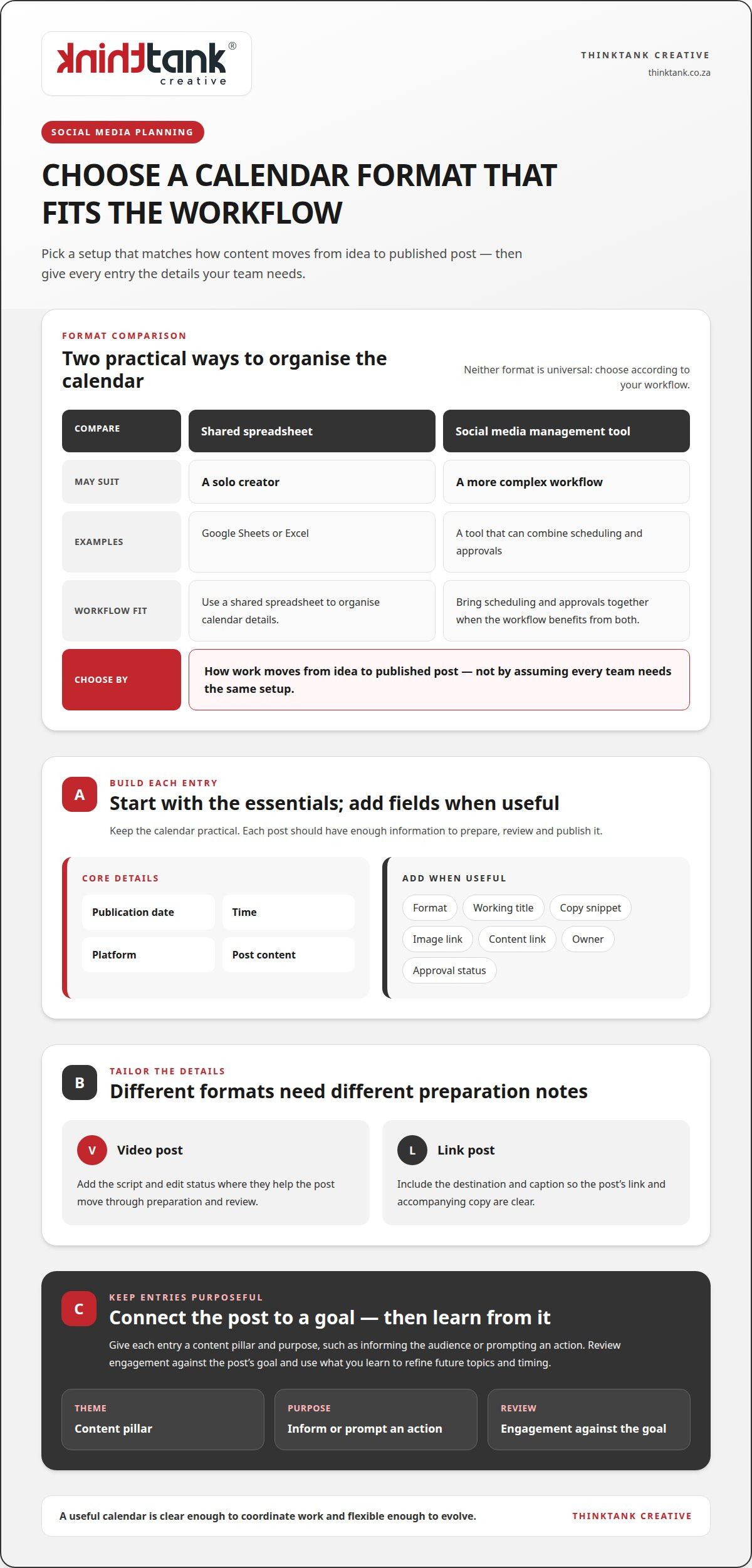
Social Media Posting Times in South Africa by Platform
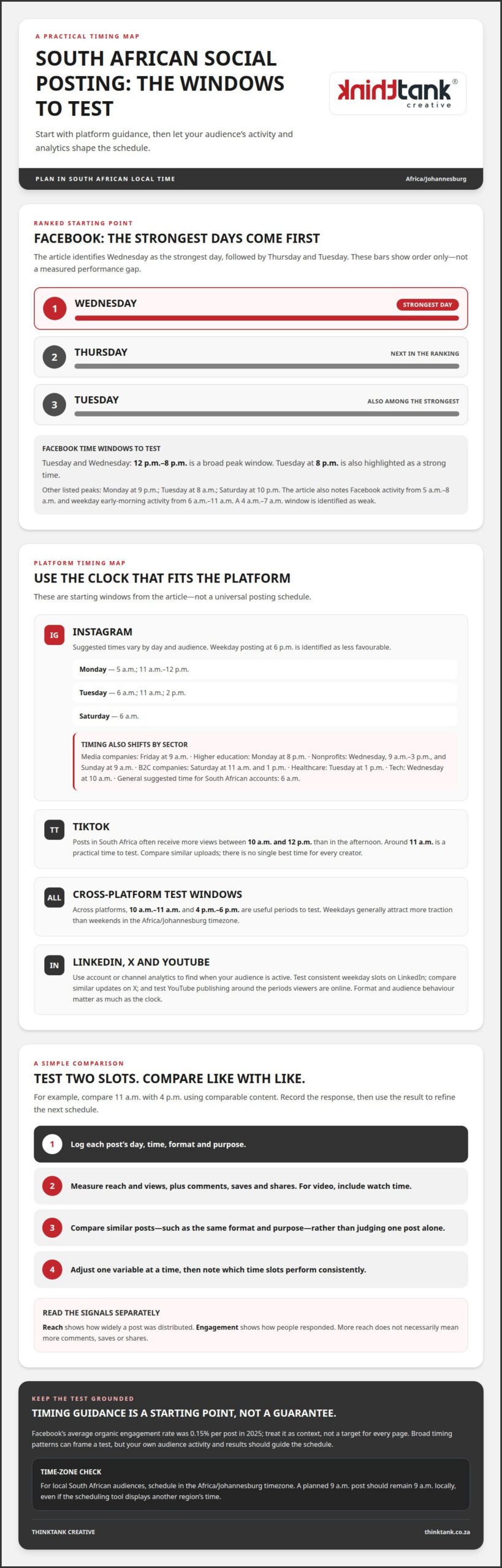
Tuesday and Wednesday, from 12 p.m. to 8 p.m. South African time, are a useful starting window for Facebook posts. The best times to post on social media in South Africa still vary by platform and audience, with Tuesday at 8 p.m. also identified as a strong time to test.
It’s understandable to want a clear schedule: posting at the wrong time can limit the chance for good content to be seen. Treat suggested times as a starting point, then refine your schedule using your audience’s activity and your own analytics.
This guide covers recommended posting times by platform and day, explains how to adapt them for different audiences, and shows how to use engagement data to build a schedule for your brand. It also accounts for South African local time, so you can plan posts for the people you want to reach.
Key Takeaways
- Use platform- and audience-specific timing rather than relying on one universal posting schedule.
- Compare Instagram’s recommended weekday and weekend windows with your audience’s own activity patterns.
- Assess posts through meaningful engagement signals, including views, watch time, comments, saves and shares.
- Test posting days and times consistently, then use the results to refine your schedule.
- Plan around South African local time and account for time-zone differences when reaching audiences elsewhere.
What is the best time to post on social media in 'Africa/Johannesburg' timezone?
For Facebook, Tuesday and Wednesday from 12 p.m. to 8 p.m. form a broad peak window. Tuesday at 8 p.m. is also identified as a strong time. Across platforms, 10 a.m. to 11 a.m. and 4 p.m. to 6 p.m. are useful periods to test. Weekdays generally attract more traction than weekends in the Africa/Johannesburg timezone. These patterns help identify the best times to post on social media in South Africa, but your audience’s activity should guide the final schedule.
Instagram recommendations differ by weekday and audience. Monday suggestions are 5 a.m. and 11 a.m. to 12 p.m.; Tuesday suggestions are 6 a.m., 11 a.m. and 2 p.m. Saturday’s suggested time is 6 a.m. Media companies’ Instagram content performs best on Fridays at 9 a.m. Higher education content performs best on Mondays at 8 p.m. Nonprofits see strong windows on Wednesdays from 9 a.m. to 3 p.m., and Sundays at 9 a.m. Weekday Instagram posting at 6 p.m. is identified as less favourable.
TikTok posts in South Africa often receive more views between 10 a.m. and 12 p.m. than during the afternoon. Around 11 a.m. is a practical starting point for testing. There is no single best time for every TikTok creator, so compare performance across similar uploads.
For LinkedIn, start with the periods when your audience is active, as shown in account analytics. Test a consistent weekday slot, then compare impressions and engagement across posts. On X, schedule comparable updates at different times when your audience is active and assess the response. On YouTube, check channel analytics to see when viewers are online, then test publishing around those periods. Format and audience behaviour matter as much as the clock.
South African businesses reaching local audiences should schedule in the Africa/Johannesburg timezone. This keeps a planned 9 a.m. post at 9 a.m. locally, even when the scheduling tool displays another region’s time.
To find the best times to post on social media in South Africa for your page, run a simple comparison. Choose two candidate slots, such as 11 a.m. and 4 p.m., and publish comparable content in each. Record reach, views, comments, saves and shares; compare like with like, rather than judging one post alone. Facebook’s weekday early-morning activity has also been noted between 6 a.m. and 11 a.m., while 4 a.m. to 7 a.m. is identified as a weak window. Treat these platform patterns as starting points, then let page performance shape your next schedule.
Using social media analytics to improve engagement
Use analytics to turn publishing times into testable decisions. Record each post’s publishing time, weekday, format and audience response. Then compare similar posts, such as two product demonstrations published in different time slots. This separates timing effects from differences in subject or creative execution. Facebook’s average organic engagement rate was 0.15% per post in 2025. Treat this as context, not a guaranteed target for every page or post.
Look for patterns across your own account before changing the schedule. Sprout Social identifies weekends as Facebook’s weakest days overall, while weekday performance can vary by audience. Buffer’s analysis found Facebook engagement tends to fall between 12 p.m. and 5 p.m. These broad patterns help frame a test, but they don’t show how your followers behave. Compare weekday results with weekend results using the same content type and measurement period.
Measure reach and engagement separately. Reach shows how widely a post was distributed; engagement shows how people responded. A post can reach more people without earning more comments, saves or shares. Set a baseline for your account by comparing posts with similar formats and goals. For example, assess awareness posts by reach and views, then compare discussion posts by comments and shares. Use the same measure for each comparison.
Format matters too. Socialinsider’s benchmarks found Reels were the only Facebook content format to increase engagement in Q1 2026. That makes format an important variable in timing tests: compare Reels with Reels, rather than crediting a time slot for a format difference. For video, include watch time alongside views. For other posts, track comments, saves and shares to understand whether the content prompted useful action.
Build a simple review routine around each publishing test:
- Log the post’s day, time, format and purpose.
- Measure views, watch time, comments, saves and shares.
- Compare like-for-like posts, then note which time slots perform consistently.
- Adjust one variable at a time before testing another.
Reviewing these signals together helps distinguish a timing pattern from a one-off result. An analytics-led social media publishing strategy can connect content planning with performance measurement, making each schedule adjustment more deliberate.
Best day and time to post
Wednesday is the strongest Facebook posting day, followed by Thursday and Tuesday. Weekdays generally attract more social media traction in South Africa, but the best day depends on the platform, audience and content. Treat these patterns as a starting point, not a universal schedule for every account.
For Facebook, daily peak hours can sharpen that starting point. Monday’s listed peaks are 7 p.m., 9 p.m. and 10 p.m., with 9 p.m. the strongest. Tuesday’s are 7 a.m., 8 a.m. and 7 p.m., with 8 a.m. the peak. Saturday’s listed hours are 6 a.m., 9 p.m. and 10 p.m., with 10 p.m. highest. Hootsuite’s data also places Facebook activity between 5 a.m. and 8 a.m. Use these morning windows as tests alongside weekday evening activity.
Instagram timing shifts with sector. South African B2C companies see their best engagement on Saturdays at 11 a.m. and 1 p.m. Healthcare companies perform best on Tuesdays at 1 p.m., while tech companies see strong engagement on Wednesdays at 10 a.m. A general suggested time for South African Instagram accounts is 6 a.m. These differences show why business type and audience habits matter as much as platform-wide averages.
Which days of the week get the most social media engagement in South Africa? Wednesday, Thursday and Tuesday are the leading Facebook days in Buffer’s ranking, while Instagram results vary by sector. For example, B2C Instagram engagement peaks on Saturday, so a weekday-only schedule could miss that audience.
Choose a posting day according to the action you want people to take. A B2C brand could test Saturday at 11 a.m. against 1 p.m.; a healthcare page could compare Tuesday at 1 p.m. with another suitable weekday slot. Keep the topic and format as consistent as possible, then compare reach and interactions. This helps show whether timing, rather than a different creative approach, shaped the response.
Treat the algorithm as one factor in distribution, rather than a reason to chase every reported peak. A morning slot may suit one audience, while an evening post may better match another’s routine. Choose a small set of day-and-time combinations, publish consistently, then use your account’s performance to refine the schedule. For a Facebook page, Wednesday is a sound first test. For Instagram, choose a sector-specific window that best matches your audience.
Local-time and time-zone considerations
Schedule for the clock your South African audience uses. The Africa/Johannesburg timezone is the reference for local posting recommendations, so a Tuesday slot listed at 8 p.m. means 8 p.m. there. If a dashboard or imported chart displays another timezone, its clock time may not match the local recommendation. Confirm the schedule’s timezone before setting a post to publish.
Time differences can shift recommended windows. Some charts may need a one-hour adjustment to account for timezone and daylight-saving differences. That matters when applying a global report to a South African account: a displayed 10 a.m. peak might need to be interpreted against the report’s stated timezone before scheduling. Preserve the original time and timezone in your planning notes, then convert the slot for your target audience.
Use a consistent conversion method for every scheduled post. First, identify the timezone used by the recommendation. Next, identify the timezone selected in your publishing tool. Then convert the intended local posting time before scheduling. For example, if your target is Tuesday at 8 p.m. in Africa/Johannesburg, make sure the tool’s displayed time represents that local moment, not simply the same clock reading elsewhere.
Separate local and international audiences rather than forcing them into one schedule. A South African post planned for 4 p.m. should reach local followers at that time. If a campaign also targets people in another timezone, create a separate publishing slot based on their local activity. This keeps the South African schedule anchored to local behaviour while allowing international posts to follow their intended audience’s clock.
Keep a timezone record beside each performance result. Include the platform, intended location, scheduled time and timezone, then compare engagement only after confirming the records use a consistent local reference. A Tuesday post recorded as 8 p.m. Africa/Johannesburg should not be compared casually with a report showing 8 p.m. in another timezone. That distinction helps prevent a scheduling conversion from being mistaken for an audience preference.
Before publishing, use this short time-zone check:
- Confirm whether the recommendation uses Africa/Johannesburg or another timezone.
- Check the timezone selected for the scheduled post.
- Convert the intended slot, allowing for a one-hour difference where applicable.
- Record the local posting time alongside engagement results.
For a campaign aimed at a South African audience, keep the final calendar in South African local time. If you use an international chart, check its timezone first, then convert the suggested window to Africa/Johannesburg. This makes a Tuesday peak or another recommended slot actionable without confusing the chart’s reporting time with the time your audience sees the post.
Scheduling posts across time zones
Start with the audience’s local clock, not the location of the person scheduling. For South African followers, plan posts in Africa/Johannesburg time. A post intended for 9 a.m. locally should reach that audience at 9 a.m., even if the person preparing it works elsewhere.
For a campaign serving audiences in South Africa and other countries, create separate time slots for each location. One publishing time might be morning for one group and evening for another. Separate schedules help each audience see the same campaign at a time that fits its local routine.
Before scheduling, establish which timezone the platform or planning calendar displays. Compare that setting with the timezone used by the timing recommendation. If a chart gives a peak at 10 a.m. in another timezone, don’t enter 10 a.m. automatically. Convert the intended moment to the target audience’s local time first.
Some charts may need a one-hour adjustment to account for timezone and daylight-saving differences. Preserve the source timezone alongside any converted slot, so the original recommendation remains clear. For example, record both the source’s 10 a.m. suggestion and the resulting Africa/Johannesburg schedule time. This makes later review more reliable than keeping only a clock reading.
Use a repeatable scheduling workflow for every platform:
- Identify the audience location and the timezone used for its schedule.
- Record the recommendation’s original timezone and suggested posting time.
- Convert that time for the intended audience before scheduling.
- Check the displayed publishing time against the local calendar entry.
- Review performance using the audience’s local posting time.
Keep records for each platform and audience segment. For example, a South African Facebook post and an international Instagram post might use the same campaign artwork but need separate local publishing slots. Label each calendar entry with its platform, market, timezone and intended posting time. This helps your team distinguish the scheduled time from a converted display time.
When comparing results, group posts by audience location and local time. A South African post published at 9 a.m. should not be treated as equivalent to an overseas post published at 9 a.m. unless both audiences experienced the same local timing. Compare similar content within each market, then adjust the relevant schedule based on its own engagement.
For a coordinated campaign, get support with social media planning so publishing calendars align with audience locations and local timing.
ThinkTank Creative: Social Media Marketing
ThinkTank Creative’s Social Media Marketing service helps businesses build a more cohesive social media presence. It’s a natural next step when your team needs support aligning platform-specific timing with consistent content and a clear brand identity.
Social media works best as part of a considered brand experience. Creative design and Logo and Corporate Identity Design help keep campaign visuals recognisable across posts, while Website Design and Development can support the journey from social content to your online presence. The right combination depends on your goals and the role social media plays in your wider marketing.
To shape a more coordinated social media approach, contact ThinkTank Creative to discuss your goals.
Make your next publishing cycle more intentional
Make your social media calendar a working plan, not a fixed set of times. Use the best times to post on social media in South Africa as a starting point, then let audience responses guide what you publish next. Your campaign can evolve as your content, objectives and audience behaviour change.
Next, connect posting times with the wider experience your brand creates. Social Media Marketing, Creative design and Website Design and Development can each support a more coherent journey from a post to meaningful interaction with your business. ThinkTank Creative can shape that work around your brand and marketing priorities.
Bring your goals and the questions you want your social media activity to answer. A considered conversation can help clarify the direction of your next campaign and how its content should work together.
Contact ThinkTank Creative to discuss a more cohesive approach to your social media presence. Build on what you’ve learned, keep refining your direction, and give your next publishing cycle a purposeful start.
Frequently Asked Questions
What are the best days and times to post on Facebook?
Wednesday, Thursday and Tuesday rank as Facebook’s strongest days in the available weekday ranking. Tuesday and Wednesday from 12 p.m. to 8 p.m. are broad posting windows, while Tuesday at 8 p.m. is a specific time to test. For a practical comparison, schedule similar posts on Wednesday and Thursday, then assess their responses using the same measures and time period.
Can a business enjoy greater profits by timing their social media posts?
Better timing can help a post reach people when they’re active, but publishing time alone doesn’t determine profit. The offer, creative, audience fit and path to purchase all affect whether engagement leads to a sale. To assess commercial impact, use tracked links or campaign-specific codes, then compare enquiries or purchases with the posts that generated them.
Does time of day matter when posting?
Yes. Publishing when your intended audience is active gives a post a better opportunity to be seen promptly. However, suitable times vary by platform, audience and content. A morning post may suit one audience, while an evening slot may better match another’s routine. Compare similar posts published at different times to find what fits your followers’ behaviour.
Does time-zones matter when scheduling social media posts?
Yes. A scheduling tool may display a different timezone from the one in your posting plan. For South African audiences, use Africa/Johannesburg as the local reference and confirm that the scheduled time reflects it. If a recommendation uses another timezone, convert the suggested time before scheduling. Keep the original timezone in your records so later comparisons remain meaningful.
Does timing on Facebook matter?
Timing can influence whether a Facebook post appears when followers are available to engage, but it’s only one part of performance. Format and content also affect the response. For example, compare similar posts published at different times, then measure reach and interactions separately. This helps you avoid mistaking wider distribution for stronger audience engagement.
When is the best time to post on Instagram in South Africa?
Six a.m. is a recommended starting time for South African Instagram accounts, but suitable slots vary by sector. For example, healthcare content performs best on Tuesdays at 1 p.m., whilst tech content sees strong engagement on Wednesdays at 10 a.m. Choose the window closest to your audience and content, then assess results against comparable posts rather than relying on one upload.
Why is it important to publish content at the right time on social media?
Timing helps align a post with periods when its intended audience is likely to be active, giving useful content a better opportunity to attract attention and interaction. For example, publishing a campaign announcement during a relevant audience window may make it easier for people to see and respond promptly. A good schedule also supports consistency without treating every platform alike.
What are the best times to post on Instagram in South Africa?
For a general starting point, test 6 a.m. on Instagram, then compare it with times suited to your industry. Media companies’ content performs best on Fridays at 9 a.m.; nonprofits see strong windows on Wednesdays from 9 a.m. to 3 p.m. and Sundays at 9 a.m. Treat these as audience-specific clues, and compare like-for-like posts before changing your ongoing schedule.