How to Create SEO-Friendly Content for Search and Readers

Create SEO-friendly content by starting with what readers want to know, then organising the page so the answer is clear, useful and easy to navigate. Learning how to create SEO-friendly content means researching relevant keywords and search intent, using related terms naturally, and adding original information that gives readers a reason to choose your page.

It’s easy to focus on keywords and overlook the people behind the searches. Yet a page works best when it meets a real need, reads smoothly and offers more than familiar advice repeated.

This guide explains how to research keywords and your audience, plan a clear page structure, write helpful headings and link thoughtfully. You’ll also learn how original insights can serve search intent, improve the reader experience and support your wider search visibility.

Key Takeaways

  • Choose a primary topic and use relevant keyword variations naturally to keep each page focused and readable.
  • Shape the content around what readers are trying to accomplish, not just the words they type.
  • Use clear titles, descriptive headings and a logical page structure to make your content easier to scan.
  • Link related pages with meaningful anchor text, and use relevant external sources to support key information.
  • Add original insights or practical examples that give readers something valuable beyond familiar advice.

Keyword research and long-tail keywords

Choose one primary keyword, then build a focused page around related searches, useful answers and original detail. On-page SEO improves elements such as headings and body text; technical SEO concerns how a site can be crawled, indexed and used.

  1. Find topics with traffic potential and low difficulty

    Start with topics that connect a reader’s need to your expertise, then assess search demand and keyword difficulty using a keyword research tool. Compare related phrases, estimated traffic and the strength of pages in search results. A broad term may attract interest but face strong competition, while a focused phrase may offer a more realistic chance to reach readers. For example, compare “kiwi fruit” with “kiwi fruit health benefits” before choosing a page topic.

  2. Use long-tail and related terms naturally

    Choose specific phrases that reflect what a reader might actually want to know. Wordstream reports that 56% of buyers use search queries with three or more words, whilst 7% type a single-word query. A phrase such as “how to store kiwi fruit” signals a clearer need than “fruit”. Use the target keyword where it fits, then add natural variations in relevant paragraphs. Avoid repeating one phrase just to increase its frequency.

  3. Cover topics and related keywords comprehensively

    Group related searches by the answer readers need, then decide whether one page can satisfy them together. For the kiwi example, basic information and health benefits may need different emphasis because they reflect distinct interests. A thorough page answers connected questions without drifting into unrelated material. Use an outline to spot gaps, then add sections only when they deepen the answer or clarify a useful detail.

  4. Assign keywords to a clear page focus. Choose a clear primary keyword and related secondary terms that support the same subject. The broader recommendation is three to eight target keywords in total per page. Keep the phrases closely related; don’t combine separate goals, such as choosing a product and learning its history, unless the page can answer both well.
  5. Place target terms where they help readers. Include the primary keyword in a relevant heading and body text, and use related terms in subheadings when they introduce useful sections. For example, a page about kiwi storage could include a heading about ripeness if that helps explain the advice. Search engines can interpret context, so write complete explanations rather than forcing exact-match phrases into every paragraph.

Audience research and user intent

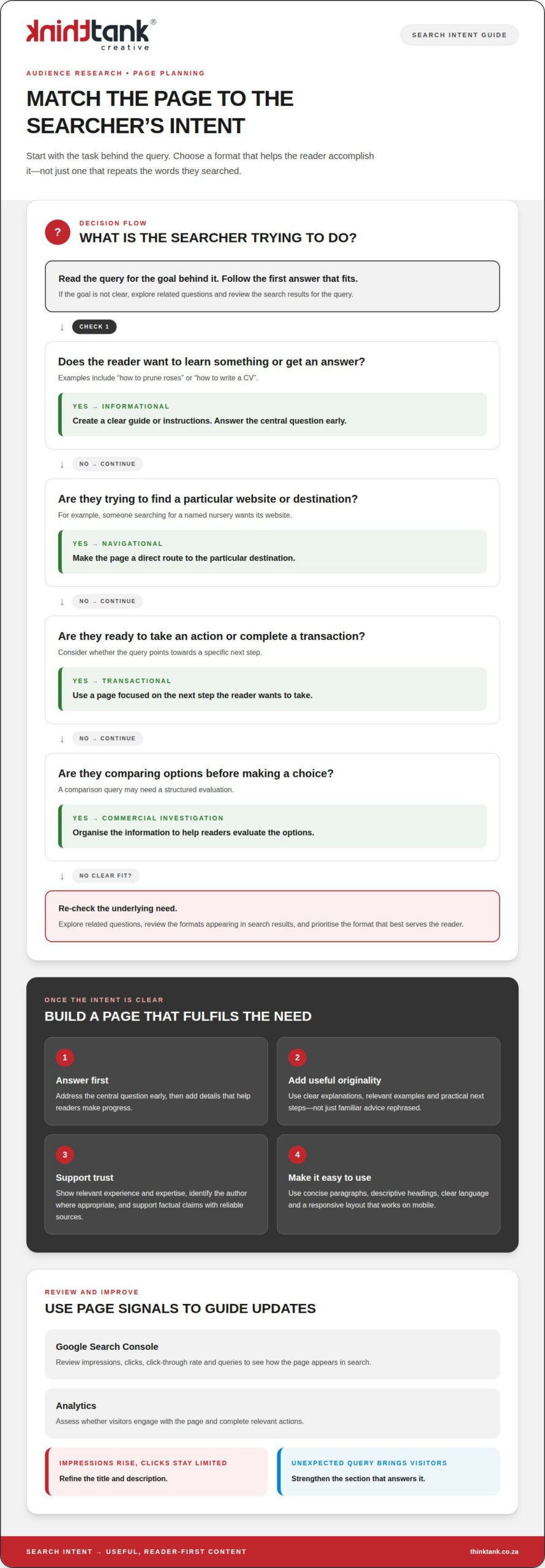
SEO-friendly content clearly answers a reader’s need, uses a suitable format and offers useful information. Identify the audience’s goal, then shape the page around the task they want to complete.

  1. Understand audience search intent

    Identify the audience behind each query and what they need next. Search intent generally falls into four types: informational, navigational, transactional and commercial investigation. Someone searching “how to prune roses” wants instructions, whilst someone searching for a named nursery wants its website. Use Google’s People Also Ask to discover related questions, then check that your page answers the same underlying need.

  2. Match content formats to search intent

    Choose a format that helps readers act on the answer. An informational query such as “how to write a CV” suits a clear guide; a comparison query may need a structured evaluation. A navigational search usually calls for a direct route to a particular destination, while transactional intent favours a page focused on the next step. Review the search results for the query and note which formats appear, but prioritise what serves the reader.

  3. Write useful, original content for readers

    Answer the central question early, then add details that help readers make progress. Useful, original content satisfies intent with clear explanations, relevant examples and practical next steps, rather than rephrasing familiar advice. Build trust by showing relevant experience and expertise, identifying the author where appropriate, and supporting factual claims with reliable sources. For example, a gardening guide can explain a pruning technique and distinguish it from methods for other plants.

  4. Make the page readable and accessible on mobile. Use a responsive layout, concise paragraphs and descriptive headings so readers can follow the content on a small screen. Compress images to support faster loading, write meaningful alt text for informative images, and make links and controls easy to identify and use. Clear language and logical headings also help people using assistive technologies navigate the page.
  5. Measure performance, then improve the page. In Google Search Console, review impressions, clicks, click-through rate and queries to see how the page appears in search. In Analytics, assess whether visitors engage with the page and complete relevant actions. If impressions rise but clicks remain limited, refine the title and description; if visitors arrive through an unexpected query, strengthen the section that answers it. A considered SEO content strategy can connect these improvements with broader search goals.

Title tags, meta descriptions and headings

Optimise titles, meta descriptions, headings, image details and internal links so each element clarifies the page’s purpose. Keep the wording accurate and useful: these elements help readers understand what they’ll find before opening the page.

  1. Write title tags and headings

    Write a distinct title tag that puts the page’s main subject near the beginning and gives readers a clear reason to click. Aim for 50 to 60 characters, such as “Pruning Roses: A Practical Guide for Gardeners”. Keep the promise accurate; a title that suggests a complete guide should lead to one.

    Organise the page with one H1 for its main title, followed by descriptive subheadings. Make each heading introduce the content beneath it, rather than repeating the same keyword. For example, use “When to prune roses” for a section explaining timing. This hierarchy makes the writing easier to scan and helps search engines interpret page structure.

  2. Create compelling meta descriptions

    Summarise the page’s subject and reader benefit in a concise meta description. A useful working range is 140 to 160 characters. Place the focus keyword near the beginning when it reads naturally, then use an active phrase to highlight what the reader will learn. For example: “Learn when to prune roses, which tools to use and how to care for new growth.”

    Give each page a description that reflects its actual content. Avoid generic copy, repeated keyword strings and promises the page doesn’t fulfil. Search engines may generate a different search snippet, so make the description a clear, accurate invitation rather than relying on it as guaranteed wording in search results.

  3. Name image files descriptively. Replace camera defaults such as “IMG_1000.jpg” with a short, accurate filename, such as “pruning-rose-branches.jpg”. Use words that describe the image, not a string of target keywords. Add alt text that explains informative images for readers using assistive technology. For decorative images, avoid alt text that adds irrelevant detail.

    Compress image files to reduce their size whilst preserving visual quality. Choose JPEG for photographs, PNG for graphics or WebP for modern, lighter image use. These choices keep images useful without adding unnecessary weight to a page.

  4. Make internal links descriptive. Link related pages using anchor text that tells readers what the destination covers. Replace “click here” with wording such as “rose pruning advice”. Add each link where it genuinely supports the explanation, and check that it leads to the relevant page. A few purposeful links are more useful than unrelated links added for appearance.
  5. Review the full search presentation. Read the title, description and headings together, then check that they accurately represent the page. The title should set a specific expectation, the description explain the benefit, and the headings lead readers through the answer. For a page about rose care, avoid a title promising a complete gardening guide if the content only discusses pruning.

    Finally, review the page on mobile and check that headings remain clear, snippets communicate the main benefit, and image filenames describe their contents. Consistency between the search result and page experience helps readers find the information they expected.
How to Create SEO-Friendly Content for Search and Readers

Internal and external linking

Use links to connect useful information, guide readers and clarify how pages relate. A considered linking structure can support organic visibility and make a website easier to explore.

  1. Use internal links

    Link each page to relevant content elsewhere on your website. For example, a blog post about choosing running shoes could link to a guide explaining shoe materials. Use descriptive anchor text such as “compare running shoe materials”, rather than “click here”. The link should help readers take a useful next step and give Google context about the linked page.

  2. Map links to the reader’s journey. Place contextual links where readers may need more detail, such as a definition or related process. A beginner’s guide to email marketing could link to an explanation of mailing-list consent. Organise pages into clear topic groups, then link between related sections. The European Union notes that logically organised content and links between related sections can support a website’s online presence.
  3. Prioritise useful destinations. Send readers to a page that extends the current point, not merely one that shares its target keyword. A page about writing product descriptions could link to a guide on product photography if the connection helps explain the task. Check that each destination loads and delivers what its anchor text promises.
  4. Include external links and backlinks

    Link externally when an authoritative source supports a factual claim or gives readers valuable context. For example, a page discussing Google Search features can cite relevant Google documentation. Choose sources closely connected to the claim, and make the anchor text describe the destination. Avoid linking to a source simply to make a page appear more researched.

  5. Understand backlinks as incoming links. A backlink points from another website to yours, unlike an internal link between your own pages. Original research, a practical resource or a useful explanation gives other publishers a reason to reference your work. Focus on earning relevant mentions through valuable content; avoid schemes that create artificial links without serving readers.
  6. Review links during content updates. Open each link in a draft or updated page and confirm that it reaches the intended destination. Replace broken links, revise vague anchor text and remove links that no longer support the surrounding paragraph. If a linked guide has moved, update the destination rather than leaving readers at an error page.
  7. Keep the structure purposeful. Each page should offer a clear route to related information, without becoming crowded with links. Check whether links help readers understand a subject, continue a task or assess a source. A well-optimised linking structure connects valuable pages and makes their relationship clearer to people and search engines.

Creating original content and adding information gain

A key part of how to create SEO-friendly content is giving readers more than a polished version of information they can find elsewhere. Original content adds a useful perspective, evidence or practical detail that helps someone understand a topic or take their next step.

  1. Identify what existing answers leave out. Review the questions a topic raises, then note which answers feel incomplete, difficult to apply or too general. For a guide to planning a garden, existing pages might explain plant choices but overlook how to organise them in a small courtyard. That gap gives your content a clearer purpose and a distinct contribution.
  2. Bring first-hand knowledge into the explanation. Add relevant experience, observations or examples to show how advice works in practice. A business explaining its onboarding process could describe the decisions customers commonly face and how each step helps. Use details you can stand behind, rather than inventing a personal story or presenting assumptions as evidence.
  3. Support claims with a clear basis. Use reliable sources for factual statements, and distinguish sourced information from your interpretation. If a page discusses a product’s performance, explain the circumstances behind the example and avoid turning one result into a universal promise. Clear attribution strengthens readers’ ability to assess the information and supports the authority of the page.
  4. Make the information easier to use. Turn a dense explanation into a practical resource, such as a decision framework, worked example or concise checklist. For instance, a guide to choosing a catering format could compare seated service with a buffet, then explain which event suits each option. The structure should help readers apply the answers, not merely decorate the page.
  5. Add an original visual where it clarifies the subject. A diagram can explain a process more clearly than several paragraphs, whilst a comparison table can make relevant differences easier to assess. Create visuals that add information, label them clearly and explain their meaning in nearby text. Useful images, diagrams and infographics may also be picked up by other websites, which could link back to the original content.
  6. Connect new insights to related topics. Organise the article so each section develops the main answer, then use internal links to direct readers to genuinely relevant detail. A guide to preparing for a website launch could link to a separate explanation of content planning. Each connection should extend the reader’s understanding, rather than divert them to an unrelated topic.
  7. Review the page for distinct value. Before publishing, identify the specific insight, example or resource readers gain from this page. Google’s helpful content update was introduced in 2022 and prioritised original, helpful content written for people. Applying these principles is central to how to create seo-friendly content that offers readers a distinctive visual experience. For distinctive visual storytelling, explore creative design support as part of presenting your ideas clearly.

ThinkTank Creative

ThinkTank Creative helps businesses bring their digital presence into alignment, from website structure to the visual identity that supports its message. When you’re applying these content principles across a new or existing site, its Website Design & Development and Branding & Creative Design services can help create a cohesive reader experience. These services are a natural next step when your content, site structure and brand presentation need to work together rather than feel like separate parts.

Build content that reflects your expertise and gives readers a clear path through your website. Contact ThinkTank Creative to discuss your digital content goals.

Build momentum with your next content decision

Treat each new page as an opportunity to deepen your relationship with readers. A distinctive point of view can strengthen your brand’s voice, whilst careful attention to changing questions keeps your content useful over time. The aim isn’t simply to publish more; it’s to make each contribution worth returning to.

Learning how to create SEO-friendly content is an ongoing practice. Review how your audience responds, listen for emerging needs and let those signals shape what you create next. Consistent, thoughtful choices can help your content strategy develop alongside your business.

If you’re ready to connect your content with a broader digital presence, ThinkTank Creative can help bring that work into focus through its social media marketing offering. Contact ThinkTank Creative to discuss your next step, and keep moving towards a more cohesive online presence.

Frequently Asked Questions

What is SEO writing?

SEO writing creates clear, helpful content that addresses readers’ needs and is structured for search engines to understand. It brings together accurate information, natural language and a defined purpose. For example, a home-maintenance business could publish a guide explaining how to prepare a roof for heavy rain, with advice suited to homeowners. The goal is to make the page useful in its own right, not to write solely for algorithms.

What is SEO content?

SEO content is a web page, article or other digital material created to answer relevant searches and reach an intended audience. It might be a service page explaining what a business does, a blog post answering a common question, or a guide that helps readers make a decision. Its format depends on the reader’s task, while its substance should provide accurate, worthwhile information rather than simply repeat a search term.

How do you research keywords and search intent?

Begin with the audience’s problem, then use a keyword research tool to explore the phrases people use and the questions behind them. Compare the wording and purpose of related searches. For example, “how to fix a leaking tap” suggests someone wants instructions, whilst “plumber near me” signals a service search. Group phrases with the same underlying need, then plan a page that answers that need directly.

How should you structure SEO-friendly content with headings and URLs?

Give each page one clear subject, a descriptive main heading and subheadings that guide readers through its sections. Use a concise URL that reflects the page topic, such as “/roof-maintenance/” for a roof-care guide. Avoid changing an established URL without considering its existing links and visitors. If a change is needed, plan a redirect to the new address so people and search engines can still reach the relevant content.

How often should you update SEO content?

Update a page when its information, examples or purpose no longer match what readers need. A seasonal travel guide, for instance, may need review before the next planning period, whilst an evergreen explanation may remain useful longer. Check for outdated claims, changed processes, broken links and new audience questions. Make revisions that improve accuracy or usefulness, and avoid changing dates or wording just to make an unchanged page appear fresh.

What SEO content practices risk Google penalties?

Practices designed to manipulate search visibility rather than help readers can put a page at risk. Avoid keyword stuffing, copied material, misleading claims and artificial link schemes. Repeating a phrase unnaturally across every paragraph, for example, makes a page harder to read and adds little value. Focus on original, accurate answers and links with a clear purpose. Review Google’s current Search guidance before adopting tactics intended to influence rankings.
Website SEO Performance Checks for Your Business Site

Rankings are only one part of SEO performance. Assess them alongside technical health, mobile usability, image optimisation, internal links and backlinks. Knowing how to check your website’s SEO performance means reviewing these signals together and repeating the audit after changes.

It’s natural to look straight at Google and ask whether your pages appear for the searches that matter. You can check rankings in Google, but treat them as one measure: visibility alone won’t tell you whether search engines can access your pages or visitors can use them easily.

This guide explains how to review keyword rankings, identify technical issues and assess mobile pages, images, internal links and backlinks. You’ll also learn how to prioritise fixes and decide when to run another audit, turning your findings into a practical improvement plan.

Key Takeaways

  • Assess mobile usability and page speed together, then prioritise image compression, streamlined code and caching where they can improve loading.
  • Review image alt text for clear, relevant descriptions, and check that images support the page rather than distract from its purpose.
  • Evaluate backlinks for relevance and quality, and consider how external signals support your site’s credibility and visibility.
  • Check for blocked pages, noindex tags and orphan pages, then prioritise fixes by their impact on search access and user experience.
  • Strengthen internal links so important pages are easier to discover, and repeat an audit after a round of changes to track progress and identify remaining issues.

Mobile optimization and image alt attributes

Assess mobile experience alongside search visibility, not as a separate design concern. Open key landing pages on a phone and test navigation, forms, headings and images. Check whether the main action, such as requesting a quote, is easy to find and complete. A page may attract clicks but still frustrate visitors if its mobile layout hides essential information.

Compare competitor performance by reviewing the search queries and pages where their domains appear alongside yours. Look for differences in topic coverage, usefulness and mobile presentation, then compare your visibility for the same search intent. Treat these findings as context, not proof that a competitor’s approach will suit your audience.

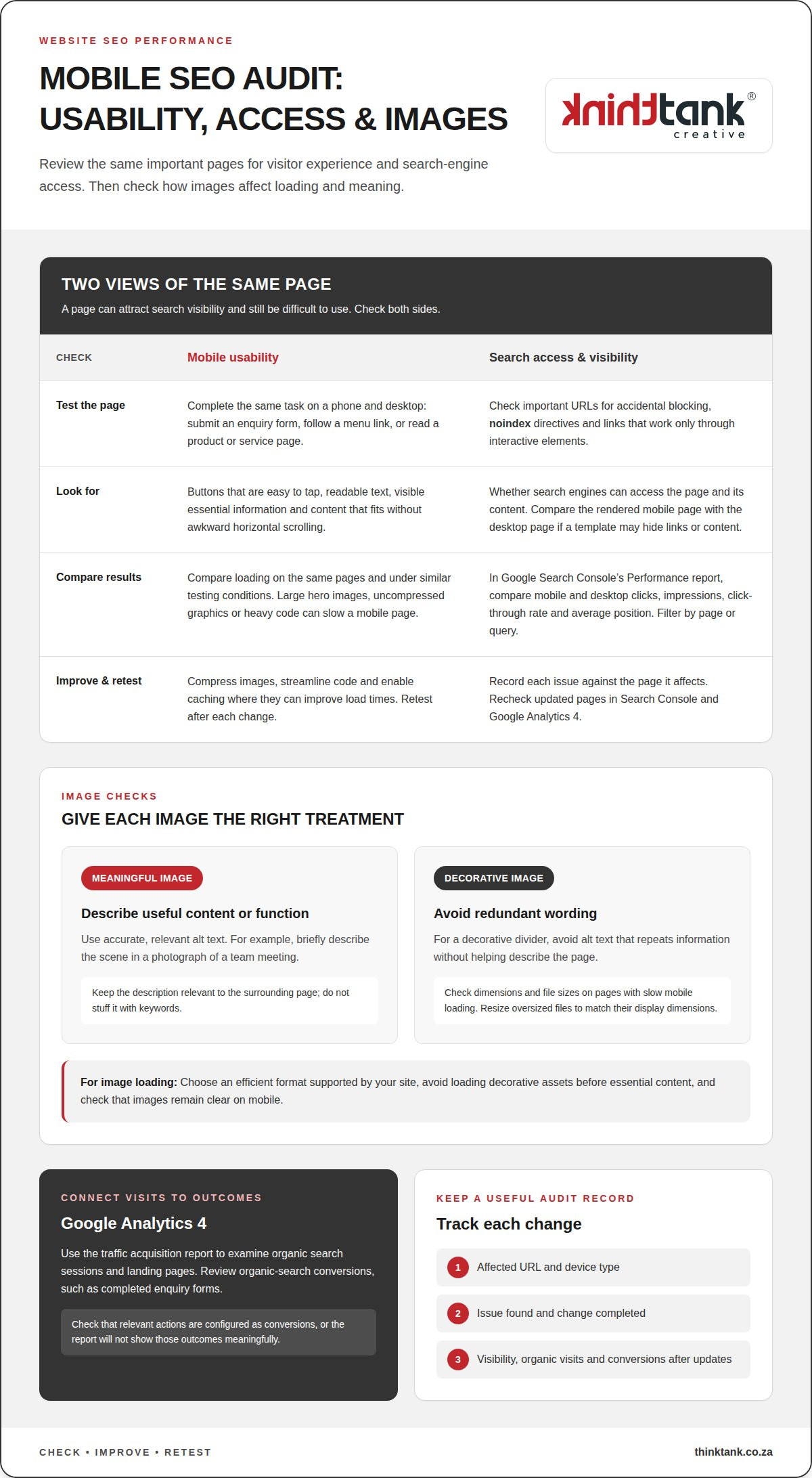
In Google Search Console, open the Performance report and review clicks, impressions, click-through rate and average position. Compare mobile and desktop results, then filter by page or query to see where visibility differs. A page with impressions but few clicks may need a clearer title or description; a page losing clicks merits closer review.

In Google Analytics 4, use the traffic acquisition report to examine organic search sessions and landing pages. Review the conversions assigned to organic search, such as completed enquiry forms, to connect visits with business outcomes. Check that the relevant actions are configured as conversions, or the report won’t show those outcomes meaningfully.

Test mobile usability by completing the same task on a phone and desktop. For example, submit an enquiry form, follow a menu link and read a product or service page. Note whether buttons are easy to tap, text is readable and content fits the screen without awkward horizontal scrolling. Record each issue against the page it affects.

Compare mobile and desktop loading on the same pages and under similar testing conditions. A large hero image, uncompressed graphics or heavy code can slow a mobile page. Compressing images, streamlining code and enabling caching are practical ways to improve load times. Retest after each change to see whether the experience improves.

Check that mobile pages are crawlable as well as usable. Review important URLs for accidental blocking, noindex directives and links that work only through interactive elements. Search engines need access to a page and its content to understand it. If a mobile template hides links or content, compare its rendered version with the desktop page.

Write alt text to describe an image’s useful content or function. For a photograph of a team meeting, briefly describe the scene; for a decorative divider, avoid redundant wording. Keep descriptions accurate and relevant to the surrounding page. Don’t stuff keywords into alt text, as this makes it less helpful.

Check image dimensions and file sizes on pages with slow mobile loading. Resize oversized files to match their display dimensions, choose an efficient format supported by your site, and avoid loading decorative assets before essential content. Then check that images remain clear on mobile and meaningful images retain descriptive alt text.

Keep a simple record of affected URLs, device type, issue and completed change. Recheck those pages in Google Search Console and Google Analytics 4 after updates. This links technical improvements with visibility, organic visits and conversions, helping you decide which mobile fixes deserve attention next.

Review backlinks as part of your wider off-page SEO picture. Their value depends on relevance and context, not simply how many links point to your domain.

For rankings, backlinks and site audits, compare platforms such as Semrush, Ahrefs and Moz by their features and reporting. Their paid plans have different subscription tiers; costs depend on factors such as tracked queries, backlink data, crawl limits and user access. Compare current plans with your requirements.

Backlink Profile Monitoring

Choose a consistent monitoring process and record which websites link to your pages, which pages receive links and whether links are gained or lost. Review each linking site’s relevance, the surrounding text and the destination page. For example, a link from a South African industry association may be more contextually useful than an unrelated directory listing, even if the directory has more pages.

Look for patterns rather than reacting to every change. A new link to a useful guide may suggest that people find it worth citing; several links from unrelated sites with repetitive wording deserve closer review. Keep dated records so you can relate changes in your backlink profile to shifts in organic visibility and relevant Google queries.

External Signal Assessment

Assess off-page signals by asking whether other websites, publications or organisations refer to your business in relevant contexts. Backlinks are one signal, but mentions and citations can also help you understand how your brand appears beyond your own domain. Record the source, linked page and context, then look for recurring themes.

Compare your profile with competitors appearing for similar queries. Note which pages attract references and what they offer, such as original research, practical guidance or a useful local resource. Use this analysis to identify content gaps, not to copy another site’s link strategy or pursue links without considering relevance.

Separate useful findings from unverified assumptions. A rise in backlinks alongside stronger organic visibility is worth investigating, but it doesn’t prove that one caused the other. Check the affected pages, query performance and timing together. If a page gains links but attracts few relevant visits, improve its usefulness and internal pathways before treating link volume as success.

Keep a monitoring log with the source, target page, link status and a brief relevance assessment. Review new and lost links periodically, and investigate sudden changes by checking the referring pages directly. This helps distinguish a meaningful editorial reference from a low-value listing or a link to an outdated page.

Use the findings to shape a credible presence beyond your site. Useful, well-structured content gives others a clearer reason to cite your expertise. If that content needs a stronger search strategy, consider SEO support for your website as part of your next optimisation step.

How Often Should I Run an SEO Audit on My Website?

Set an audit rhythm around meaningful changes rather than an arbitrary calendar. Review content after publication, redesigns or SEO fixes, then record what changed and what still needs attention.

For South African websites, useful benchmarks include your own previous performance and competitors targeting the same audience, locations and queries. Compare organic clicks, qualified enquiries and page visibility over consistent periods, rather than treating one ranking as a universal standard.

Review important pages after substantial content or site changes. A new service page, revised navigation or migrated domain can affect discovery and search visibility. Re-run relevant checks after implementing fixes: the results can show progress and reveal remaining issues. Between audits, monitor traffic, enquiries and pages that stop attracting visits.

Assess content quality by checking whether each page meets a distinct reader need. For example, a South African accountant’s tax guide should explain its topic clearly and point readers towards a relevant next step. Check accuracy, usefulness, readability and whether the page reflects the service or product it describes.

Look for duplicate content where similar pages cover the same location or offer. Compare titles, headings and main copy across those URLs. If two pages explain the same service, decide whether to consolidate them or give each a distinct purpose for a different audience need. Make the preferred page clear in your navigation and internal links.

Structure content so people and search engines can understand its hierarchy. Use one clear page title, descriptive subheadings and sections that progress logically. A page about home insulation, for example, could cover material choices, installation considerations and maintenance in separate sections. Include the relevant keyword naturally, but prioritise a complete answer over repetition or an arbitrary keyword density target.

Review meta tags and headings alongside visible content. A page title should describe the subject, while its meta description should accurately summarise what visitors will find. Check that headings are specific, not duplicated across unrelated pages, and match the page’s promise. If a title promises pricing guidance, the content should address pricing factors.

Use a repeatable review record for each important URL:

This approach makes audit timing responsive to your site’s needs. A stable page may need a different review trigger from a newly revised landing page. Prioritise changes that affect accuracy, search access or the visitor’s next step.

Website SEO Performance Checks for Your Business Site

Technical SEO audits and prioritised fixes

A technical audit turns crawl, indexing and link findings into practical recommendations. First, focus on SEO issues that prevent important pages from appearing or working properly.

Audit Tools and Measurements

Free tools reveal different aspects of site health. Google Search Console reports indexing, search queries and page performance. PageSpeed Insights analyses loading and user-experience signals for individual URLs. A crawler can identify broken links, redirects and missing page elements. Use more than one tool because each checks different issues.

Knowing how to check your website’s SEO performance starts with matching measurements to your role. A business owner can review priority pages and organic visibility; a developer can inspect crawl errors and redirects. No single audit score explains performance. Check affected URLs and reproduce important findings before assigning work.

Prioritised Audit Recommendations

Rank recommendations by likely effect, reach and effort. A blocked service page deserves attention before a minor heading inconsistency because search engines may not access its content. A broken internal link to an important landing page also warrants prompt repair. Record each affected URL, its business purpose and the proposed action.

Separate urgent access problems from improvements that need more analysis. Check robots.txt blocks, noindex tags and orphan pages, since each can prevent search engines from seeing content. Then consider how many valuable pages an issue affects. Don’t treat every warning from an automated scan as equally important.

Fixes Guided by Audit Reports

Make the report actionable by assigning technical issues to developers and content issues to content teams. For example, a developer can investigate redirect chains while an editor revises a duplicate page title. Include the URL, evidence, priority and proposed fix so each owner understands the task without interpreting a vague alert.

Track recommendations as open, in progress or resolved. After a round of SEO fixes, rerun the audit to measure progress and identify remaining issues. Compare the same URLs and checks; otherwise, changes in crawl scope can make results misleading. Confirm that each fix works on the live page.

Step-by-Step Performance Checks

To understand how to check your website’s SEO performance, follow a consistent sequence: review search visibility, inspect indexing, crawl key URLs, test important links, then group findings by impact. This gives business owners, content teams and developers a shared view of the work. Include pages targeting relevant local searches.

Common reporting mistakes include comparing different date ranges, mixing branded and non-branded queries, or treating a tool score as a ranking. Device, location and crawl scope can also change results. Keep these conditions consistent and note major site changes before drawing conclusions.

Internal linking and image optimization

Internal links and images shape how people and search engines move through your site. Audit them together: useful links guide visitors to relevant pages, while well-prepared images add context without obstructing the experience.

Build clear routes between important pages

Start with your main navigation and identify priority pages, such as a service page, location page or enquiry form. Check whether relevant supporting pages link to them. A guide to office security, for example, could link naturally to a business security service page. This creates a useful route for visitors and helps search engines discover related content.

Review links in the main body, not just menus or footers. Use descriptive anchor text that explains the destination, such as “commercial security services” rather than “click here”. Keep the wording accurate and varied. Repeating the same keyword-heavy phrase across unrelated links can make navigation feel forced.

Look for important pages with no internal links pointing to them. A page can be live yet difficult to find if it sits outside normal navigation paths. Also test existing links for errors, redirects and unexpected destinations. A link to an old campaign page, for instance, may take visitors away from current information.

Use images to support page meaning

Review image files on key pages and ask what each contributes. A product photograph should show the item clearly; a chart should make its subject understandable. Give descriptive images accurate alt text, and leave decorative images without redundant descriptions where the site allows. This keeps assistive descriptions useful rather than repetitive.

Compare each image’s file dimensions with its display size. A very large original used in a small card adds unnecessary page weight. Choose an efficient image format supported by your website, and ensure responsive layouts serve suitable versions across screen sizes. Then inspect the result on a phone and desktop for clarity and layout shifts.

Use meaningful filenames before uploading, such as “cape-town-office-interior” instead of “IMG_4821”. Keep filenames concise and relevant to the image. Avoid treating filenames or alt attributes as places to repeat keywords; describe what is actually shown. Review the surrounding paragraph too, so the image and nearby copy provide consistent context.

Turn findings into a practical review

For each priority URL, record its incoming internal links, broken destinations, image purpose and missing or inaccurate descriptions. Fix links that obstruct a visitor’s next step first, then address images that obscure content or slow key pages. Revisit the same URLs after updates and check that navigation remains clear.

If your site needs a more cohesive approach to search visibility, get support with SEO optimisation and build a stronger connection between its pages, content and images.

ThinkTank Creative: Website Design and Development

ThinkTank Creative can turn audit findings into a clearer, more effective business website. If technical issues, confusing navigation or outdated pages make it difficult for visitors to take the next step, the agency’s website design and development services can align structure and usability with your business goals.

Bring your audit findings into the planning process. They can inform how pages are organised, how visitors move between them and where design can support clearer communication. Creative design can also help present your brand consistently across the site.

If you’re ready to turn your findings into a practical next step, contact ThinkTank Creative or visit thinktank.co.za.

Build your next phase of online growth

Let your next SEO review shape more than a list of corrections. Use what you learn to guide a clearer digital direction, with priorities connected to how people discover and engage with your business. A repeatable approach to checking your website’s SEO performance can help you make informed decisions as your website and marketing evolve.

ThinkTank Creative can support that next step through SEO, website design and development, social media marketing and creative design. These disciplines can work together to strengthen your business’s online presence, from website structure to consistent branding.

Bring your goals and audit findings into a focused conversation about what to improve next. Contact ThinkTank Creative for SEO support and take a considered step towards a stronger digital presence.

Frequently Asked Questions

Can I check keyword rankings on Google too?

Yes. Search Google for a target phrase, but treat the result as a snapshot, not a definitive ranking: location, device and search context can affect what appears. For a more consistent view, use Google Search Console to compare query and page performance over the same date range. For example, assess a service page’s mobile visibility separately from its desktop results.

What is an SEO score?

An SEO score is a tool’s summary of selected website checks, not a universal Google ranking or a complete measure of success. Different tools may assess different elements, such as crawlability, page titles or loading performance. Use the score to identify areas for investigation, then inspect the affected pages. A lower score on a low-priority page may matter less than an indexing problem on a key landing page.

Why Check Your Website’s SEO?

Check SEO to understand whether people can find useful pages and take meaningful actions on your site. For example, a South African business might receive search visits to a service page but few completed enquiry forms. Comparing the page’s search visibility with form activity helps reveal where to investigate, such as whether the page meets searchers’ needs or makes the next step clear.

Which SEO metrics should you track, including organic traffic, rankings, clicks and conversions?

Track organic clicks, impressions, query positions, relevant landing-page visits and completed conversions together. Each metric answers a different question: clicks indicate visits from search, while conversions show whether visitors took an intended action. For instance, a rise in clicks without more qualified enquiries may call for a closer look at the search terms and pages bringing people to your site.

How do you check website speed, Core Web Vitals and mobile usability?

Test representative pages with PageSpeed Insights, then review its loading and user-experience findings alongside a hands-on mobile check. Core Web Vitals include Largest Contentful Paint, Interaction to Next Paint and Cumulative Layout Shift. On a phone, open a key page, use its menu and complete its main task. Note the URL and specific difficulty so you can retest that page after changes.

How do you check indexing, crawl errors, sitemap status and robots.txt?

Use Google Search Console’s indexing reports and URL inspection to investigate whether important pages are indexed. Review sitemap status for submission or processing issues, then inspect robots.txt for rules affecting key URLs. A crawl report can help uncover broken destinations and inaccessible pages. For example, check a newly launched service page directly before assuming that a sitemap entry means search engines can index it.

How often should you review SEO performance, and how should you report progress?

Review performance on a consistent schedule and after significant website changes, such as a redesign or migration. A useful report records the date range, pages reviewed, changes made and outcomes against business goals. Separate completed work from outstanding actions, and name the responsible role for each. This gives a business owner a clear view of progress without mistaking a short-term ranking movement for lasting improvement.

Which paid SEO tools compare best for tracking rankings, backlinks and site audits, and what do they cost?

Compare Semrush, Ahrefs and Moz by their ranking, backlink and audit features and reporting. Their paid plans have different tiers, with costs depending on tracked queries, backlink data, crawl limits and user access.

On-page SEO checklist 2026 for keywords, links, and images

An on-page SEO checklist for 2026 is a practical set of checks for making each page clear, useful and easy for search engines to understand. Start with one descriptive H1, use headings in a logical order, and place your main keyword naturally in the opening 100 words. Then refine the page title, images, internal links and answers to common questions.

It’s easy to focus on keywords, but a well-optimised page must also answer the reader’s needs and make information easy to navigate. Repeating a phrase in every heading won’t make the content more useful.

Use this checklist to improve keyword placement, write clearer titles, add descriptive image details and connect related pages. You’ll also learn how to structure FAQ content so people and AI-powered search experiences can identify direct, relevant answers.

Key Takeaways

  • Give each page a clear focus, place relevant terms naturally and organise headings so readers can follow the content.
  • Write a unique, compelling title for each page that reflects its purpose and encourages the right audience to click.
  • Use relevant internal links to guide visitors to useful content, and make every link’s destination clear from its anchor text.
  • Choose descriptive image file names and alt text, and optimise image files to support a smooth page experience.
  • Shape FAQ answers around real reader questions, leading with a direct response and adding concise context that makes the information easy to understand.

Natural keyword placement and content coverage

An on-page SEO checklist for 2026 checks whether a page answers one search need clearly. It covers the keyword, content, headings, readability and mobile experience. Begin by identifying the reader’s intent, then make the page’s central answer easy to find. For example, a page about wedding flowers should explain arrangements, ordering or delivery, according to its purpose.

Use the primary keyword naturally in the opening 100 words, then add relevant terms where they help explain the topic. Avoid repeating the exact phrase in every paragraph or inserting keywords into unrelated headings. Google Search can surface pages that match a query, so write for the task behind the search, not just the wording.

Give the page one clear H1, followed by H2 headings for main sections and H3 headings for supporting topics. Keep the sequence logical: an H2 should not jump straight to an H4. A heading such as “Choosing seasonal wedding flowers” tells readers more than a string of search terms. Each heading should introduce useful content beneath it.

Readable content uses plain language, descriptive subheadings and a format suited to the task. A step-by-step guide needs ordered instructions; a comparison may be clearer with labelled differences. On mobile, check that text is legible, buttons are easy to use and visitors don’t need to scroll sideways. These checks help readers find the information they came for.

Google Search Console and PageSpeed Insights are free tools for reviewing search performance and page experience. Paid SEO platforms charge subscription fees that vary by product, plan and billing terms, so there’s no standard South African price.

Keyword stuffing, copied or thin content, cloaking and manipulative links can undermine search visibility or trigger spam systems. Keep wording accurate, publish original material and make each page serve a distinct reader need. Don’t repeat phrases or hide text to influence rankings.

Build topical clusters by linking a main guide to focused supporting pages. For example, a wedding-flower guide could link to pages about seasonal varieties, bouquet care and venue arrangements. Publish new articles when they address a genuine content gap, and refresh existing pages when details, examples or reader needs change. Prioritise meaningful improvements over cosmetic edits, while preserving each page’s purpose.

Title tag optimisation

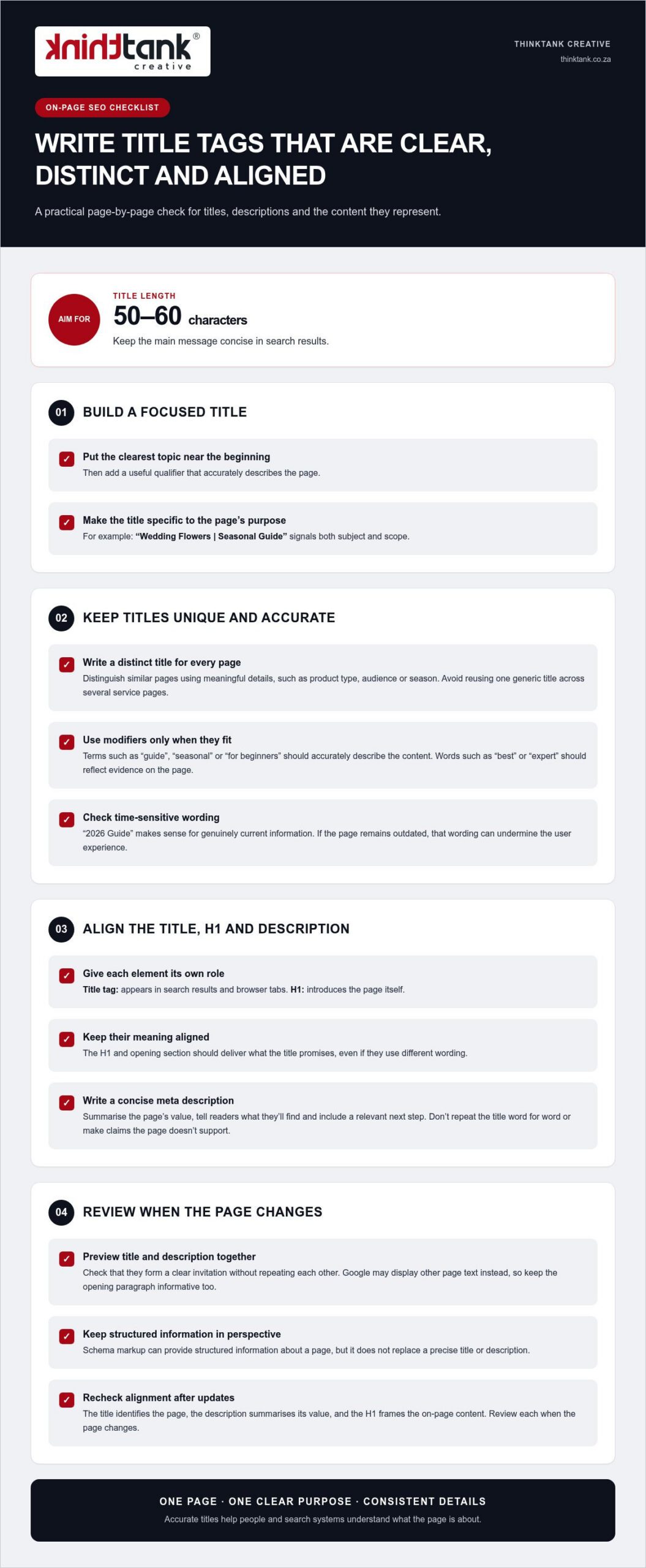
Give every page a distinct title tag that describes its specific purpose. Aim for 50-60 characters, which helps keep the main message concise in search results. Put the clearest topic near the beginning, then add a useful qualifier. For example, “Wedding Flowers | Seasonal Guide” signals both subject and scope. Don’t reuse one generic title across several service pages.

A title tag and an H1 serve related, but different, roles. The title tag appears in search results and browser tabs; the H1 introduces the page itself. Keep their meaning aligned, whilst allowing different wording. If the title promises a seasonal flower guide, the H1 and opening section should deliver that guide, not shift to unrelated wedding planning advice.

Write the meta description as a concise summary of the page’s value. Tell readers what they’ll find, then include a relevant next step, such as comparing seasonal arrangements. Don’t repeat the title word for word or make claims the page doesn’t support. Google may display other page text instead, so make the opening paragraph informative too.

Modifiers can clarify a page’s scope, but they don’t create authority by themselves. “2026 Guide” makes sense for genuinely current information; it can undermine user experience if the page remains outdated. Likewise, “best” or “expert” should reflect evidence within the content, not serve as decoration. Check titles during each content refresh and remove qualifiers that no longer fit.

Schema markup can provide structured information about a page, but it doesn’t replace a precise title or description. Keep each element focused: the title identifies the page, the description summarises its value, and the H1 frames the on-page content. Review their alignment whenever the page changes, because consistent details make its subject clearer to people and search systems.

For a coordinated review of page titles and search visibility, explore SEO planning and page optimisation as part of your wider content process.

External and internal linking

Links help visitors find related pages and give search engines context about your site’s structure. A useful internal link points to a genuinely relevant next step, such as linking an accounting services page to a guide to bookkeeping. This supports navigation and can distribute page authority across related content. Link to help readers, not just to influence ranking signals.

When publishing new content, add links to 2-5 relevant pages on your site. Choose destinations that deepen the subject or help readers act on what they’ve learnt. Use descriptive anchor text, such as “small business tax services”, rather than vague wording like “click here”. Clear anchors set expectations and make the connection between pages easier to understand.

Review your site’s navigation as well as links within page copy. Important pages should be reachable within 3 clicks from the homepage, where practical. Look for orphan pages that have no internal links pointing to them; visitors and search engines may struggle to discover these pages. A simple site map or crawl can reveal broken links, repeated destinations and pages buried too deeply.

External links can support a claim by taking readers to a useful, authoritative source. For example, a South African business explaining tax terminology could link to relevant information on the South African Revenue Service website. Choose a source that directly supports the statement, and make sure the surrounding explanation is clear without requiring a visit. Don’t add external links simply to appear comprehensive.

Keep URLs short, descriptive and relevant to the destination. A slug such as /small-business-tax is easier to interpret than an opaque identifier or a string of query parameters. Aim for fewer than 75 characters, and avoid changing a working URL without a clear reason. If a permanent URL change is necessary, use a 301 redirect; use a 302 redirect for a temporary change.

Assess links in context. A product page, service explanation and supporting article may each need different onward links. Reviewing them helps preserve useful pathways as content changes, while removing irrelevant links that distract readers or obscure the page’s purpose.

On-page SEO checklist 2026 for keywords, links, and images

Image optimisation and alt text

Optimise each visual for its role on the page, not just its file size. A product photograph needs enough detail to show texture, while a small decorative icon can use fewer resources. Choose suitable formats and dimensions before publishing, then preview the page on desktop and mobile. This balances visual quality with loading performance and ensures each asset suits its intended display.

WebP images are described as 25 to 35 per cent smaller than JPEG files at equivalent quality. Convert suitable files to WebP, then compare the result with the original to ensure important details remain clear. Keep a high-quality source file separately if your team may need to edit or repurpose the visual later. Check that the converted file displays correctly across the page before publishing it.

Give each file a descriptive name that reflects its subject. For example, use cape-town-wedding-bouquet.webp instead of IMG_2048.webp. Add concise alt text that explains the image’s relevant information, such as “white proteas and greenery in a bridal bouquet”. Avoid stuffing keywords into the description or repeating nearby copy. For a purely decorative visual, use empty alt text so assistive technology can skip it.

Lazy loading can defer off-screen visuals until visitors approach them, reducing the initial work required to load a long page. Don’t apply it indiscriminately to the main visual shown when the page opens, as that element may be central to the first view. Test on a phone, where slower connections can make delays more noticeable, and check that deferred content appears as visitors scroll.

Search engines need access to image files to understand them. Review your robots directives and page settings to make sure they don’t block important resources. If a visual carries essential information, include that information in nearby text too. This gives readers another way to understand the content if the file fails to load.

For video, choose a clear poster frame and provide a descriptive title and supporting text. A short explanation beside a product demonstration, for example, tells visitors what they’ll learn before playback. Check that video fits narrow screens without obscuring page content. Keep media relevant to the page’s purpose, then review the complete page after each optimisation.

Before publishing, open the page on a mobile device and check image clarity, loading behaviour, alt text and surrounding copy. A final review can catch missing visuals, misleading descriptions and oversized files before they affect the visitor experience.

FAQ sections and AI search optimisation

For a South African audience, use South African English and make the page’s geographic scope clear. If a business serves customers nationally, say so when it helps answer the reader’s question. Include local details only when they genuinely affect the information, such as delivery coverage, service availability or regional requirements.

Build FAQ content around questions readers actually ask. Use customer enquiries, search queries and gaps in existing page explanations to find them. Start with a concise answer, then add context and a practical example. For instance, a question about choosing a local service should explain relevant factors, such as the work required, coverage and customer support.

Don’t make readers scroll through 1,000 words before reaching the answer. Put the response beside its question, then explain key terms and exceptions in plain language. For an unfamiliar concept, provide a one-to-three-sentence explanation before expanding on technical detail. This format helps the reader understand the subject and gives search engines clearer passages to interpret.

AI search rewards clarity, not a special phrase repeated across every answer. Identify the main subject, explain how it relates to the reader’s question and use consistent names. For example, a page about a South African tax consultant should identify the service and explain which tax question it addresses. Accurate, self-contained sections make information easier to interpret across search formats.

Schema markup adds machine-readable context to page content. FAQ schema can describe question-and-answer content, while local schema can describe a business with a physical location. Use markup only when it accurately reflects visible page information. Structured data helps search engines understand page elements, but it doesn’t guarantee a rich result or inclusion in an AI-generated answer.

Review FAQ content whenever you make a substantive page update. Remove questions that no longer fit, correct outdated examples and check that each answer is complete when read on its own. A technical review should also confirm that search engines can access the page and that its markup matches the content visitors see.

Use this final test before publishing: can a reader find the direct answer, understand the key term and see what to do next? If any step is unclear, revise the question or response. For a considered approach to search visibility and useful page content, plan your SEO content strategy.

Which free and paid tools can audit on-page SEO, and what do they cost in South Africa?

Google Search Console and PageSpeed Insights are free tools for reviewing search performance and page experience. Paid SEO platforms charge subscription fees that vary by product, plan and billing terms, so there’s no standard South African price.

ThinkTank Creative: Website Design and Development

ThinkTank Creative can help turn these on-page checks into a coherent website experience with custom Website Design and Development. Consider this support when page structure, content presentation or mobile usability needs attention across your site, not just on one page. Creative design can bring visual elements into alignment with your brand, while Logo and Corporate Identity Design helps establish a consistent identity across digital touchpoints.

A well-considered website connects how pages look with how visitors navigate and use them. It provides a practical foundation for clear content structures and useful page layouts as your website evolves.

Planning website improvements? Contact ThinkTank Creative or visit thinktank.co.za to discuss your next steps.

Build the next phase of your digital presence

Turn the on-page SEO checklist for 2026 into an ongoing way of working. As your business changes, revisit how your pages serve customers, and let their questions guide what you improve next. A useful page is not a one-off task; it’s part of a wider digital experience that should grow with your goals.

ThinkTank Creative brings Website Design and Development, Social Media Marketing and creative design together to support your wider online presence. If you’re strengthening your website or aligning its content with your marketing, consider how these elements can work together around a clear direction.

Contact ThinkTank Creative to discuss where you’d like to take your digital presence next. A considered next step can help you build with purpose and move forward with confidence.

Frequently Asked Questions

What is On Page SEO Checklist?

An on-page SEO checklist is a page-by-page review of the elements that help visitors and search engines understand a website. It covers content relevance, page titles, headings, links, images and technical usability. For example, reviewing a product page means checking whether its details answer likely customer questions, not just whether it includes a target phrase. Use the checklist to identify specific edits and prioritise pages that matter to your audience.

What should an on-page SEO checklist include in 2026?

A practical 2026 checklist should cover search intent, original content, page metadata, heading structure, internal links, descriptive image details, mobile usability and page performance. Add a final review for broken links and outdated information. For a South African service page, check that the described service and geographic coverage reflect the business accurately. This keeps optimisation aligned with the actual offer, rather than publishing claims or details the page cannot support.

What are Google's 2026 on-page SEO best practices for title tags and meta descriptions?

Write a unique title tag for each page, aiming for 50-60 characters, and make its subject clear to potential visitors. A page about bookkeeping for small businesses should say so, rather than use a broad title such as “Our Services”. Write a concise meta description that previews the page’s actual value and matches its content. Google may generate a different search-result snippet, so make the page copy useful on its own.

How should headings, URLs, and internal links be optimised for on-page SEO?

Give a page one clear H1, then use H2 and H3 headings to show how its ideas relate. Choose a short, descriptive URL that reflects the destination, such as a slug about bookkeeping services. Add internal links where readers may need a relevant next step, using anchor text that describes the destination. For instance, an article about cash flow could link naturally to a related business finance guide, rather than an unrelated sales page.

How do you optimise images, alt text, and page speed for SEO in 2026?

Resize images to suit their display area, compress them and use WebP where it preserves the required quality. WebP files are described as 25 to 35 per cent smaller than JPEG at equivalent quality. Write alt text for meaningful images, such as identifying the subject of a product photograph; leave decorative images without descriptive text. Check loading performance against Core Web Vitals: good thresholds include LCP at 2.5 seconds or less and INP at 200 milliseconds or less.

What is the recommended keyword placement and density for on-page SEO?

Place the primary keyword naturally within the opening 100 words, then use related language where it helps explain the subject. There is no keyword-density target in this checklist: forcing a phrase into every heading can make copy awkward and less useful. For a page about bookkeeping, mention the service where it fits, then cover connected questions such as record keeping or monthly reporting only when they match the page’s purpose.

How should content be optimised for Google AI Overviews and featured snippets in 2026?

Answer the reader’s main question directly, then add the context needed to understand the response. A useful structure is question, direct answer, supporting explanation and relevant example. For a question about choosing an accounting system, state the decision factors first, then explain how business needs affect the choice. Clear, self-contained passages can help search systems interpret a page, but no format guarantees a featured snippet or AI Overview appearance.

Which structured data types should websites use, and what are Google's current schema rules?

Choose structured data that accurately describes the page. FAQ schema can mark up visible question-and-answer content, while local schema can describe a business with a physical location. Keep marked-up details consistent with what readers see, and validate the implementation for technical errors. Schema helps search engines interpret content, but it doesn’t guarantee enhanced search results. Choose types based on the page’s real purpose, not just their potential visibility.