How to Create SEO-Friendly Content for Search and Readers
Create SEO-friendly content by starting with what readers want to know, then organising the page so the answer is clear, useful and easy to navigate. Learning how to create SEO-friendly content means researching relevant keywords and search intent, using related terms naturally, and adding original information that gives readers a reason to choose your page.
It’s easy to focus on keywords and overlook the people behind the searches. Yet a page works best when it meets a real need, reads smoothly and offers more than familiar advice repeated.
This guide explains how to research keywords and your audience, plan a clear page structure, write helpful headings and link thoughtfully. You’ll also learn how original insights can serve search intent, improve the reader experience and support your wider search visibility.
Key Takeaways
- Choose a primary topic and use relevant keyword variations naturally to keep each page focused and readable.
- Shape the content around what readers are trying to accomplish, not just the words they type.
- Use clear titles, descriptive headings and a logical page structure to make your content easier to scan.
- Link related pages with meaningful anchor text, and use relevant external sources to support key information.
- Add original insights or practical examples that give readers something valuable beyond familiar advice.
Keyword research and long-tail keywords
Choose one primary keyword, then build a focused page around related searches, useful answers and original detail. On-page SEO improves elements such as headings and body text; technical SEO concerns how a site can be crawled, indexed and used.
-
Find topics with traffic potential and low difficulty
Start with topics that connect a reader’s need to your expertise, then assess search demand and keyword difficulty using a keyword research tool. Compare related phrases, estimated traffic and the strength of pages in search results. A broad term may attract interest but face strong competition, while a focused phrase may offer a more realistic chance to reach readers. For example, compare “kiwi fruit” with “kiwi fruit health benefits” before choosing a page topic.
-
Use long-tail and related terms naturally
Choose specific phrases that reflect what a reader might actually want to know. Wordstream reports that 56% of buyers use search queries with three or more words, whilst 7% type a single-word query. A phrase such as “how to store kiwi fruit” signals a clearer need than “fruit”. Use the target keyword where it fits, then add natural variations in relevant paragraphs. Avoid repeating one phrase just to increase its frequency.
-
Cover topics and related keywords comprehensively
Group related searches by the answer readers need, then decide whether one page can satisfy them together. For the kiwi example, basic information and health benefits may need different emphasis because they reflect distinct interests. A thorough page answers connected questions without drifting into unrelated material. Use an outline to spot gaps, then add sections only when they deepen the answer or clarify a useful detail.
- Assign keywords to a clear page focus. Choose a clear primary keyword and related secondary terms that support the same subject. The broader recommendation is three to eight target keywords in total per page. Keep the phrases closely related; don’t combine separate goals, such as choosing a product and learning its history, unless the page can answer both well.
- Place target terms where they help readers. Include the primary keyword in a relevant heading and body text, and use related terms in subheadings when they introduce useful sections. For example, a page about kiwi storage could include a heading about ripeness if that helps explain the advice. Search engines can interpret context, so write complete explanations rather than forcing exact-match phrases into every paragraph.
Audience research and user intent
SEO-friendly content clearly answers a reader’s need, uses a suitable format and offers useful information. Identify the audience’s goal, then shape the page around the task they want to complete.
-
Understand audience search intent
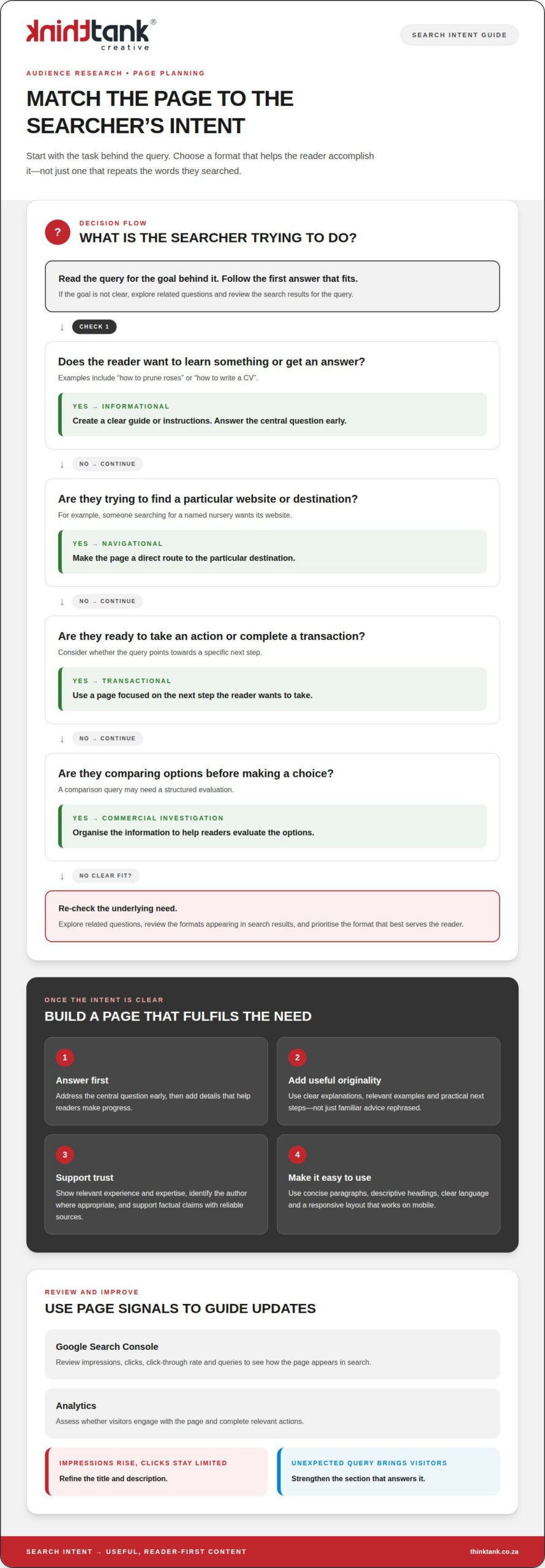
Identify the audience behind each query and what they need next. Search intent generally falls into four types: informational, navigational, transactional and commercial investigation. Someone searching “how to prune roses” wants instructions, whilst someone searching for a named nursery wants its website. Use Google’s People Also Ask to discover related questions, then check that your page answers the same underlying need.
-
Match content formats to search intent
Choose a format that helps readers act on the answer. An informational query such as “how to write a CV” suits a clear guide; a comparison query may need a structured evaluation. A navigational search usually calls for a direct route to a particular destination, while transactional intent favours a page focused on the next step. Review the search results for the query and note which formats appear, but prioritise what serves the reader.
-
Write useful, original content for readers
Answer the central question early, then add details that help readers make progress. Useful, original content satisfies intent with clear explanations, relevant examples and practical next steps, rather than rephrasing familiar advice. Build trust by showing relevant experience and expertise, identifying the author where appropriate, and supporting factual claims with reliable sources. For example, a gardening guide can explain a pruning technique and distinguish it from methods for other plants.
- Make the page readable and accessible on mobile. Use a responsive layout, concise paragraphs and descriptive headings so readers can follow the content on a small screen. Compress images to support faster loading, write meaningful alt text for informative images, and make links and controls easy to identify and use. Clear language and logical headings also help people using assistive technologies navigate the page.
- Measure performance, then improve the page. In Google Search Console, review impressions, clicks, click-through rate and queries to see how the page appears in search. In Analytics, assess whether visitors engage with the page and complete relevant actions. If impressions rise but clicks remain limited, refine the title and description; if visitors arrive through an unexpected query, strengthen the section that answers it. A considered SEO content strategy can connect these improvements with broader search goals.
Title tags, meta descriptions and headings
Optimise titles, meta descriptions, headings, image details and internal links so each element clarifies the page’s purpose. Keep the wording accurate and useful: these elements help readers understand what they’ll find before opening the page.
-
Write title tags and headings
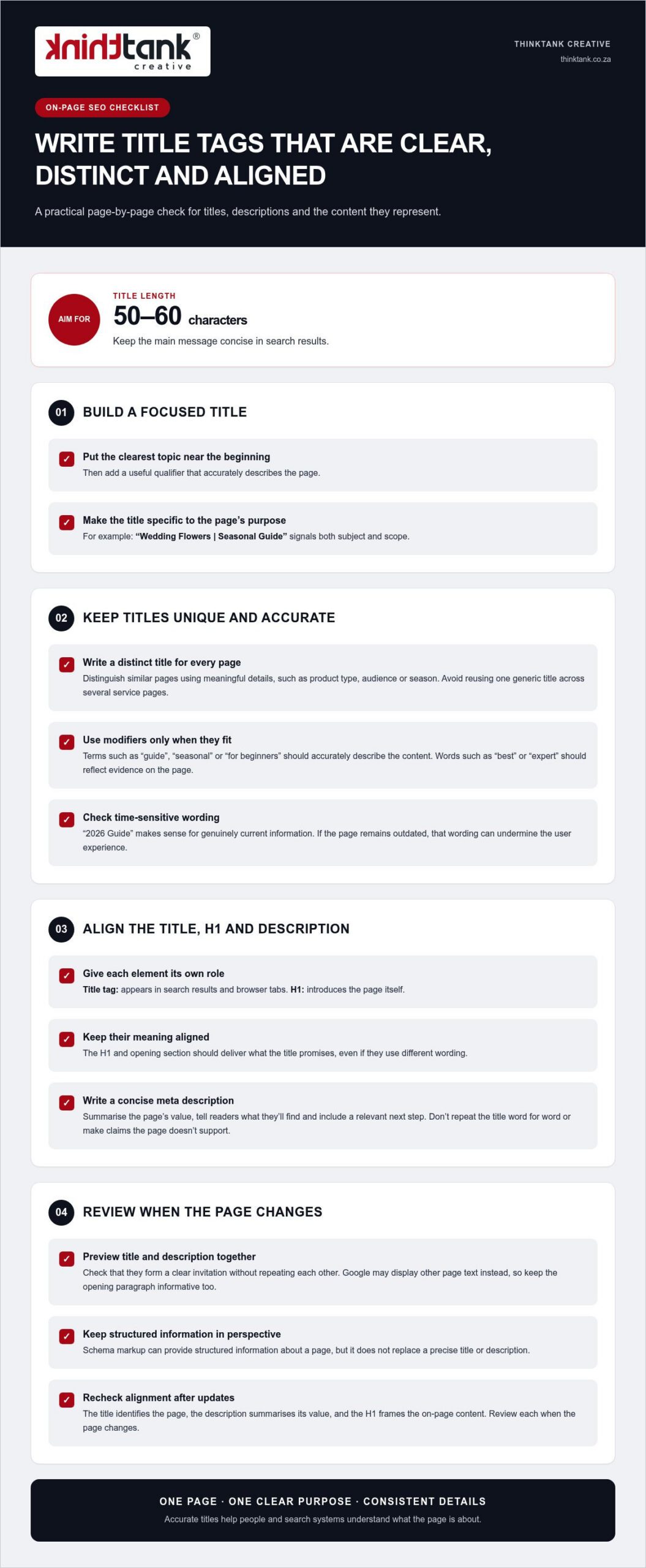
Write a distinct title tag that puts the page’s main subject near the beginning and gives readers a clear reason to click. Aim for 50 to 60 characters, such as “Pruning Roses: A Practical Guide for Gardeners”. Keep the promise accurate; a title that suggests a complete guide should lead to one.
Organise the page with one H1 for its main title, followed by descriptive subheadings. Make each heading introduce the content beneath it, rather than repeating the same keyword. For example, use “When to prune roses” for a section explaining timing. This hierarchy makes the writing easier to scan and helps search engines interpret page structure.
-
Create compelling meta descriptions
Summarise the page’s subject and reader benefit in a concise meta description. A useful working range is 140 to 160 characters. Place the focus keyword near the beginning when it reads naturally, then use an active phrase to highlight what the reader will learn. For example: “Learn when to prune roses, which tools to use and how to care for new growth.”
Give each page a description that reflects its actual content. Avoid generic copy, repeated keyword strings and promises the page doesn’t fulfil. Search engines may generate a different search snippet, so make the description a clear, accurate invitation rather than relying on it as guaranteed wording in search results.
- Name image files descriptively. Replace camera defaults such as “IMG_1000.jpg” with a short, accurate filename, such as “pruning-rose-branches.jpg”. Use words that describe the image, not a string of target keywords. Add alt text that explains informative images for readers using assistive technology. For decorative images, avoid alt text that adds irrelevant detail.
Compress image files to reduce their size whilst preserving visual quality. Choose JPEG for photographs, PNG for graphics or WebP for modern, lighter image use. These choices keep images useful without adding unnecessary weight to a page.
- Make internal links descriptive. Link related pages using anchor text that tells readers what the destination covers. Replace “click here” with wording such as “rose pruning advice”. Add each link where it genuinely supports the explanation, and check that it leads to the relevant page. A few purposeful links are more useful than unrelated links added for appearance.
- Review the full search presentation. Read the title, description and headings together, then check that they accurately represent the page. The title should set a specific expectation, the description explain the benefit, and the headings lead readers through the answer. For a page about rose care, avoid a title promising a complete gardening guide if the content only discusses pruning.
Finally, review the page on mobile and check that headings remain clear, snippets communicate the main benefit, and image filenames describe their contents. Consistency between the search result and page experience helps readers find the information they expected.
Internal and external linking
Use links to connect useful information, guide readers and clarify how pages relate. A considered linking structure can support organic visibility and make a website easier to explore.
-
Use internal links
Link each page to relevant content elsewhere on your website. For example, a blog post about choosing running shoes could link to a guide explaining shoe materials. Use descriptive anchor text such as “compare running shoe materials”, rather than “click here”. The link should help readers take a useful next step and give Google context about the linked page.
- Map links to the reader’s journey. Place contextual links where readers may need more detail, such as a definition or related process. A beginner’s guide to email marketing could link to an explanation of mailing-list consent. Organise pages into clear topic groups, then link between related sections. The European Union notes that logically organised content and links between related sections can support a website’s online presence.
- Prioritise useful destinations. Send readers to a page that extends the current point, not merely one that shares its target keyword. A page about writing product descriptions could link to a guide on product photography if the connection helps explain the task. Check that each destination loads and delivers what its anchor text promises.
-
Include external links and backlinks
Link externally when an authoritative source supports a factual claim or gives readers valuable context. For example, a page discussing Google Search features can cite relevant Google documentation. Choose sources closely connected to the claim, and make the anchor text describe the destination. Avoid linking to a source simply to make a page appear more researched.
- Understand backlinks as incoming links. A backlink points from another website to yours, unlike an internal link between your own pages. Original research, a practical resource or a useful explanation gives other publishers a reason to reference your work. Focus on earning relevant mentions through valuable content; avoid schemes that create artificial links without serving readers.
- Review links during content updates. Open each link in a draft or updated page and confirm that it reaches the intended destination. Replace broken links, revise vague anchor text and remove links that no longer support the surrounding paragraph. If a linked guide has moved, update the destination rather than leaving readers at an error page.
- Keep the structure purposeful. Each page should offer a clear route to related information, without becoming crowded with links. Check whether links help readers understand a subject, continue a task or assess a source. A well-optimised linking structure connects valuable pages and makes their relationship clearer to people and search engines.
Creating original content and adding information gain
A key part of how to create SEO-friendly content is giving readers more than a polished version of information they can find elsewhere. Original content adds a useful perspective, evidence or practical detail that helps someone understand a topic or take their next step.
- Identify what existing answers leave out. Review the questions a topic raises, then note which answers feel incomplete, difficult to apply or too general. For a guide to planning a garden, existing pages might explain plant choices but overlook how to organise them in a small courtyard. That gap gives your content a clearer purpose and a distinct contribution.
- Bring first-hand knowledge into the explanation. Add relevant experience, observations or examples to show how advice works in practice. A business explaining its onboarding process could describe the decisions customers commonly face and how each step helps. Use details you can stand behind, rather than inventing a personal story or presenting assumptions as evidence.
- Support claims with a clear basis. Use reliable sources for factual statements, and distinguish sourced information from your interpretation. If a page discusses a product’s performance, explain the circumstances behind the example and avoid turning one result into a universal promise. Clear attribution strengthens readers’ ability to assess the information and supports the authority of the page.
- Make the information easier to use. Turn a dense explanation into a practical resource, such as a decision framework, worked example or concise checklist. For instance, a guide to choosing a catering format could compare seated service with a buffet, then explain which event suits each option. The structure should help readers apply the answers, not merely decorate the page.
- Add an original visual where it clarifies the subject. A diagram can explain a process more clearly than several paragraphs, whilst a comparison table can make relevant differences easier to assess. Create visuals that add information, label them clearly and explain their meaning in nearby text. Useful images, diagrams and infographics may also be picked up by other websites, which could link back to the original content.
- Connect new insights to related topics. Organise the article so each section develops the main answer, then use internal links to direct readers to genuinely relevant detail. A guide to preparing for a website launch could link to a separate explanation of content planning. Each connection should extend the reader’s understanding, rather than divert them to an unrelated topic.
- Review the page for distinct value. Before publishing, identify the specific insight, example or resource readers gain from this page. Google’s helpful content update was introduced in 2022 and prioritised original, helpful content written for people. Applying these principles is central to how to create seo-friendly content that offers readers a distinctive visual experience. For distinctive visual storytelling, explore creative design support as part of presenting your ideas clearly.
ThinkTank Creative
ThinkTank Creative helps businesses bring their digital presence into alignment, from website structure to the visual identity that supports its message. When you’re applying these content principles across a new or existing site, its Website Design & Development and Branding & Creative Design services can help create a cohesive reader experience. These services are a natural next step when your content, site structure and brand presentation need to work together rather than feel like separate parts.
Build content that reflects your expertise and gives readers a clear path through your website. Contact ThinkTank Creative to discuss your digital content goals.
Build momentum with your next content decision
Treat each new page as an opportunity to deepen your relationship with readers. A distinctive point of view can strengthen your brand’s voice, whilst careful attention to changing questions keeps your content useful over time. The aim isn’t simply to publish more; it’s to make each contribution worth returning to.
Learning how to create SEO-friendly content is an ongoing practice. Review how your audience responds, listen for emerging needs and let those signals shape what you create next. Consistent, thoughtful choices can help your content strategy develop alongside your business.
If you’re ready to connect your content with a broader digital presence, ThinkTank Creative can help bring that work into focus through its social media marketing offering. Contact ThinkTank Creative to discuss your next step, and keep moving towards a more cohesive online presence.
Frequently Asked Questions
What is SEO writing?
SEO writing creates clear, helpful content that addresses readers’ needs and is structured for search engines to understand. It brings together accurate information, natural language and a defined purpose. For example, a home-maintenance business could publish a guide explaining how to prepare a roof for heavy rain, with advice suited to homeowners. The goal is to make the page useful in its own right, not to write solely for algorithms.
What is SEO content?
SEO content is a web page, article or other digital material created to answer relevant searches and reach an intended audience. It might be a service page explaining what a business does, a blog post answering a common question, or a guide that helps readers make a decision. Its format depends on the reader’s task, while its substance should provide accurate, worthwhile information rather than simply repeat a search term.
How do you research keywords and search intent?
Begin with the audience’s problem, then use a keyword research tool to explore the phrases people use and the questions behind them. Compare the wording and purpose of related searches. For example, “how to fix a leaking tap” suggests someone wants instructions, whilst “plumber near me” signals a service search. Group phrases with the same underlying need, then plan a page that answers that need directly.
How should you structure SEO-friendly content with headings and URLs?
Give each page one clear subject, a descriptive main heading and subheadings that guide readers through its sections. Use a concise URL that reflects the page topic, such as “/roof-maintenance/” for a roof-care guide. Avoid changing an established URL without considering its existing links and visitors. If a change is needed, plan a redirect to the new address so people and search engines can still reach the relevant content.
How often should you update SEO content?
Update a page when its information, examples or purpose no longer match what readers need. A seasonal travel guide, for instance, may need review before the next planning period, whilst an evergreen explanation may remain useful longer. Check for outdated claims, changed processes, broken links and new audience questions. Make revisions that improve accuracy or usefulness, and avoid changing dates or wording just to make an unchanged page appear fresh.
What SEO content practices risk Google penalties?
Practices designed to manipulate search visibility rather than help readers can put a page at risk. Avoid keyword stuffing, copied material, misleading claims and artificial link schemes. Repeating a phrase unnaturally across every paragraph, for example, makes a page harder to read and adds little value. Focus on original, accurate answers and links with a clear purpose. Review Google’s current Search guidance before adopting tactics intended to influence rankings.