Website Redesign Checklist for SEO: Protect Rankings in 2026
What if the greatest risk in a website redesign isn’t the new design, but the search value you leave behind? A redesign can change URLs, content and technical settings that help valuable pages earn visibility. Treat it as a controlled migration of existing search equity, not simply a visual refresh. This website redesign checklist for SEO is built around that principle.
If you’re concerned about losing rankings, organic traffic or important landing pages, that concern is justified. Knowing what to preserve, and when to check it, helps your team make considered decisions before launch rather than react to avoidable issues afterwards. A successful redesign brings SEO, design and development into the same conversation from the outset.
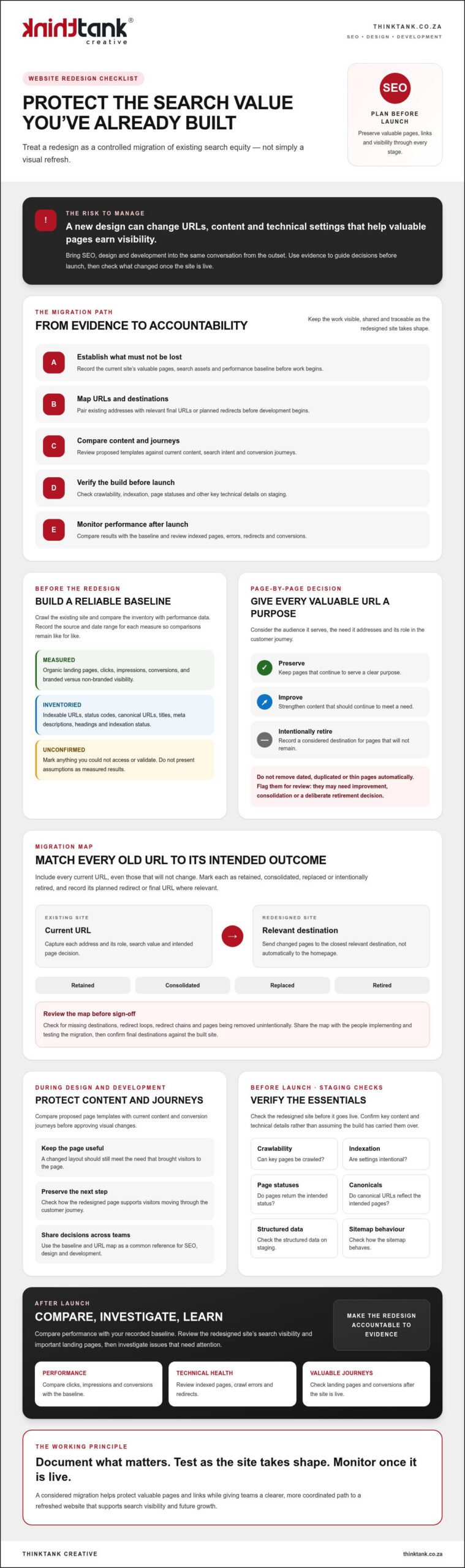
Use this practical checklist to plan the transition, protect valuable pages and links, and verify key content and technical details before and after launch. You’ll document what matters before work begins, test as the redesigned site takes shape, and monitor performance once it’s live. The result is a clearer, more coordinated path to a refreshed website that supports both search visibility and future growth.
Key Takeaways
- Use a website redesign checklist for SEO to establish which pages, search assets and performance measures need to be protected.
- Map existing URLs to their intended destinations before development, so changed pages have considered redirects and relevant paths.
- Compare proposed page templates with current content and conversion journeys before approving visual changes.
- Check crawlability, indexation settings, page statuses, canonicals, structured data and sitemap behaviour on staging before launch.
- After launch, compare performance with your baseline and review indexed pages, crawl errors, redirects, landing pages and conversions.
Website redesign checklist for SEO: establish what must not be lost
A redesign should do more than give your website a new appearance. It should retain the pages, content and authority that already help people find your business. Before changing layouts or navigation, establish what the current site contributes: which landing pages attract organic visits, which generate conversions, and where search visibility comes from.
Use this evidence to guide design and development decisions. Strong web design principles bring usability and search considerations together, so document the current experience before deciding what to change.
For an overview of SEO considerations during a redesign, watch:
Which SEO assets should you record before redesigning?
Crawl the existing site to create an inventory of indexable URLs, status codes, canonical URLs, titles, meta descriptions, headings and indexation status. Compare that inventory with performance data. Identify pages associated with organic visits, conversions, quality backlinks or meaningful impressions. Separate branded searches from non-branded searches to understand how people are finding you.
Keep the baseline concise and traceable. For each measure, record its source and date range so post-launch comparisons are like for like. Clearly distinguish verified results from assumptions or data you could not access.
- Measured: organic landing pages, clicks, impressions, conversions and branded versus non-branded visibility, with reporting periods.
- Inventoried: URLs, page elements, status codes, canonicals and indexation status from the crawl.
- Unconfirmed: data you could not access or validate, clearly marked rather than estimated.
How do you decide what content deserves to survive?
Give each valuable URL a clear purpose: the audience it serves, the need it addresses and its role in the customer journey. For example, a service page may attract relevant searches and help visitors understand how to take the next step. Its redesigned version should retain that usefulness, even if the layout changes.
Don’t automatically remove pages because they’re dated, duplicated or thin. Flag them for review. They may need improvement, consolidation or a deliberate retirement decision. Record the intended destination for any page that won’t remain at its current URL, ready for the migration planning that follows.
Decide page by page: preserve, improve or intentionally retire each valuable URL. This website redesign checklist for SEO starts with evidence, giving your design, development and SEO teams a shared reference before work begins.
Map URLs, redirects and site structure before development begins
Once you’ve identified the pages worth protecting, decide where each one will live in the redesigned site. A changed URL without a relevant destination can leave visitors facing a broken page and disconnect an established search result from the content users expect. Build the migration map before development, while the structure can still be adjusted.
A comprehensive website redesign guide can help frame the wider project, but URL decisions need to reflect your own pages, audience journeys and search evidence. Include every current URL in a source-to-destination map, including those that won’t change. Mark each as retained, consolidated, replaced or intentionally retired, and record the planned redirect or final URL where relevant.
How should you create a URL and redirect map?
Pair each old address with the closest relevant destination. If an existing service page gets a new address, redirect it to that service’s replacement page, not automatically to the homepage. A homepage redirect may technically send visitors somewhere, but it won’t meet the original page’s intent.
Before sign-off, check the map for missing destinations, loops, redirect chains and pages being removed unintentionally. Give the map to the people responsible for implementation and testing, then have them confirm the final destinations against the built site. A shared, reviewed document helps SEO, design and development teams work from the same plan.
How can you protect internal links and site architecture?
Review proposed navigation and internal links against key audience journeys and the important landing pages identified in your baseline. High-value pages should be reachable through clear navigation or relevant contextual links, rather than becoming isolated after a menu or content restructure. Clear journeys help visitors find the next useful step, while a guide to improving website user experience can offer further ideas for assessing those paths.
Update internal links to point directly to final destination URLs. Don’t leave links pointing to old addresses and rely on redirects to complete the journey. This makes pathways clearer for visitors and avoids unnecessary redirect steps.
Include technical changes in the same review. Flag redirect rules, canonical tags, robots directives and XML sitemap updates for technical review before launch. For example, confirm that a canonical points to the intended live URL and that staging-only crawl restrictions won’t carry over to the public site.
- Map: every existing URL, including unchanged pages.
- Match: changed pages to the closest relevant destination.
- Review: links, redirects and technical directives against the proposed structure.
A well-maintained URL map turns the website redesign checklist for SEO into a practical handover between planning and development. If you’re aligning website development with SEO decisions, explore website design and SEO planning as part of your project preparation.
Compare redesign content and on-page SEO before approving templates
A polished template can still underperform if it removes the information that made a page useful. Before approving designs, compare the current and proposed versions by page type. Check whether each still serves the same search purpose, answers the audience’s questions and supports a clear conversion path. A service page, for instance, may need descriptive detail to explain the offer before inviting a visitor to enquire.
Keep the review collaborative. Designers can identify opportunities to simplify the layout, while content and SEO reviewers confirm that key information remains easy to find and understand. Visual restraint is valuable, but it shouldn’t mean stripping out relevant explanations, headings or internal links just to create more empty space.
What should each redesigned page retain or improve?
Assess content in context rather than copying it wholesale. Retain subject coverage that meets a genuine audience need, improve unclear or outdated explanations, and review duplicated or irrelevant material before it moves across. Each page should have a clear purpose, not just a familiar appearance.
Check that titles and headings describe the page accurately, body copy is useful, image alternatives convey relevant information where needed, and calls to action make the next step clear. Don’t promise that these changes will secure a particular ranking. They can make a page more coherent and useful, while search performance depends on multiple factors.
Use a comparison matrix to make decisions visible and assign responsibility. For each page type, record:
- Page type and purpose: for example, service page, information page or article, plus the audience need it serves.
- Content decision: what will be retained, improved, consolidated or removed, and why.
- On-page elements: proposed title, headings, descriptive copy, image alternatives and calls to action.
- Review owner: the person responsible for checking the content and confirming it is ready.
How should design and UX decisions support SEO?
Review proposed templates on mobile as well as desktop. Text should remain readable, navigation should be clear, and important content shouldn’t disappear behind design choices that make it difficult to find. Check that headings create a logical structure and links help visitors move naturally between related information and next steps.
Image choices also affect the page experience. Discuss image dimensions, formats and how assets are handled with the development team, then test the built pages rather than assuming they’ll perform well. A visually minimal page isn’t automatically faster, just as a content-rich page isn’t automatically slow. Measure the implementation and address any issues you find.
Use this part of your website redesign checklist for SEO to approve content and templates together, not in separate silos. For broader planning, place those decisions within your wider search engine optimisation strategy, with clear responsibilities for design, development and content review.
Run this pre-launch SEO checklist before the redesigned site goes live
Make the staging site a formal quality-assurance checkpoint, not just a place to preview the design. Work through the checks with SEO, design and development together, and record an owner plus a clear pass or fix status for each item. This creates an accountable sign-off without implying that any launch is entirely risk-free.
What technical SEO checks belong on a staging site?
Check that staging isn’t accidentally available for public indexing, and verify how that restriction will be removed for the live site. Review representative page templates and priority URLs, including their titles, meta descriptions, canonical tags, robots directives and structured data. Confirm each setting against the project scope rather than assuming it’s correct by default.
Use a crawler to review the staging site, then investigate issues such as unexpected status codes, missing metadata, broken internal links or pages blocked from crawling. Test important URLs individually as well as across representative templates. A correct homepage doesn’t confirm that every page type is ready.
- Crawl and indexation: staging access, crawl controls and intended live indexation settings checked.
- Page signals: status codes, titles, descriptions, canonicals, robots directives and structured data reviewed.
- Site pathways: redirects, internal links, navigation and priority pages tested on mobile and desktop.
- Functionality: key forms and conversion paths tested, with issues assigned for resolution.
- Sitemap: confirm the live XML sitemap includes intended URLs and excludes staging or unsuitable pages.
For each item, record the reviewer, result and any follow-up action. A check isn’t complete if an issue has been spotted but no one owns its resolution.
How do you prepare the launch handover?
Before release, confirm that the final redirect rules and updated XML sitemap are ready, and that analytics measurement can continue across the transition. Document the planned launch timing, who is responsible for each task, how the team will decide whether rollback needs consideration, and which contacts should be notified if a critical issue appears.
Agree how changes will be checked after release, including who will verify priority pages and confirm that staging restrictions haven’t carried over. A guide on what to do after a new website goes live can help structure the next phase. The handover should make clear who will carry out those follow-up checks.
This step turns the website redesign checklist for SEO into a shared release plan, connecting technical checks with real responsibilities. For support coordinating website development and SEO considerations, review website launch requirements with ThinkTank Creative.
Monitor SEO after launch and make the redesign accountable
Launch is a transition point, not the end of the redesign. Use the baseline you documented earlier to compare performance, keeping the same reporting periods where possible. This gives your team a consistent reference for spotting changes in organic visibility, landing-page activity and conversions.
What should you monitor after the redesigned site launches?
Review Search Console for indexing issues, crawl anomalies and unexpected URL changes. Check that priority pages are being indexed as intended, then test key redirects and landing pages directly. Compare organic clicks, impressions and conversions with corresponding baseline periods where possible, and note any differences in tracking or measurement that could affect the comparison.
A change in performance doesn’t automatically mean the redesign caused it. Investigate in a considered sequence: confirm the page is accessible, check its status and redirect destination, review indexation and internal links, then compare the affected URL and reporting period with your baseline. Consider other possible influences before deciding on a cause. Record what you find, the action taken and the outcome, so decisions are grounded in evidence rather than guesswork.
- Indexing and crawling: check for unexpected exclusions, errors or URL changes.
- Redirects and landing pages: test important destinations and confirm key pages remain accessible.
- Organic performance: compare traffic and conversions with baseline periods, noting any limitations.
- Follow-up: document each issue, its owner, the fix and the observed result.
When can an agency help coordinate the redesign?
Bringing strategy, design, development, testing and SEO together takes time and clear handovers. If your internal team is finding it difficult to coordinate these decisions, a partner offering website development and SEO may help keep search considerations in view throughout the project.
ThinkTank Creative’s website process covers research and strategy, design, development, testing, launch, training and support, with ongoing service after project completion. This provides a structured path from early planning into post-launch work, without implying any particular ranking outcome.
Discuss your project needs and timeline before deciding on the next step. An estimated cost can be provided after that discussion. Discuss your website redesign with ThinkTank Creative.
A well-managed website redesign checklist for SEO continues after release: compare, investigate and document, so the redesigned site remains accountable to the goals set before work began.
Make your redesign a stronger foundation for growth
A successful redesign protects the value your existing website has built while creating a clearer, more useful experience for what comes next. This website redesign checklist for SEO gives your team a practical sequence: document valuable pages, map URL changes, review content and templates, complete pre-launch checks, then monitor performance against your baseline.
Coordination matters at every stage. ThinkTank Creative, founded in 2001, brings website design and development together with SEO through a process spanning research and strategy, design, development, testing, launch, training and support. Its award-winning design team and ongoing service after project completion provide continuity from planning into post-launch care.
Every redesign has its own priorities and timeline. Review your website redesign requirements with ThinkTank Creative. An estimated cost can be provided after discussing your requirements and timeline.
Plan carefully, bring the right people into the conversation and treat launch as the start of the next phase. With a considered approach, your redesigned website can be ready to serve both your audience and your business goals.
Frequently Asked Questions
Can a website redesign affect SEO rankings?
Yes, a redesign can affect rankings if it changes URLs, removes useful content, disrupts internal links or introduces technical problems. A new visual identity alone doesn’t determine search performance, but changes to the pages and signals search engines rely on can influence visibility. Record existing performance before work begins, then check key pages, redirects and indexation after launch. This helps your team identify issues and investigate changes using evidence.
What should be included in an SEO website redesign checklist?
An SEO website redesign checklist should cover the current site baseline, valuable URLs, content decisions, redirect mapping, page templates and pre-launch testing. Include checks for crawlability, indexation settings, page status codes, canonical tags, structured data and sitemap behaviour. Assign an owner and pass or fix status to each check. After launch, monitor indexed pages, crawl errors, organic landing pages and conversions against the baseline, recording findings and follow-up actions.
Should I change URLs during a website redesign?
Change URLs only when there’s a clear reason, such as improving an inconsistent structure or consolidating overlapping pages. If an address changes, map the old URL to the closest relevant destination and test the redirect. Don’t send unrelated pages to the homepage simply to avoid a missing page. Keep a record of URLs that stay the same as well, and update internal links to point directly to each final address.
How do I keep SEO traffic when launching a new website?
You can reduce avoidable disruption by protecting valuable pages and checking the migration carefully, although no checklist can guarantee unchanged traffic. Before launch, document search performance, preserve useful content, test redirects and confirm that live pages can be crawled and indexed as intended. Once the new site is public, check priority URLs, redirects, crawl issues and organic landing-page performance. Compare results with consistent baseline periods and investigate changes before deciding what caused them.
When should SEO be considered in a website redesign?
Consider SEO from the research and planning stage, before approving the site structure, page templates or content changes. Early input gives the team time to identify valuable landing pages, decide what content should remain and map URL changes before development is complete. It also helps design, development and SEO reviewers coordinate their work. Leaving search checks until just before launch can make important changes harder to assess and resolve.
How long does it take for SEO to recover after a website redesign?
There’s no reliable fixed recovery period. The time and direction of any change depend on what altered, whether search engines can access and understand the new pages, and how quickly problems are identified and addressed. Check Search Console and site performance after launch, comparing results with your baseline rather than assuming every fluctuation is caused by the redesign. If visibility falls, investigate affected URLs, redirects, indexation and content before choosing a response.