On-page SEO checklist 2026 for keywords, links, and images

An on-page SEO checklist for 2026 is a practical set of checks for making each page clear, useful and easy for search engines to understand. Start with one descriptive H1, use headings in a logical order, and place your main keyword naturally in the opening 100 words. Then refine the page title, images, internal links and answers to common questions.

It’s easy to focus on keywords, but a well-optimised page must also answer the reader’s needs and make information easy to navigate. Repeating a phrase in every heading won’t make the content more useful.

Use this checklist to improve keyword placement, write clearer titles, add descriptive image details and connect related pages. You’ll also learn how to structure FAQ content so people and AI-powered search experiences can identify direct, relevant answers.

Key Takeaways

  • Give each page a clear focus, place relevant terms naturally and organise headings so readers can follow the content.
  • Write a unique, compelling title for each page that reflects its purpose and encourages the right audience to click.
  • Use relevant internal links to guide visitors to useful content, and make every link’s destination clear from its anchor text.
  • Choose descriptive image file names and alt text, and optimise image files to support a smooth page experience.
  • Shape FAQ answers around real reader questions, leading with a direct response and adding concise context that makes the information easy to understand.

Natural keyword placement and content coverage

An on-page SEO checklist for 2026 checks whether a page answers one search need clearly. It covers the keyword, content, headings, readability and mobile experience. Begin by identifying the reader’s intent, then make the page’s central answer easy to find. For example, a page about wedding flowers should explain arrangements, ordering or delivery, according to its purpose.

Use the primary keyword naturally in the opening 100 words, then add relevant terms where they help explain the topic. Avoid repeating the exact phrase in every paragraph or inserting keywords into unrelated headings. Google Search can surface pages that match a query, so write for the task behind the search, not just the wording.

Give the page one clear H1, followed by H2 headings for main sections and H3 headings for supporting topics. Keep the sequence logical: an H2 should not jump straight to an H4. A heading such as “Choosing seasonal wedding flowers” tells readers more than a string of search terms. Each heading should introduce useful content beneath it.

Readable content uses plain language, descriptive subheadings and a format suited to the task. A step-by-step guide needs ordered instructions; a comparison may be clearer with labelled differences. On mobile, check that text is legible, buttons are easy to use and visitors don’t need to scroll sideways. These checks help readers find the information they came for.

Google Search Console and PageSpeed Insights are free tools for reviewing search performance and page experience. Paid SEO platforms charge subscription fees that vary by product, plan and billing terms, so there’s no standard South African price.

Keyword stuffing, copied or thin content, cloaking and manipulative links can undermine search visibility or trigger spam systems. Keep wording accurate, publish original material and make each page serve a distinct reader need. Don’t repeat phrases or hide text to influence rankings.

Build topical clusters by linking a main guide to focused supporting pages. For example, a wedding-flower guide could link to pages about seasonal varieties, bouquet care and venue arrangements. Publish new articles when they address a genuine content gap, and refresh existing pages when details, examples or reader needs change. Prioritise meaningful improvements over cosmetic edits, while preserving each page’s purpose.

Title tag optimisation

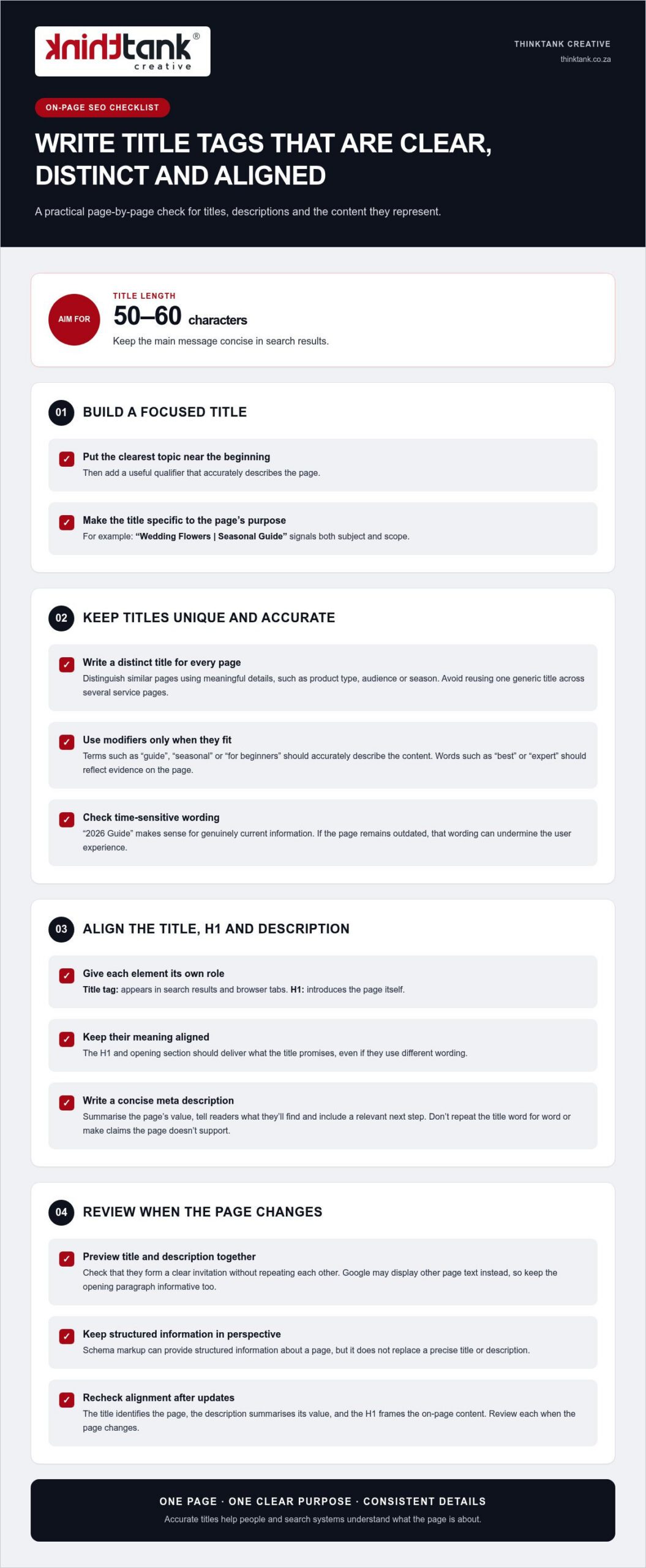
Give every page a distinct title tag that describes its specific purpose. Aim for 50-60 characters, which helps keep the main message concise in search results. Put the clearest topic near the beginning, then add a useful qualifier. For example, “Wedding Flowers | Seasonal Guide” signals both subject and scope. Don’t reuse one generic title across several service pages.

A title tag and an H1 serve related, but different, roles. The title tag appears in search results and browser tabs; the H1 introduces the page itself. Keep their meaning aligned, whilst allowing different wording. If the title promises a seasonal flower guide, the H1 and opening section should deliver that guide, not shift to unrelated wedding planning advice.

Write the meta description as a concise summary of the page’s value. Tell readers what they’ll find, then include a relevant next step, such as comparing seasonal arrangements. Don’t repeat the title word for word or make claims the page doesn’t support. Google may display other page text instead, so make the opening paragraph informative too.

Modifiers can clarify a page’s scope, but they don’t create authority by themselves. “2026 Guide” makes sense for genuinely current information; it can undermine user experience if the page remains outdated. Likewise, “best” or “expert” should reflect evidence within the content, not serve as decoration. Check titles during each content refresh and remove qualifiers that no longer fit.

Schema markup can provide structured information about a page, but it doesn’t replace a precise title or description. Keep each element focused: the title identifies the page, the description summarises its value, and the H1 frames the on-page content. Review their alignment whenever the page changes, because consistent details make its subject clearer to people and search systems.

For a coordinated review of page titles and search visibility, explore SEO planning and page optimisation as part of your wider content process.

External and internal linking

Links help visitors find related pages and give search engines context about your site’s structure. A useful internal link points to a genuinely relevant next step, such as linking an accounting services page to a guide to bookkeeping. This supports navigation and can distribute page authority across related content. Link to help readers, not just to influence ranking signals.

When publishing new content, add links to 2-5 relevant pages on your site. Choose destinations that deepen the subject or help readers act on what they’ve learnt. Use descriptive anchor text, such as “small business tax services”, rather than vague wording like “click here”. Clear anchors set expectations and make the connection between pages easier to understand.

Review your site’s navigation as well as links within page copy. Important pages should be reachable within 3 clicks from the homepage, where practical. Look for orphan pages that have no internal links pointing to them; visitors and search engines may struggle to discover these pages. A simple site map or crawl can reveal broken links, repeated destinations and pages buried too deeply.

External links can support a claim by taking readers to a useful, authoritative source. For example, a South African business explaining tax terminology could link to relevant information on the South African Revenue Service website. Choose a source that directly supports the statement, and make sure the surrounding explanation is clear without requiring a visit. Don’t add external links simply to appear comprehensive.

Keep URLs short, descriptive and relevant to the destination. A slug such as /small-business-tax is easier to interpret than an opaque identifier or a string of query parameters. Aim for fewer than 75 characters, and avoid changing a working URL without a clear reason. If a permanent URL change is necessary, use a 301 redirect; use a 302 redirect for a temporary change.

Assess links in context. A product page, service explanation and supporting article may each need different onward links. Reviewing them helps preserve useful pathways as content changes, while removing irrelevant links that distract readers or obscure the page’s purpose.
On-page SEO checklist 2026 for keywords, links, and images

Image optimisation and alt text

Optimise each visual for its role on the page, not just its file size. A product photograph needs enough detail to show texture, while a small decorative icon can use fewer resources. Choose suitable formats and dimensions before publishing, then preview the page on desktop and mobile. This balances visual quality with loading performance and ensures each asset suits its intended display.

WebP images are described as 25 to 35 per cent smaller than JPEG files at equivalent quality. Convert suitable files to WebP, then compare the result with the original to ensure important details remain clear. Keep a high-quality source file separately if your team may need to edit or repurpose the visual later. Check that the converted file displays correctly across the page before publishing it.

Give each file a descriptive name that reflects its subject. For example, use cape-town-wedding-bouquet.webp instead of IMG_2048.webp. Add concise alt text that explains the image’s relevant information, such as “white proteas and greenery in a bridal bouquet”. Avoid stuffing keywords into the description or repeating nearby copy. For a purely decorative visual, use empty alt text so assistive technology can skip it.

Lazy loading can defer off-screen visuals until visitors approach them, reducing the initial work required to load a long page. Don’t apply it indiscriminately to the main visual shown when the page opens, as that element may be central to the first view. Test on a phone, where slower connections can make delays more noticeable, and check that deferred content appears as visitors scroll.

Search engines need access to image files to understand them. Review your robots directives and page settings to make sure they don’t block important resources. If a visual carries essential information, include that information in nearby text too. This gives readers another way to understand the content if the file fails to load.

For video, choose a clear poster frame and provide a descriptive title and supporting text. A short explanation beside a product demonstration, for example, tells visitors what they’ll learn before playback. Check that video fits narrow screens without obscuring page content. Keep media relevant to the page’s purpose, then review the complete page after each optimisation.

Before publishing, open the page on a mobile device and check image clarity, loading behaviour, alt text and surrounding copy. A final review can catch missing visuals, misleading descriptions and oversized files before they affect the visitor experience.

FAQ sections and AI search optimisation

For a South African audience, use South African English and make the page’s geographic scope clear. If a business serves customers nationally, say so when it helps answer the reader’s question. Include local details only when they genuinely affect the information, such as delivery coverage, service availability or regional requirements.

Build FAQ content around questions readers actually ask. Use customer enquiries, search queries and gaps in existing page explanations to find them. Start with a concise answer, then add context and a practical example. For instance, a question about choosing a local service should explain relevant factors, such as the work required, coverage and customer support.

Don’t make readers scroll through 1,000 words before reaching the answer. Put the response beside its question, then explain key terms and exceptions in plain language. For an unfamiliar concept, provide a one-to-three-sentence explanation before expanding on technical detail. This format helps the reader understand the subject and gives search engines clearer passages to interpret.

AI search rewards clarity, not a special phrase repeated across every answer. Identify the main subject, explain how it relates to the reader’s question and use consistent names. For example, a page about a South African tax consultant should identify the service and explain which tax question it addresses. Accurate, self-contained sections make information easier to interpret across search formats.

Schema markup adds machine-readable context to page content. FAQ schema can describe question-and-answer content, while local schema can describe a business with a physical location. Use markup only when it accurately reflects visible page information. Structured data helps search engines understand page elements, but it doesn’t guarantee a rich result or inclusion in an AI-generated answer.

Review FAQ content whenever you make a substantive page update. Remove questions that no longer fit, correct outdated examples and check that each answer is complete when read on its own. A technical review should also confirm that search engines can access the page and that its markup matches the content visitors see.

Use this final test before publishing: can a reader find the direct answer, understand the key term and see what to do next? If any step is unclear, revise the question or response. For a considered approach to search visibility and useful page content, plan your SEO content strategy.

Which free and paid tools can audit on-page SEO, and what do they cost in South Africa?

Google Search Console and PageSpeed Insights are free tools for reviewing search performance and page experience. Paid SEO platforms charge subscription fees that vary by product, plan and billing terms, so there’s no standard South African price.

ThinkTank Creative: Website Design and Development

ThinkTank Creative can help turn these on-page checks into a coherent website experience with custom Website Design and Development. Consider this support when page structure, content presentation or mobile usability needs attention across your site, not just on one page. Creative design can bring visual elements into alignment with your brand, while Logo and Corporate Identity Design helps establish a consistent identity across digital touchpoints.

A well-considered website connects how pages look with how visitors navigate and use them. It provides a practical foundation for clear content structures and useful page layouts as your website evolves.

Planning website improvements? Contact ThinkTank Creative or visit thinktank.co.za to discuss your next steps.

Build the next phase of your digital presence

Turn the on-page SEO checklist for 2026 into an ongoing way of working. As your business changes, revisit how your pages serve customers, and let their questions guide what you improve next. A useful page is not a one-off task; it’s part of a wider digital experience that should grow with your goals.

ThinkTank Creative brings Website Design and Development, Social Media Marketing and creative design together to support your wider online presence. If you’re strengthening your website or aligning its content with your marketing, consider how these elements can work together around a clear direction.

Contact ThinkTank Creative to discuss where you’d like to take your digital presence next. A considered next step can help you build with purpose and move forward with confidence.

Frequently Asked Questions

What is On Page SEO Checklist?

An on-page SEO checklist is a page-by-page review of the elements that help visitors and search engines understand a website. It covers content relevance, page titles, headings, links, images and technical usability. For example, reviewing a product page means checking whether its details answer likely customer questions, not just whether it includes a target phrase. Use the checklist to identify specific edits and prioritise pages that matter to your audience.

What should an on-page SEO checklist include in 2026?

A practical 2026 checklist should cover search intent, original content, page metadata, heading structure, internal links, descriptive image details, mobile usability and page performance. Add a final review for broken links and outdated information. For a South African service page, check that the described service and geographic coverage reflect the business accurately. This keeps optimisation aligned with the actual offer, rather than publishing claims or details the page cannot support.

What are Google's 2026 on-page SEO best practices for title tags and meta descriptions?

Write a unique title tag for each page, aiming for 50-60 characters, and make its subject clear to potential visitors. A page about bookkeeping for small businesses should say so, rather than use a broad title such as “Our Services”. Write a concise meta description that previews the page’s actual value and matches its content. Google may generate a different search-result snippet, so make the page copy useful on its own.

How should headings, URLs, and internal links be optimised for on-page SEO?

Give a page one clear H1, then use H2 and H3 headings to show how its ideas relate. Choose a short, descriptive URL that reflects the destination, such as a slug about bookkeeping services. Add internal links where readers may need a relevant next step, using anchor text that describes the destination. For instance, an article about cash flow could link naturally to a related business finance guide, rather than an unrelated sales page.

How do you optimise images, alt text, and page speed for SEO in 2026?

Resize images to suit their display area, compress them and use WebP where it preserves the required quality. WebP files are described as 25 to 35 per cent smaller than JPEG at equivalent quality. Write alt text for meaningful images, such as identifying the subject of a product photograph; leave decorative images without descriptive text. Check loading performance against Core Web Vitals: good thresholds include LCP at 2.5 seconds or less and INP at 200 milliseconds or less.

What is the recommended keyword placement and density for on-page SEO?

Place the primary keyword naturally within the opening 100 words, then use related language where it helps explain the subject. There is no keyword-density target in this checklist: forcing a phrase into every heading can make copy awkward and less useful. For a page about bookkeeping, mention the service where it fits, then cover connected questions such as record keeping or monthly reporting only when they match the page’s purpose.

How should content be optimised for Google AI Overviews and featured snippets in 2026?

Answer the reader’s main question directly, then add the context needed to understand the response. A useful structure is question, direct answer, supporting explanation and relevant example. For a question about choosing an accounting system, state the decision factors first, then explain how business needs affect the choice. Clear, self-contained passages can help search systems interpret a page, but no format guarantees a featured snippet or AI Overview appearance.

Which structured data types should websites use, and what are Google's current schema rules?

Choose structured data that accurately describes the page. FAQ schema can mark up visible question-and-answer content, while local schema can describe a business with a physical location. Keep marked-up details consistent with what readers see, and validate the implementation for technical errors. Schema helps search engines interpret content, but it doesn’t guarantee enhanced search results. Choose types based on the page’s real purpose, not just their potential visibility.
Signs of a Bad SEO Agency: A Practical Checklist for Businesses

What if the biggest warning sign isn’t a ranking drop, but an agency that can’t explain what it’s doing or why? The signs of a bad seo agency often show up in the gaps between promised results, completed work and evidence you can inspect. A change in traffic alone doesn’t prove an agency has failed, but vague answers and unexplained tactics deserve attention.

It’s reasonable to expect SEO reports to show more than rankings and activity. You need to understand how the work supports your business objectives, what the results mean and what happens next. Comparing agencies can be difficult when proposals use different terms and measures, so look for clarity as well as confidence.

This practical checklist will help you recognise risky practices, assess evidence and accountability, and ask informed questions about strategy, access and communication. You’ll also learn how to distinguish normal fluctuations from more serious concerns, so you can choose a collaborative SEO partner with a clear view of the next steps.

Key Takeaways

  • Treat the signs of a bad seo agency as prompts to investigate, not automatic proof of misconduct.
  • Use a structured review of goals, baseline results, completed work, supporting evidence and next steps to assess an agency’s reporting.
  • Compare contracts, account access and link-building practices, then use focused questions to clarify responsibilities and expectations.
  • If concerns arise, document them, request clear explanations and preserve access to accounts and records before making changes.
  • Look for a partner whose transparent process connects SEO with relevant content, paid advertising and website development.

Signs of a bad SEO agency: warning signs worth investigating

Vague promises, unclear work and reports that don’t connect activity to business results can leave you wondering what your SEO agency is actually doing. These are among the signs of a bad seo agency worth investigating, but a red flag calls for scrutiny, not an automatic conclusion. Look for repeated patterns and ask for evidence before deciding whether there’s a problem.

SEO involves more than chasing rankings. A neutral overview of search engine optimization can help clarify the range of work involved. Strategy should account for your business goals and circumstances, and the agency should be able to explain its approach in language you can understand.

Use this video as a prompt for questions to raise with your agency:

Which SEO agency promises should make you pause?

A guaranteed first-place ranking or a precise traffic outcome deserves questions, not blind trust. Search results are influenced by factors such as competition, your website’s condition and the resources available for the work. A credible agency can set measurable goals, explain its assumptions and review progress, but it shouldn’t present an uncertain outcome as assured.

Measurable targets show what you’re working towards; guaranteed rankings claim control over an outcome no agency can fully dictate. Be cautious if an agency promises results before discussing your goals or assessing your starting point. “Secret methods” that can’t be explained, or pressure to sign before the strategy is clear, also make the work and its risks harder to assess.

When does poor communication become a warning sign?

One delayed reply or a short-term ranking change isn’t enough to establish a problem. Pay attention to a pattern: questions repeatedly go unanswered, reports arrive without explanation, or updates use jargon instead of describing what was done and what comes next. Technical work can be complex, but its purpose and business relevance should still be understandable.

SEO often involves research, implementation, testing and adjustment over time. Rankings can move as search conditions and strategies change, so judge performance in context rather than reacting to a single fluctuation. Ask what changed, what evidence supports the explanation and whether any follow-up is planned. A clear, considered response helps distinguish normal movement from an accountability concern.

How to check an SEO agency’s strategy, evidence and reporting

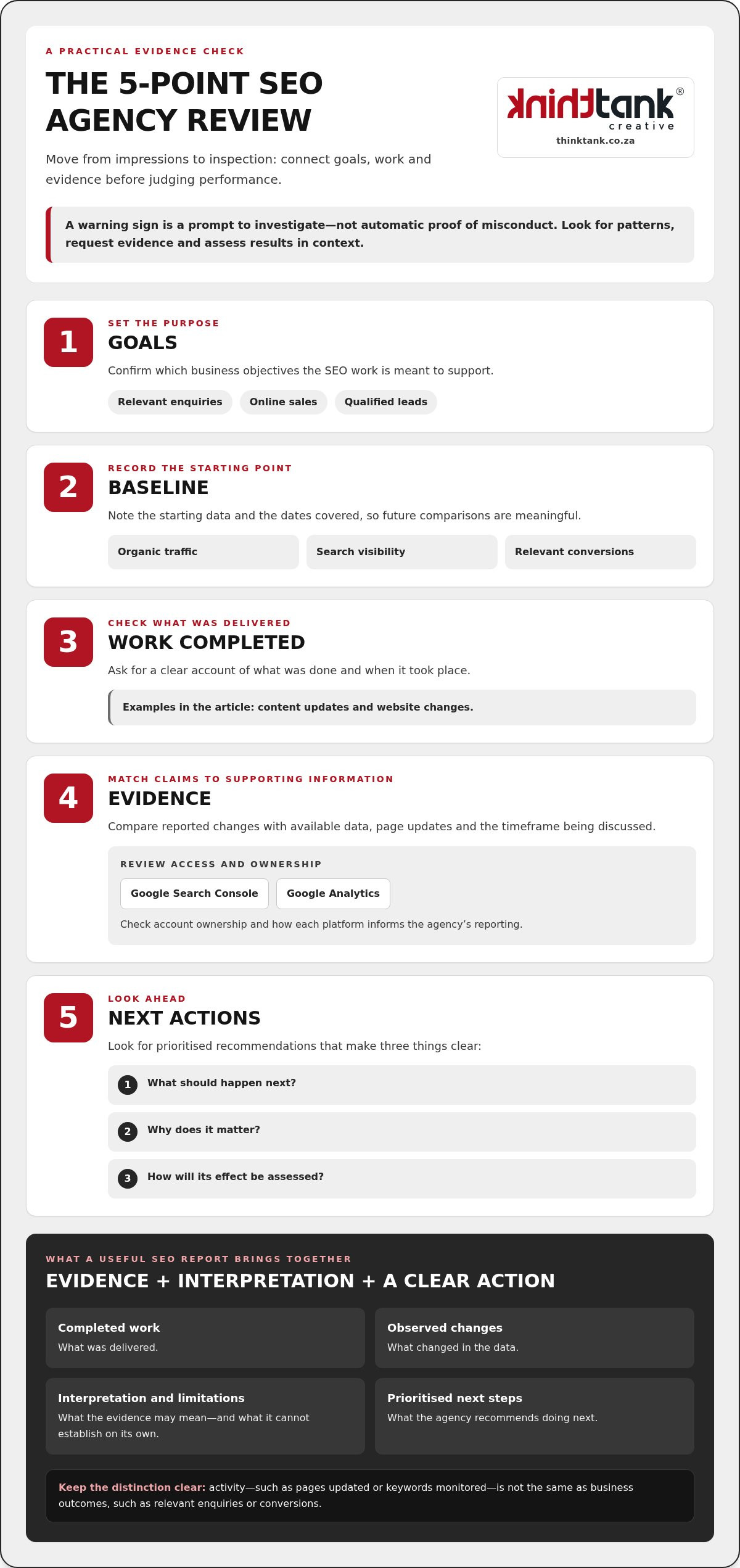
Move from impressions to inspection. Reviewing goals, baseline data, completed work and outcomes helps you assess whether an agency’s strategy is connected to your business, rather than simply producing activity. These checks can help distinguish genuine signs of a bad seo agency from a report that needs more context.

Use this five-step review:

For broader context on SEO strategy in South Africa, read this South African SEO strategic guide.

What should an SEO report explain?

A useful report sets out completed work, observed changes, the agency’s interpretation, any limitations and prioritised next steps. It distinguishes activity, such as pages updated or keywords monitored, from outcomes that matter to your business, such as relevant enquiries or conversions. Search visibility and organic traffic can indicate whether more people are finding your site, but the business context helps reveal whether that attention is valuable.

A useful SEO report combines evidence with interpretation and a clear action. If a metric has changed, the report should explain what it may mean, what it can’t establish on its own and what the agency recommends doing next.

How can you assess SEO claims without relying on rankings alone?

Compare each claim with the dates, baseline, pages changed, search data and relevant business outcomes. Rankings vary, so consider them alongside organic traffic, conversions and the quality of enquiries. A sudden traffic spike or impressive backlink total is a reason to ask for context: which pages or sources drove the change, and did it reach the intended audience?

Clear reporting makes collaboration easier. For more on assessing an SEO approach, explore SEO strategy and reporting as part of a wider digital marketing plan.

Review the working arrangements as carefully as the strategy. A clear agreement should explain what the agency will do, how progress will be communicated and what happens if the relationship ends. Vague terms, restricted access or unexplained link-building methods are signs of a bad seo agency worth examining, but they aren’t proof of wrongdoing on their own.

Use this comparison to identify what needs clarification:

Transparent practice Concerning practice Follow-up question
Deliverables, responsibilities and reporting cadence are described plainly. The scope is vague, or reports and updates are irregular or undefined. What work will be completed, by whom and how often will progress be reported?
Cancellation and exit terms are understandable. It’s unclear how to end the arrangement or what happens to work in progress. What steps, notice and handover apply if either party ends the agreement?
Your business can access its website and analytics accounts, with responsibilities agreed. Access is controlled solely by the agency, or account ownership is unclear. Who owns each account, and how can authorised people access it?
Link acquisition methods and their purpose can be explained. Links are undisclosed, irrelevant or presented in reports that can’t be verified. How were these links acquired, and where can I review them?

What contract details should an SEO client understand?

Before work begins, check that the scope, deliverables, each party’s responsibilities, reporting cadence and exit terms are clear. An agreed activity, such as updating pages, is different from a promised ranking or revenue result. If a clause is unclear or its implications matter, seek qualified professional advice on the contract rather than relying on an agency’s explanation alone.

Make access practical, too. Your organisation should understand who controls its website, Google Search Console and Google Analytics accounts, and how access can be maintained if the working relationship changes. Clarify who is responsible for changes and approvals so important work isn’t left in limbo.

What makes backlink work difficult to trust?

Ask the agency to explain how links are acquired and what role they play in the strategy. Undisclosed paid links, irrelevant placements or reports that don’t let you verify the sites involved warrant further questions. Link volume alone doesn’t show whether the work is relevant or responsibly carried out. For a deeper look at ethical authority-building, explore local link-building strategies in South Africa.

Look for explanations you can follow and records you can review. Clear terms and accessible accounts help you assess the work and keep your digital assets under your organisation’s control.

Signs of a Bad SEO Agency: A Practical Checklist for Businesses

What to do when your SEO agency shows warning signs

Take a measured approach. One disappointing metric or unclear report doesn’t automatically mean your agency is acting irresponsibly, but repeated gaps deserve a direct conversation. Document what concerns you, ask for an explanation and agree on specific next steps before making a decision about the relationship.

How should you raise concerns with an SEO agency?

Prepare for a focused review. Bring examples, dates, relevant reports and the business priorities the SEO work is meant to support. For instance, note which deliverable you expected, when it was due and what information you’ve received so far. This keeps the discussion grounded in observable details rather than general frustration.

Ask the agency to explain its findings, decisions and any risks or limitations, then set out what needs to happen next. Confirm the agreed actions, who is responsible and a practical date to review progress in writing. A clear record helps both sides understand the plan and makes it easier to assess whether concerns are being addressed.

When should you consider changing SEO agencies?

Consider a change if material concerns persist after you’ve raised them clearly and allowed for agreed follow-up. Repeatedly unexplained tactics, missing work or an unwillingness to clarify responsibilities may point to a working relationship that no longer supports your objectives. Slow progress on its own doesn’t prove poor or unethical work; SEO outcomes can take time, and performance needs to be assessed in context.

Before ending an engagement, review the transition carefully. Preserve access to your website, Google Search Console and Google Analytics accounts, along with reports, records of completed work and relevant communications. Clarify what work is under way, what remains outstanding and how access or responsibilities will be handed over. Check the agreement’s exit terms and seek professional advice if you need help interpreting them. Avoid making abrupt changes based on one ranking movement.

If you’re unsure how to interpret the evidence, return to the same practical checks: what work was agreed, what was completed, what the data shows and what action is proposed. Use the answers to make a considered decision rather than abandoning useful work without understanding the consequences.

For more context as you review your approach, explore ThinkTank Creative’s SEO strategic guide for South Africa.

To understand how SEO work can fit into a wider digital marketing plan, review ThinkTank Creative’s SEO services.

Choose an accountable SEO partner with a clear working process

A strong SEO partnership makes the work understandable and keeps it connected to your business priorities. Look for a transparent scope, clear responsibilities, reporting you can interpret and communication that welcomes informed questions. Realistic expectations matter, too: a credible partner can explain the intended direction and how progress will be assessed without promising instant, guaranteed transformation.

What does a credible SEO partnership look like?

Start with shared objectives. You and the agency should understand what SEO is meant to support, who is responsible for each part of the work and how decisions will be reviewed. As results and circumstances change, an accountable partner explains the evidence behind adjustments, including the trade-offs involved. The strategy shouldn’t be a black box.

SEO also works best when it fits the wider digital picture. Relevant content can support search visibility, paid advertising can complement broader marketing activity, and website development can help address user experience or site needs. The right mix depends on your goals; connected services should work together rather than become a list of disconnected tasks.

How does ThinkTank Creative approach connected digital work?

ThinkTank Creative’s approach includes research and strategy, clear communication, testing and delivery. Its digital work includes SEO alongside content creation, digital paid advertising, copywriting and reporting. Where appropriate, these activities can align with website development so search strategy, content and the website contribute to a coherent direction.

ThinkTank Creative provides ongoing service after project completion, supporting continued collaboration as priorities and learning develop. You should be able to understand what is being done, why it matters and how the work relates to your objectives. That’s a more dependable foundation than unexplained tactics or claims of overnight success. We Do It All So You Don’t Have To reflects an integrated approach, with communication and strategy helping connect the work.

As you weigh the signs of a bad seo agency against the qualities of a more accountable partner, focus on whether the process gives you clarity and a meaningful role in decisions. Consider how the proposed work will support your objectives, how progress will be communicated and what the next steps involve.

Discussing your SEO needs and timeline is a practical way to establish those priorities. An estimated cost is provided after discussion of your needs and timeline, so you can consider the proposed work in context.

Choose clarity and build a stronger SEO partnership

The signs of a bad seo agency are reasons to investigate, not a verdict based on one ranking change. Look for a consistent pattern: promises without a clear strategy, work you can’t verify, reports without business context or unclear access and responsibilities. A credible partner makes its approach understandable, connects activity to your goals and agrees practical next steps with you.

Founded in 2001, ThinkTank Creative provides connected digital work that includes SEO, content creation, digital paid advertising, copywriting and reporting, with ongoing service after project completion. This creates room for a considered approach that can bring related marketing activity together where it supports your objectives.

Ready to discuss your digital marketing needs and timeline? Talk with ThinkTank Creative. An estimated cost follows a discussion of your requirements, so the proposed work can reflect your priorities.

Choose a partnership built on clear communication, thoughtful strategy and progress you can understand.

Frequently Asked Questions

What are the biggest signs of a bad SEO agency?

The clearest signs of a bad seo agency include guaranteed rankings, unexplained tactics, unclear deliverables and reports that don’t connect work to business goals. Repeatedly unanswered questions or pressure to sign before the strategy is explained also deserve scrutiny. Look for patterns, not one isolated incident. Ask the agency to show what it has done, explain the evidence and outline what it recommends next before deciding whether there’s a serious concern.

Can an SEO agency guarantee first-page rankings?

No agency can credibly guarantee a specific first-page ranking, because search results depend on factors beyond its control, including competition and changes in search systems. A responsible agency can set measurable goals, explain its strategy and track progress against an agreed baseline. Treat promises of a precise position or outcome as a reason to ask how that result is assured. Distinguish a target the agency will work towards from a result it claims to guarantee.

How do I know if my SEO agency is doing a good job?

Assess whether the agency’s work is clear, evidence-led and relevant to your business objectives. Check what was completed, compare search visibility and organic traffic with a baseline, and review whether those changes are contributing to relevant enquiries or conversions. Reports should interpret results, acknowledge limitations and identify next actions, not just list rankings or activity. Good work also includes understandable communication, agreed responsibilities and a strategy that can be adjusted as evidence develops.

Should an SEO agency own my website or Google Analytics account?

Your business should retain ownership and control of its website and analytics accounts, whilst giving the agency the access it needs to carry out agreed work. Make sure authorised people in your organisation can access Google Analytics and Google Search Console, and understand who manages permissions. Clarify account responsibilities at the start of the relationship. Keeping access and records in your control helps protect continuity if staff, suppliers or working arrangements change.

Is a sudden drop in organic traffic proof my SEO agency is bad?

No. A traffic drop by itself doesn’t prove that your agency has done poor work or used harmful tactics. Check the dates, affected pages and search data, and consider whether website changes or broader search fluctuations could provide context. Ask the agency to investigate the change, explain what the evidence shows and recommend next steps. Look for a clear response and follow-through rather than drawing a firm conclusion from one metric.

What should I do if I think my SEO agency is using harmful tactics?

Document the specific work or claims that concern you, including dates, pages and reports, then ask the agency for a clear explanation of its methods and their purpose. Preserve access to your website and analytics accounts, along with relevant records, before making changes to the relationship. Agree corrective actions and a review point in writing. If concerns persist, assess the transition options carefully rather than reacting on incomplete evidence.

How often should an SEO agency report on its work?

Agree a reporting cadence that suits the scope of work and your decision-making needs; there isn’t one frequency that fits every SEO engagement. Reports should arrive consistently and explain completed work, changes in relevant metrics, context, limitations and prioritised next steps. Make sure you know who will provide updates and how questions will be handled between reports. A regular, understandable reporting rhythm helps you evaluate progress without treating every short-term movement as a final verdict.

Website Redesign Checklist for SEO: Protect Rankings in 2026

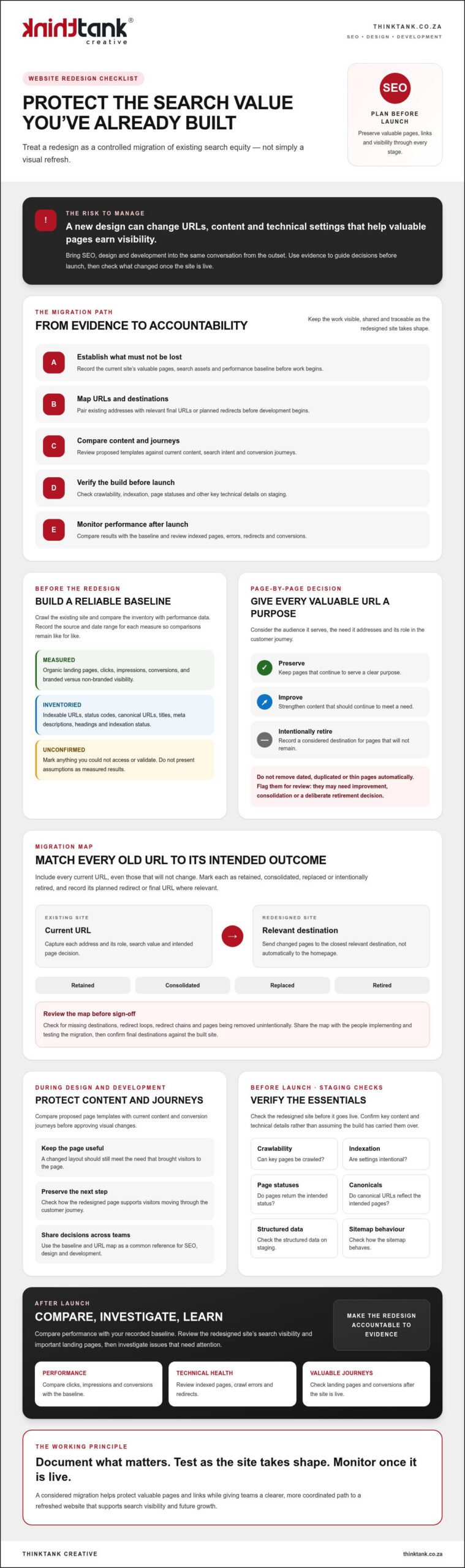
What if the greatest risk in a website redesign isn’t the new design, but the search value you leave behind? A redesign can change URLs, content and technical settings that help valuable pages earn visibility. Treat it as a controlled migration of existing search equity, not simply a visual refresh. This website redesign checklist for SEO is built around that principle.

If you’re concerned about losing rankings, organic traffic or important landing pages, that concern is justified. Knowing what to preserve, and when to check it, helps your team make considered decisions before launch rather than react to avoidable issues afterwards. A successful redesign brings SEO, design and development into the same conversation from the outset.

Use this practical checklist to plan the transition, protect valuable pages and links, and verify key content and technical details before and after launch. You’ll document what matters before work begins, test as the redesigned site takes shape, and monitor performance once it’s live. The result is a clearer, more coordinated path to a refreshed website that supports both search visibility and future growth.

Key Takeaways

  • Use a website redesign checklist for SEO to establish which pages, search assets and performance measures need to be protected.
  • Map existing URLs to their intended destinations before development, so changed pages have considered redirects and relevant paths.
  • Compare proposed page templates with current content and conversion journeys before approving visual changes.
  • Check crawlability, indexation settings, page statuses, canonicals, structured data and sitemap behaviour on staging before launch.
  • After launch, compare performance with your baseline and review indexed pages, crawl errors, redirects, landing pages and conversions.

Website redesign checklist for SEO: establish what must not be lost

A redesign should do more than give your website a new appearance. It should retain the pages, content and authority that already help people find your business. Before changing layouts or navigation, establish what the current site contributes: which landing pages attract organic visits, which generate conversions, and where search visibility comes from.

Use this evidence to guide design and development decisions. Strong web design principles bring usability and search considerations together, so document the current experience before deciding what to change.

For an overview of SEO considerations during a redesign, watch:

Which SEO assets should you record before redesigning?

Crawl the existing site to create an inventory of indexable URLs, status codes, canonical URLs, titles, meta descriptions, headings and indexation status. Compare that inventory with performance data. Identify pages associated with organic visits, conversions, quality backlinks or meaningful impressions. Separate branded searches from non-branded searches to understand how people are finding you.

Keep the baseline concise and traceable. For each measure, record its source and date range so post-launch comparisons are like for like. Clearly distinguish verified results from assumptions or data you could not access.

How do you decide what content deserves to survive?

Give each valuable URL a clear purpose: the audience it serves, the need it addresses and its role in the customer journey. For example, a service page may attract relevant searches and help visitors understand how to take the next step. Its redesigned version should retain that usefulness, even if the layout changes.

Don’t automatically remove pages because they’re dated, duplicated or thin. Flag them for review. They may need improvement, consolidation or a deliberate retirement decision. Record the intended destination for any page that won’t remain at its current URL, ready for the migration planning that follows.

Decide page by page: preserve, improve or intentionally retire each valuable URL. This website redesign checklist for SEO starts with evidence, giving your design, development and SEO teams a shared reference before work begins.

Map URLs, redirects and site structure before development begins

Once you’ve identified the pages worth protecting, decide where each one will live in the redesigned site. A changed URL without a relevant destination can leave visitors facing a broken page and disconnect an established search result from the content users expect. Build the migration map before development, while the structure can still be adjusted.

A comprehensive website redesign guide can help frame the wider project, but URL decisions need to reflect your own pages, audience journeys and search evidence. Include every current URL in a source-to-destination map, including those that won’t change. Mark each as retained, consolidated, replaced or intentionally retired, and record the planned redirect or final URL where relevant.

How should you create a URL and redirect map?

Pair each old address with the closest relevant destination. If an existing service page gets a new address, redirect it to that service’s replacement page, not automatically to the homepage. A homepage redirect may technically send visitors somewhere, but it won’t meet the original page’s intent.

Before sign-off, check the map for missing destinations, loops, redirect chains and pages being removed unintentionally. Give the map to the people responsible for implementation and testing, then have them confirm the final destinations against the built site. A shared, reviewed document helps SEO, design and development teams work from the same plan.

How can you protect internal links and site architecture?

Review proposed navigation and internal links against key audience journeys and the important landing pages identified in your baseline. High-value pages should be reachable through clear navigation or relevant contextual links, rather than becoming isolated after a menu or content restructure. Clear journeys help visitors find the next useful step, while a guide to improving website user experience can offer further ideas for assessing those paths.

Update internal links to point directly to final destination URLs. Don’t leave links pointing to old addresses and rely on redirects to complete the journey. This makes pathways clearer for visitors and avoids unnecessary redirect steps.

Include technical changes in the same review. Flag redirect rules, canonical tags, robots directives and XML sitemap updates for technical review before launch. For example, confirm that a canonical points to the intended live URL and that staging-only crawl restrictions won’t carry over to the public site.

A well-maintained URL map turns the website redesign checklist for SEO into a practical handover between planning and development. If you’re aligning website development with SEO decisions, explore website design and SEO planning as part of your project preparation.

Compare redesign content and on-page SEO before approving templates

A polished template can still underperform if it removes the information that made a page useful. Before approving designs, compare the current and proposed versions by page type. Check whether each still serves the same search purpose, answers the audience’s questions and supports a clear conversion path. A service page, for instance, may need descriptive detail to explain the offer before inviting a visitor to enquire.

Keep the review collaborative. Designers can identify opportunities to simplify the layout, while content and SEO reviewers confirm that key information remains easy to find and understand. Visual restraint is valuable, but it shouldn’t mean stripping out relevant explanations, headings or internal links just to create more empty space.

What should each redesigned page retain or improve?

Assess content in context rather than copying it wholesale. Retain subject coverage that meets a genuine audience need, improve unclear or outdated explanations, and review duplicated or irrelevant material before it moves across. Each page should have a clear purpose, not just a familiar appearance.

Check that titles and headings describe the page accurately, body copy is useful, image alternatives convey relevant information where needed, and calls to action make the next step clear. Don’t promise that these changes will secure a particular ranking. They can make a page more coherent and useful, while search performance depends on multiple factors.

Use a comparison matrix to make decisions visible and assign responsibility. For each page type, record:

How should design and UX decisions support SEO?

Review proposed templates on mobile as well as desktop. Text should remain readable, navigation should be clear, and important content shouldn’t disappear behind design choices that make it difficult to find. Check that headings create a logical structure and links help visitors move naturally between related information and next steps.

Image choices also affect the page experience. Discuss image dimensions, formats and how assets are handled with the development team, then test the built pages rather than assuming they’ll perform well. A visually minimal page isn’t automatically faster, just as a content-rich page isn’t automatically slow. Measure the implementation and address any issues you find.

Use this part of your website redesign checklist for SEO to approve content and templates together, not in separate silos. For broader planning, place those decisions within your wider search engine optimisation strategy, with clear responsibilities for design, development and content review.

Website Redesign Checklist for SEO: Protect Rankings in 2026

Run this pre-launch SEO checklist before the redesigned site goes live

Make the staging site a formal quality-assurance checkpoint, not just a place to preview the design. Work through the checks with SEO, design and development together, and record an owner plus a clear pass or fix status for each item. This creates an accountable sign-off without implying that any launch is entirely risk-free.

What technical SEO checks belong on a staging site?

Check that staging isn’t accidentally available for public indexing, and verify how that restriction will be removed for the live site. Review representative page templates and priority URLs, including their titles, meta descriptions, canonical tags, robots directives and structured data. Confirm each setting against the project scope rather than assuming it’s correct by default.

Use a crawler to review the staging site, then investigate issues such as unexpected status codes, missing metadata, broken internal links or pages blocked from crawling. Test important URLs individually as well as across representative templates. A correct homepage doesn’t confirm that every page type is ready.

For each item, record the reviewer, result and any follow-up action. A check isn’t complete if an issue has been spotted but no one owns its resolution.

How do you prepare the launch handover?

Before release, confirm that the final redirect rules and updated XML sitemap are ready, and that analytics measurement can continue across the transition. Document the planned launch timing, who is responsible for each task, how the team will decide whether rollback needs consideration, and which contacts should be notified if a critical issue appears.

Agree how changes will be checked after release, including who will verify priority pages and confirm that staging restrictions haven’t carried over. A guide on what to do after a new website goes live can help structure the next phase. The handover should make clear who will carry out those follow-up checks.

This step turns the website redesign checklist for SEO into a shared release plan, connecting technical checks with real responsibilities. For support coordinating website development and SEO considerations, review website launch requirements with ThinkTank Creative.

Monitor SEO after launch and make the redesign accountable

Launch is a transition point, not the end of the redesign. Use the baseline you documented earlier to compare performance, keeping the same reporting periods where possible. This gives your team a consistent reference for spotting changes in organic visibility, landing-page activity and conversions.

What should you monitor after the redesigned site launches?

Review Search Console for indexing issues, crawl anomalies and unexpected URL changes. Check that priority pages are being indexed as intended, then test key redirects and landing pages directly. Compare organic clicks, impressions and conversions with corresponding baseline periods where possible, and note any differences in tracking or measurement that could affect the comparison.

A change in performance doesn’t automatically mean the redesign caused it. Investigate in a considered sequence: confirm the page is accessible, check its status and redirect destination, review indexation and internal links, then compare the affected URL and reporting period with your baseline. Consider other possible influences before deciding on a cause. Record what you find, the action taken and the outcome, so decisions are grounded in evidence rather than guesswork.

When can an agency help coordinate the redesign?

Bringing strategy, design, development, testing and SEO together takes time and clear handovers. If your internal team is finding it difficult to coordinate these decisions, a partner offering website development and SEO may help keep search considerations in view throughout the project.

ThinkTank Creative’s website process covers research and strategy, design, development, testing, launch, training and support, with ongoing service after project completion. This provides a structured path from early planning into post-launch work, without implying any particular ranking outcome.

Discuss your project needs and timeline before deciding on the next step. An estimated cost can be provided after that discussion. Discuss your website redesign with ThinkTank Creative.

A well-managed website redesign checklist for SEO continues after release: compare, investigate and document, so the redesigned site remains accountable to the goals set before work began.

Make your redesign a stronger foundation for growth

A successful redesign protects the value your existing website has built while creating a clearer, more useful experience for what comes next. This website redesign checklist for SEO gives your team a practical sequence: document valuable pages, map URL changes, review content and templates, complete pre-launch checks, then monitor performance against your baseline.

Coordination matters at every stage. ThinkTank Creative, founded in 2001, brings website design and development together with SEO through a process spanning research and strategy, design, development, testing, launch, training and support. Its award-winning design team and ongoing service after project completion provide continuity from planning into post-launch care.

Every redesign has its own priorities and timeline. Review your website redesign requirements with ThinkTank Creative. An estimated cost can be provided after discussing your requirements and timeline.

Plan carefully, bring the right people into the conversation and treat launch as the start of the next phase. With a considered approach, your redesigned website can be ready to serve both your audience and your business goals.

Frequently Asked Questions

Can a website redesign affect SEO rankings?

Yes, a redesign can affect rankings if it changes URLs, removes useful content, disrupts internal links or introduces technical problems. A new visual identity alone doesn’t determine search performance, but changes to the pages and signals search engines rely on can influence visibility. Record existing performance before work begins, then check key pages, redirects and indexation after launch. This helps your team identify issues and investigate changes using evidence.

What should be included in an SEO website redesign checklist?

An SEO website redesign checklist should cover the current site baseline, valuable URLs, content decisions, redirect mapping, page templates and pre-launch testing. Include checks for crawlability, indexation settings, page status codes, canonical tags, structured data and sitemap behaviour. Assign an owner and pass or fix status to each check. After launch, monitor indexed pages, crawl errors, organic landing pages and conversions against the baseline, recording findings and follow-up actions.

Should I change URLs during a website redesign?

Change URLs only when there’s a clear reason, such as improving an inconsistent structure or consolidating overlapping pages. If an address changes, map the old URL to the closest relevant destination and test the redirect. Don’t send unrelated pages to the homepage simply to avoid a missing page. Keep a record of URLs that stay the same as well, and update internal links to point directly to each final address.

How do I keep SEO traffic when launching a new website?

You can reduce avoidable disruption by protecting valuable pages and checking the migration carefully, although no checklist can guarantee unchanged traffic. Before launch, document search performance, preserve useful content, test redirects and confirm that live pages can be crawled and indexed as intended. Once the new site is public, check priority URLs, redirects, crawl issues and organic landing-page performance. Compare results with consistent baseline periods and investigate changes before deciding what caused them.

When should SEO be considered in a website redesign?

Consider SEO from the research and planning stage, before approving the site structure, page templates or content changes. Early input gives the team time to identify valuable landing pages, decide what content should remain and map URL changes before development is complete. It also helps design, development and SEO reviewers coordinate their work. Leaving search checks until just before launch can make important changes harder to assess and resolve.

How long does it take for SEO to recover after a website redesign?

There’s no reliable fixed recovery period. The time and direction of any change depend on what altered, whether search engines can access and understand the new pages, and how quickly problems are identified and addressed. Check Search Console and site performance after launch, comparing results with your baseline rather than assuming every fluctuation is caused by the redesign. If visibility falls, investigate affected URLs, redirects, indexation and content before choosing a response.

Technical SEO Checklist for Small Business: Debunking the Myths of Search Invisibility

What if the reason your website remains invisible isn't a lack of quality content, but a fundamental breakdown in your digital plumbing? It's a common frustration for many entrepreneurs who find their beautiful pages ignored by search engines whilst competitors with less flair seem to climb the rankings. You've likely felt the sting of a wasted investment, where sophisticated copy and bespoke designs fail to move the needle because the underlying architecture is flawed. This is where a technical seo checklist for small business becomes your most vital strategic asset, ensuring that Google and AI agents can actually find, trust, and surface your brand.

We understand that the technicalities of modern search can feel overwhelming, but you don't need a massive team to achieve elite results. This guide will help you ground your site for the AI-driven search landscape of 2026, focusing on the precision of Core Web Vitals and the synergy of structured data. We'll explore how to refine your site's performance and security, ensuring your online behaviour aligns with the latest standards for excellence. We Do It All So You Don't Have To, allowing you to focus on your vision whilst we handle the complexity of the digital infrastructure.

Key Takeaways

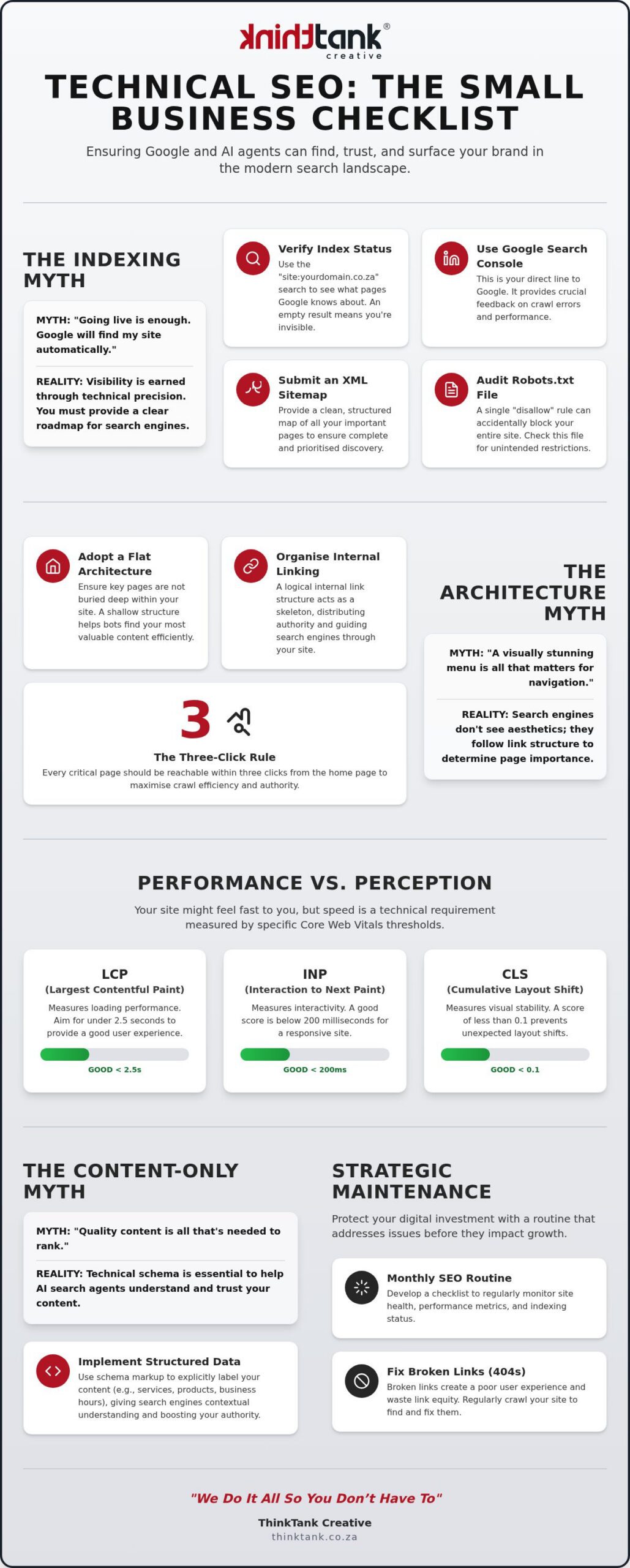
  • Move beyond the myth of automatic indexing by providing search engines with a precise XML roadmap and logical site architecture.
  • Shift from purely aesthetic design to technical performance by meeting the specific Core Web Vitals thresholds required for elite rankings.
  • Utilise our technical seo checklist for small business to implement structured data that allows AI agents to surface your brand with confidence.
  • Protect your digital investment through strategic ongoing maintenance that addresses broken links and outdated code before they impact your growth.

Debunking the Indexing Myth: Why "Going Live" Is Not Enough

Launch day often brings a sense of relief, but it's usually followed by a confusing silence. Many entrepreneurs believe the myth that once a site is live, Google automatically finds and ranks it. Search engines aren't psychic; they require a structured roadmap and explicit permission to explore your pages. Visibility is earned through technical precision, not just existence. Understanding the foundations of Search Engine Optimization (SEO) reveals that visibility is a deliberate outcome of strategic configuration rather than a lucky accident.

To better understand this concept, watch this helpful video:

A quick reality check involves the "site:yourdomain.co.za" test. By typing this into a search bar, you'll see exactly which pages Google has committed to its memory. If the results are sparse or non-existent, your business is effectively invisible. In 2026, the most common hurdle for small enterprises is the "crawled - currently not indexed" status. This indicates that while Google's bots have visited your site, they haven't deemed the technical health or content structure worthy of being served to users. Implementing a robust technical seo checklist for small business starts with verifying this indexation status to ensure your foundations are secure.

The Essential Indexing Toolkit

Your journey toward visibility requires the right diagnostic tools. Setting up Google Search Console provides the only honest view into your search performance, offering direct feedback from the algorithm itself. You must submit a clean XML sitemap to ensure every service page is discovered and prioritised. Additionally, audit your Robots.txt file. A single accidental "disallow" rule can hide your entire site from the world, turning your digital investment into a ghost ship. At ThinkTank Creative, We Do It All So You Don't Have To, ensuring these technical gatekeepers are always working in your favour.

Reasons My Business Is Not Showing Up on Google

When a site fails to appear, the culprit is often found in the code. A common oversight is the presence of "noindex" tags, often left over from the development staging site by mistake. Security issues or manual actions can also lead to sudden de-indexing, requiring a professional eye to resolve. Duplicate content caused by multiple URL versions, such as the conflict between www and non-www addresses, confuses search bots and dilutes your authority. Addressing these overlaps is a critical step in any technical seo checklist for small business, as it ensures search engines see one clear, authoritative version of your brand.

The Architecture Myth: Why Your Site Navigation Might Be Blocking Google

Aesthetic appeal often masks structural decay. Whilst a visually stunning menu might impress your visitors, it offers little value to a search engine if the underlying hierarchy is convoluted or illogical. Search engines don't see the colours or the sleek animations; they follow link equity to determine which pages are important. If a page isn't linked properly within your site's framework, it effectively doesn't exist to the bots that decide your ranking. As noted in foundational guides regarding SEO for Small Business, your site structure is the skeleton that supports all your other marketing efforts.

Adopting a flat site architecture is a strategic move that allows smaller brands to compete with national players. We recommend the "Three-Click Rule," which ensures every critical service or product page is reachable within three clicks from the home page. When your architecture is deep and buried, link authority dissipates before it reaches your high-value content. By keeping your structure shallow, you ensure that search engines can crawl your site efficiently and index your most important offerings without getting lost in a digital labyrinth. Including this structural audit in your technical seo checklist for small business ensures your site remains accessible and authoritative.

Organising Your Digital Hierarchy

Precision in your hierarchy helps both users and bots understand the relationship between your pages. Breadcrumbs act as an essential orientation tool, providing a clear path back to the home page whilst signalling page depth to search engines. You must also identify and fix "orphan pages," which are those isolated sections of your site with no internal links pointing to them. These pages are invisible to crawlers and provide zero SEO value. Additionally, ensure your URL slugs are descriptive and clean. A slug like /services/website-design-development/ provides immediate context, whereas a generic string of numbers offers no strategic benefit. If you're unsure where your site structure stands, our team can help you organise your digital presence for maximum impact.

The Role of Internal Linking

Internal linking is the mechanism that distributes authority across your domain. Use keyword-rich anchor text to link from your high-traffic blog posts to your core service pillars, building topical authority as you go. This practice tells Google exactly what the target page is about whilst helping visitors discover more of your expertise. Internal link equity serves as the primary currency of your website architecture, distributing authority from your most popular pages to those that drive conversions. By meticulously mapping these connections, you create a web of relevance that is difficult for competitors to ignore. This level of detail is a cornerstone of any comprehensive technical seo checklist for small business, transforming a simple website into a powerful lead-generation tool.

Performance vs. Perception: Why Speed is a Technical Requirement

Many small business owners believe that a slightly sluggish website is merely a minor inconvenience for their visitors. This perception is a dangerous myth that can cripple your search presence before you've even begun. Google prioritises user experience above all else, treating site speed as a direct and non-negotiable ranking factor. If your site doesn't load quickly, it doesn't matter how high the quality of your copy is; you'll be penalised and pushed down the rankings. Following a comprehensive technical SEO guide for small business helps you move past the "Content is King" mantra to realise that performance is the actual foundation of your digital authority.

Understanding Core Web Vitals in 2026

Google's metrics have evolved to measure real-world user behaviour with extreme precision, focusing on how a page feels rather than just how it loads. The Largest Contentful Paint (LCP) requires your main content to appear in under 2.5 seconds, whilst current 2026 standards suggest a target of 2.0 seconds for those aiming for elite status. Interaction to Next Paint (INP) measures the delay of every user interaction, ensuring your site reacts instantly to a click or a tap. Finally, Cumulative Layout Shift (CLS) prevents the annoying "jumping" of content as images load. These aren't just abstract numbers; they're the technical benchmarks that stop Google from ignoring your hard-earned traffic. For a deeper understanding of how these metrics apply locally, our dedicated guide to core web vitals for South African websites provides a strategic roadmap tailored to our unique digital environment.

Optimising for the National User

In our national context, performance is not just about pleasing an algorithm; it's about accessibility and resilience. Our digital landscape is defined by high mobile data costs and the persistent challenge of load shedding, which can impact server uptime and connection stability. A lightweight, efficient site performs better for users on limited data plans or those trying to access your services between power cuts. Choosing a server location with national proximity is a strategic decision that reduces latency and ensures your site remains responsive when your customers need it most. This focus on the end-user is a vital component of any technical seo checklist for small business.

Modern image optimisation is another pillar of a successful strategy. Moving beyond outdated JPEGs to next-gen formats like WebP can reduce file sizes by up to 30% without sacrificing visual quality, which is essential for a mobile-first world. However, technical performance isn't a one-time fix. It requires high-quality website maintenance and support to ensure your plugins remain updated and your code stays clean. We handle these intricate details with a sense of quiet assurance, ensuring your brand remains fast, responsive, and ready for growth in any environment.

Technical SEO Checklist for Small Business: Debunking the Myths of Search Invisibility

Many business owners believe that high-quality prose is the final frontier of search visibility. Whilst compelling copy engages human readers, AI agents like ChatGPT and Google Gemini require a different kind of clarity to function effectively. These systems rely on structured data to ground their responses in verifiable facts, ensuring that the information they provide is accurate and sourced from reliable domains. If your site lacks this technical layer, even your most insightful articles may remain invisible to the generative engines that define the search landscape of 2026.

Technical SEO has evolved from simply ranking in a list to becoming the cited source in an AI-generated answer. Small businesses can win this race by being the most readable and reliable source of truth within their specific niche. By following a robust technical seo checklist for small business, you provide the structural clarity these machines crave, moving your brand from the shadows into the spotlight of modern search. This approach transforms your website from a static brochure into a dynamic data source that search engines can trust and surface with confidence. Understanding what makes a good business website in 2026 means recognising that technical precision and content quality must work together as a unified strategy.

Essential Schema for Small Businesses

Precision in your structured data allows you to claim digital space that competitors often overlook. Organisation Schema is the first step, defining your brand identity, logo, and national contact details for search engines. Service Schema goes further, telling the algorithm exactly what you sell and who your target audience is. Whilst Google retired visual FAQ rich results in May 2026, implementing FAQ Schema remains a vital strategy; it helps AI systems understand the depth of your expertise and can still capture valuable real estate in "People Also Ask" sections. Including these elements in your technical seo checklist for small business ensures your brand is not just indexed, but deeply understood.

Preparing for Generative Engine Optimisation (GEO)

The transition toward generative engine optimisation requires a meticulous approach to your site's underlying code. AI crawlers prefer clean HTML that allows them to parse text without getting stuck in bloated scripts or outdated tags. Security also plays a vital role in this new era, as HTTPS and valid SSL certificates serve as essential trust signals for AI grounding. Schema acts as the translator between your bespoke business language and complex machine logic, ensuring your data is surfaced accurately across all platforms. To ensure your site is ready for this evolution, partner with our SEO experts to build a future-proof foundation that handles the complexity whilst you focus on your growth.

Strategic Maintenance: Developing Your Monthly Technical SEO Routine

Achieving a high ranking is a significant milestone, but maintaining that position requires constant vigilance and precision. There's a common misconception that SEO is a project with a definitive finish line, yet the reality of the digital space is far more fluid. Technical decay is an inevitable byproduct of a growing site; broken links, bloated plugins, and outdated code accumulate naturally as your business evolves. By adopting a proactive mindset, you protect your digital assets from the slow erosion of performance that often leads to a sudden loss in visibility. Investing in a consistent routine is always more cost-effective than an emergency SEO rescue after your traffic has already plummeted.

Your Monthly Technical SEO Checklist

A disciplined technical seo checklist for small business transforms maintenance from a chore into a strategic advantage. This routine allows you to catch minor issues before they escalate into systemic failures that alienate both users and search engines. We recommend a methodical approach to your monthly health checks:

Factoring in these recurring tasks prevents the accumulation of technical debt, ensuring your website remains a stable platform for your marketing efforts.

When to Call in the Experts

Whilst routine checks are manageable, certain digital bottlenecks require the intervention of a seasoned partner. Complex issues such as redirect loops, server-side performance drags, or database optimisations can be difficult to diagnose without specialised tools and deep technical expertise. If your rankings have plateaued despite producing high-quality content, it's often a sign that deeper architectural issues are hindering your progress.

At ThinkTank Creative, we provide a meticulous end-to-end process that spans from initial research to launch and comprehensive ongoing support. We believe in building long-term relationships where we handle the intricate plumbing of your digital presence whilst you focus on your core vision. We Do It All So You Don't Have To, ensuring your brand remains elite, dependable, and perfectly positioned for the AI-driven search landscape of 2026. By combining our award-winning design with technical excellence, we help you turn search invisibility into a thing of the past.

Elevating Your Digital Presence for the AI Era

Securing a prominent position in the digital landscape requires more than just high-quality content; it demands a foundation built on technical excellence and structural integrity. By implementing a robust technical seo checklist for small business, you ensure that your architecture is logical, your performance is optimised for Core Web Vitals, and your data is perfectly translated for AI agents. This strategic approach transforms your website from a quiet digital brochure into a powerful, visible asset that search engines can trust and surface with confidence. It's about moving beyond simple visibility to achieve a state of digital authority that lasts.

As a top all-rounder agency in South Africa since 2001, ThinkTank Creative brings over 25 years of experience to every project. Our award-winning design and development team is dedicated to handling the complex digital plumbing that keeps your brand moving forward. We provide bespoke solutions where estimated costs are provided after a detailed discussion of your unique needs. We Do It All So You Don't Have To, allowing you to focus on your vision whilst we secure your growth. Partner with ThinkTank Creative for a comprehensive SEO strategy and begin your journey toward lasting search visibility today.

Frequently Asked Questions

Why is my business not showing up on Google after my website launch?

Your site may not be showing up because search engines haven't crawled your pages or have been blocked by technical barriers. This often happens if you haven't submitted an XML sitemap or if a "noindex" tag was accidentally left in the code from the development stage. Google needs a clear roadmap to find you. Without these essential signals, your professional website remains invisible to the very customers you're trying to reach.

How long does it take for technical SEO changes to affect my rankings?

Technical SEO changes usually take between a few days and several weeks to reflect in search results. The timeline depends entirely on how often Google crawls your specific domain. Whilst smaller sites might see a slower response, larger sites with high authority are indexed more frequently. You can accelerate this process by manually requesting indexation through Google Search Console after you've implemented critical fixes to your site's infrastructure.

Do I need a technical SEO checklist if I use a platform like Wix or Shopify?

You absolutely need a technical seo checklist for small business even when using closed platforms like Wix or Shopify. Whilst these systems handle basic hosting and server security, they don't automatically organise your site hierarchy or implement bespoke schema markup. You're still responsible for managing URL structures, internal linking, and image optimisation. Relying solely on a platform's default settings often leads to a generic, underperforming presence that fails to compete.

What is the difference between on-page SEO and technical SEO?

On-page SEO focuses on the visible content and keywords your visitors read, whilst technical SEO handles the invisible infrastructure that search engines crawl. Think of on-page SEO as the beautiful interior design of a house and technical SEO as the essential plumbing and foundations. Both must work in synergy to achieve success. If your foundations are cracked, even the most compelling copy won't be enough to secure a top ranking.

Can a slow website really stop my business from showing up on Google?

A sluggish website can definitely prevent your business from appearing in top search results. Google prioritises user experience, and their Core Web Vitals update directly penalises sites that fail to load quickly on mobile devices. If your page takes too long to respond, visitors will bounce back to the search results, signalling to the algorithm that your site is not a high-quality destination for national users on limited data plans.

Is technical SEO a one-time cost for small businesses?

Technical SEO is not a one-time investment but an ongoing commitment to your site's health. Digital infrastructure naturally decays as plugins update, links break, and search algorithms evolve. Regular maintenance prevents these minor issues from turning into major ranking drops. At ThinkTank Creative, we provide continuous support to ensure your site remains fast and secure, protecting your long-term marketing investment from the risks of technical obsolescence.

How does the POPI Act affect technical SEO for South African websites?

The POPI Act impacts technical SEO by making website security and data privacy essential trust signals. Implementing SSL certificates and secure data handling isn't just a legal requirement; it's a technical necessity that tells search engines your site is safe for South African users. Google's algorithms increasingly prioritise secure domains, meaning that a failure to comply with privacy standards can indirectly damage your search visibility and brand reputation.

What is schema markup and why does my small business need it for AI search?

Schema markup is a specific vocabulary of code that helps search engines and AI agents understand the context of your content. By using this structured data, you provide a clear "translator" for machine logic, allowing AI systems to ground their answers in your business facts. This is vital for appearing in AI-driven search results, as it ensures your services and contact details are surfaced accurately across the modern digital landscape. To build a truly high-performance platform, it helps to first understand what makes a good business website at a foundational level, combining technical rigour with strategic design.