How to Plan a Website Redesign Project: A Practical 2026 Guide
A website redesign planned as a visual refresh can leave the problems that matter most untouched. If you’re asking how to plan a website redesign project, start by treating it as a business change, not simply a new look.
Priorities can blur when stakeholders have different expectations, content needs reviewing and technical decisions start to mount up. Without a clear plan, a redesign can also put search visibility and important user journeys at risk. Agreeing on a shared direction makes decisions easier to manage and keeps the project focused on what the website needs to achieve.
This guide sets out a practical sequence for connecting business goals with user needs, content, technology and launch readiness. You’ll learn how to shape a brief that aligns stakeholders and delivery teams, decide what to keep or improve, and prepare for launch while protecting key content and search performance. The result is a considered foundation for your redesign and a website your team can continue to refine after it goes live.
Key Takeaways
- Plan your website redesign around defined business goals, rather than visual change alone.
- Use customer questions, website insights and staff knowledge to shape a brief around audience needs and next steps.
- Choose between a focused refresh and a broader redesign by weighing the scope against your business needs and the website’s technical condition.
- Make the project manageable by assigning clear owners for decisions, content, reviews and approvals at each milestone.
- Use a considered pre-launch check to catch issues, then treat launch as the start of ongoing improvement.
How to Plan a Website Redesign Project Around Business Goals
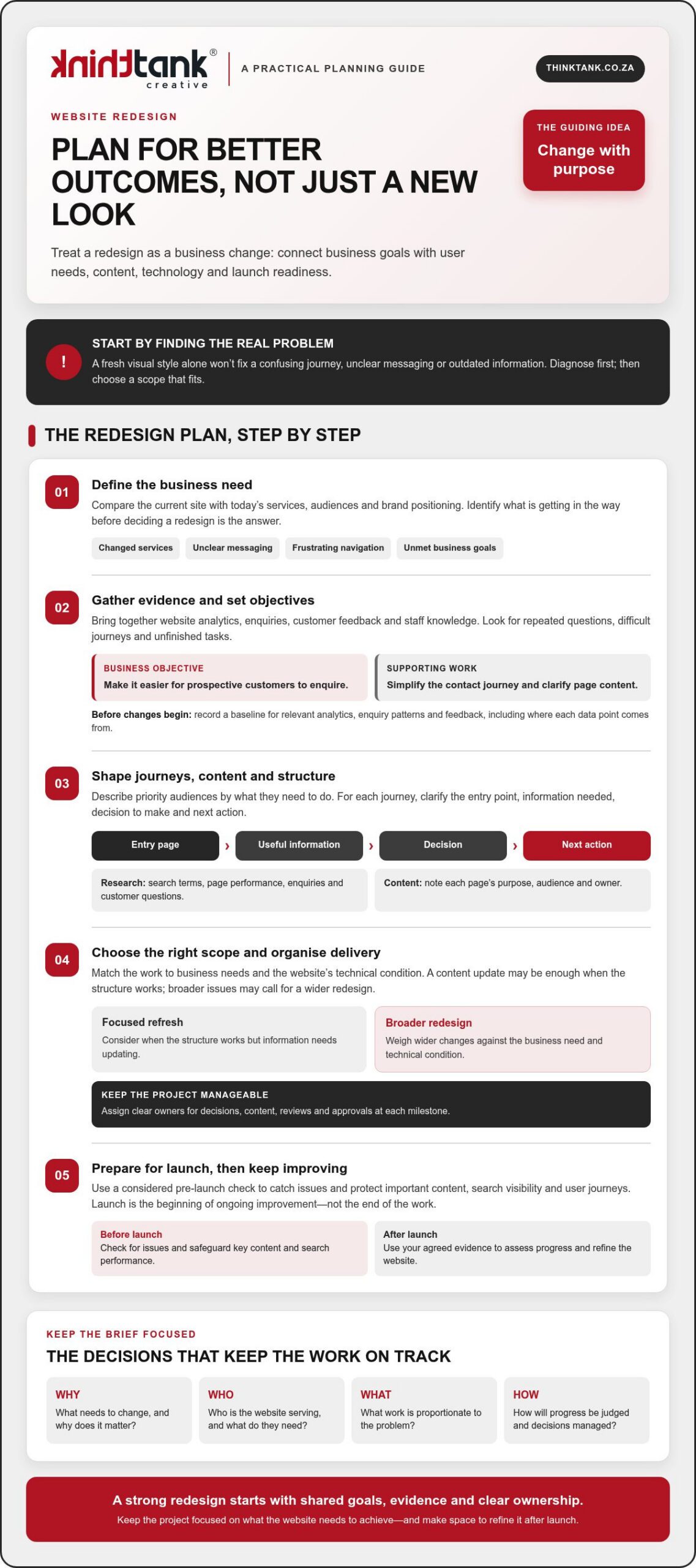
Changed services, unclear messaging, frustrating navigation or business goals the website isn’t helping to meet are all valid reasons to review your site. First, identify the underlying problem before deciding that a redesign is the answer. A new visual style alone won’t resolve a confusing journey or outdated information.
Gather evidence from website analytics, enquiries, customer feedback and staff who speak with customers or update the site. Look for patterns: visitors may struggle to find a service, ask questions the website should answer or leave an important journey unfinished. This gives stakeholders a shared view of what needs attention and helps distinguish structural or technical issues from problems a focused content update could solve.
A good project plan turns that evidence into decisions. This short video offers another perspective on why planning matters:
Decide whether your website needs a redesign
Compare the current site with your present-day services, audiences and brand positioning. If visitors can’t tell what you offer or staff repeatedly answer the same basic questions, the issue may involve messaging, navigation or page structure. If the structure works but some information is out of date, a content update may be enough. Understanding the difference keeps the scope proportionate to the problem.
Design should support clarity and ease of use, not compete with them. Reviewing established web design principles can help frame discussions about how layout, visual choices and interaction work together to serve visitors.
Set objectives and agree how progress will be judged
Choose a small set of objectives tied to business priorities, then define what evidence could show progress. Keep the objective separate from the website deliverable: “make it easier for prospective customers to enquire” is a business objective; “simplify the contact journey and clarify the relevant page content” describes work that may support it.
Record a baseline before changes begin. Note the relevant analytics, enquiry patterns and feedback, along with where each data point comes from, so you can make a fair comparison after launch. For a deeper look at how usability decisions shape the experience, see this website user experience strategic guide.
A redesign brief is the shared record of a project’s goals, scope and success measures. Use it to align stakeholders, guide design and development decisions, and keep the work focused as details emerge. Knowing how to plan a website redesign project starts with agreeing what needs to change, why it matters and how you’ll assess the outcome.
Research, Content and Site Structure: Build the Redesign Brief
Once the project’s goals are clear, gather the evidence that will shape the experience. Review search terms, page performance and enquiry patterns alongside the questions customers ask your team. Staff who handle sales, service or website updates often know where people get stuck, what details they need and which information is frequently missing. Bringing these perspectives together helps the brief reflect real needs, not assumptions.
Describe priority audiences by what they’re trying to do. For each group, note their likely entry point, the information they need, the decision they must make and the next action you want them to take. A prospective customer might arrive on a service page, compare options, then enquire. Sketching that path can expose missing information or unnecessary steps before design and development begin. The lead generation strategies framework can also help connect audience journeys with meaningful next actions.
Turn audience research into useful user journeys
Map the important journeys in a simple diagram. Show how someone moves from an entry page through key decisions to a call to action, and mark where they may need reassurance or more detail. Keep the map focused on user tasks rather than imagined demographic profiles. Check that each step is clear, relevant and easy to complete, then use the findings to guide content and structure decisions.
Create a content inventory and draft the sitemap
List current pages and record each page’s purpose, intended audience, owner, available performance evidence and recommended action. Classify content to retain, revise, combine, remove or create. Flag material that needs subject-matter review, approval, rewriting or migration so content work doesn’t become a late-stage obstacle.
Next, group pages into a sitemap with clear, audience-friendly labels. A sitemap shows the proposed hierarchy; user-flow diagrams show how people move through it. Together, they can reveal duplicated sections, gaps in key information and journeys that lead nowhere. Share these drafts with relevant stakeholders and invite specific feedback before they become design assumptions.
This is how to plan a website redesign project with a brief grounded in evidence and ready to guide delivery. If you’re considering professional support, you can explore ThinkTank Creative’s website design and development as one option for taking the work from research and strategy through design, development and testing.
Compare Redesign Approaches, Platforms and Key Project Risks
Choose the scale of change to fit the problem. A focused refresh may suit a site with a sound technical foundation but outdated content or inconsistent visual presentation. A broader redesign may be more appropriate if the structure, user journeys or underlying technology no longer support your business needs. The ultimate guide to website redesign offers further considerations, but your decision should reflect your own scope, capacity and requirements.
Choose an approach that matches your resources and requirements
An in-house project can keep decisions close to the business, provided the team has the time and skills to do the work and maintain content afterwards. DIY tools may suit a straightforward site, but assess their limits against your design and technical needs. An agency-led project brings external design and development capability, while requiring clear communication and timely feedback from your team. Consider your available decision-makers, internal skills and responsibility for ongoing content before choosing.
| Approach | Control | Internal capacity | Complexity and support |
|---|---|---|---|
| In-house | High | Requires dedicated staff time and skills | Internal team manages delivery and ongoing needs |
| DIY | High over routine edits | Requires time to build and maintain the site | Best assessed against the project’s technical demands |
| Agency-led | Shared through agreed decisions | Needs a client-side contact for input and approvals | Can support design, development and testing; agree responsibilities upfront |
Assess a content management system (CMS) by how well it supports your publishing workflow, required integrations, accessibility needs and long-term maintainability. Avoid choosing on popularity alone. If you’re weighing bespoke requirements against other options, this custom website design strategic guide provides broader service considerations.
Plan for content migration, search continuity and data protection
Before build work starts, list pages, files, forms and important URLs, then record whether each will move, change, be combined or be retired. Map old URLs to relevant new destinations and arrange suitable redirects for changed or removed pages. Test those redirects and key page links before launch. Rankings can’t be guaranteed, so record search and analytics performance beforehand, then check for broken pages, indexing issues and changes in relevant traffic after launch.
Include forms and analytics in your migration checks. Identify where personal information is collected, used or stored, and ask an appropriate person to review the project against current South African privacy requirements. Knowing how to plan a website redesign project means addressing these risks early, not treating them as final launch tasks.
Turn the Website Redesign Plan into a Manageable Project Roadmap
A clear sequence turns the agreed brief into work people can own and approve. Use a roadmap to move from planning to launch without leaving key decisions until the last moment:
- Confirm the brief: agree goals, scope and success measures.
- Assign owners: name who decides, contributes, reviews and approves.
- Plan content: identify what must be written, reviewed or supplied.
- Approve the structure: confirm the sitemap and priority user journeys.
- Design and build: review designs before development begins, then track dependencies.
- Test and launch: check agreed requirements, resolve issues and prepare the team for handover.
For each milestone, record the person responsible, what they need to deliver and who has final approval. Set review windows that reflect people’s availability, and ask contributors to consolidate feedback before sending it to the project team. Keep approved materials, decisions, open questions and dependencies in one source of truth, such as a shared project document or workspace, so the latest agreed direction is easy to find.
Set responsibilities, approvals and project boundaries
Name a decision-maker, then identify contributors for business, content, design and technical reviews. Define what the project includes and what requires separate discussion. If a new request changes the agreed scope, assess its impact on priorities, timing and estimated cost before approving it. Clear ownership and approval points reduce avoidable project uncertainty.
Coordinate content, design and development work
Track dependencies: design may need approved copy and brand assets, while development may rely on agreed integrations and access to existing systems. Plan design reviews before build work, then test against the user and business requirements in the brief. Include training and handover planning so the team understands how to manage day-to-day website tasks after launch.
Keep the timeline proportionate to the scope, review capacity and dependencies rather than selecting a launch date before the work is understood. Costs depend on the project’s needs and timeline. ThinkTank Creative provides an estimated cost after discussing these with you, not a fixed price before the requirements are clear.
If you want a collaborative team to help shape and deliver the roadmap, discuss your website redesign project with ThinkTank Creative, from research and strategy through design, development, testing, launch and support.
Prepare for Launch and Choose the Right Redesign Partner
Launch is a handover, not a finish line. A thorough readiness check helps the team catch avoidable issues, while a clear plan for monitoring and support gives the new site room to improve as people use it.
Use a practical website launch-readiness checklist
Before going live, test priority journeys on relevant devices and confirm that essential content and contact routes work as intended. Use this checklist with the project team responsible for each area:
- Navigation: check menus, key page links and the route to important actions.
- Forms and contact routes: submit test enquiries and confirm they reach the right destination.
- Content: proofread priority pages and check that agreed content has been migrated.
- Responsive layouts: review page layouts and interactions on relevant screen sizes.
- Agreed technical checks: confirm analytics, search, backups, redirects and other project-specific checks with the responsible specialists.
- Issue handling: name who monitors launch, records problems, assigns them and confirms when they’re resolved.
Use the agreed project requirements as your reference rather than assuming a site is ready because it looks polished. Once live, monitor the measures set in the brief, gather feedback from users and staff, and prioritise improvements based on what you learn. Launch begins the next cycle of observation and refinement; it doesn’t prove that every business objective has already been achieved.
Evaluate a redesign partner beyond visual presentation
Ask prospective partners how they approach research and strategy, UX/UI design, coding, testing, launch and support. Discuss who will make decisions, how feedback and approvals are managed, and what your team will need to provide. A clear, collaborative process makes responsibilities easier to understand and keeps the work aligned with the brief.
Plan for ownership after launch, too. Ask what training, documentation and support are included, and how your team will learn to manage routine website tasks. These details help make handover a practical transfer of knowledge, rather than simply receiving a completed site.
ThinkTank Creative, founded in 2001, offers end-to-end website design and development, from research and strategy through design, development, testing, launch, training and support. Its approach reflects the promise, “We Do It All So You Don’t Have To”, while keeping discussion and collaboration central to the project. If you’re considering a redesign, discuss your website redesign with ThinkTank Creative.
Turn Your Redesign Plan into Lasting Progress
A successful redesign starts with clear business goals, evidence about what users need and a brief that gives stakeholders a shared direction. From there, choose an approach and platform suited to your requirements, assign clear owners, and plan content, testing and launch with care.
Knowing how to plan a website redesign project also means looking beyond launch day. Track the measures you agreed, listen to user feedback and use what you learn to guide ongoing improvements. A thoughtful plan gives your team a stronger foundation for making those decisions with confidence.
ThinkTank Creative was founded in 2001 and offers website services spanning UX/UI design, coding, testing, launch, training and support, with ongoing service after project completion. If you’re ready to explore a collaborative approach to your redesign, discuss your website redesign project with ThinkTank Creative.
With shared goals and a practical roadmap in place, your next website can become a more useful, adaptable part of your business.
Frequently Asked Questions
When should a business plan a website redesign?
Plan a redesign when the site no longer reflects your services, confuses visitors or makes important tasks difficult. Other signs include outdated content, repeated customer questions, navigation problems or website goals that aren’t being met. First, check whether a content update or focused improvement could address the issue. A broader redesign makes sense when the underlying structure, technology or user journeys also need attention.
How do you start planning a website redesign project?
Start by agreeing on the business problem the redesign needs to solve. Gather evidence from website analytics, customer enquiries and feedback, and staff who work with customers or manage the site. Then identify priority audiences, their key tasks and the actions they need to take. This helps you shape the scope, choose suitable measures of progress and build a shared brief before design and development begin.
What should a website redesign brief include?
A useful redesign brief records the project’s goals, scope and success measures. It should also outline priority audiences, key user journeys, content requirements, technical considerations, responsibilities and approval points. Note current performance where relevant, so you can compare results after launch. Keep business objectives distinct from deliverables: improving the enquiry journey is an objective, while updating page content or navigation may be work that supports it.
How do you redesign a website without losing search visibility?
Protect search continuity by recording important pages and URLs before work begins. Map each URL that will change to its most relevant new destination, and arrange suitable redirects for changed or retired pages. Before launch, check links, redirects and agreed search settings. After launch, monitor relevant search and analytics data and investigate broken pages or unexpected changes. These steps help manage risk, but no redesign can guarantee unchanged rankings.
Should I redesign my website myself or work with an agency?
Choose based on the project’s complexity, your team’s skills and the time available for delivery and ongoing content management. A DIY approach may suit a straightforward site; an in-house team can keep decisions close to the business if it has the required capacity. An agency can contribute design and development expertise, with your team providing input and approvals. Clarify responsibilities, process and post-launch support before deciding.
Who should be involved in a website redesign project?
Involve a decision-maker who can keep priorities clear, alongside people responsible for business requirements, customer insight, content and technical knowledge. Include those who manage enquiries or maintain the current website, as they can identify practical user and workflow issues. Assign clear owners for decisions, content supply, reviews and approvals. The right contributors depend on the project, but everyone should understand their role and when their input is needed.
What should be checked before a redesigned website goes live?
Test priority journeys, navigation, page content, links, forms and contact routes. Review responsive layouts on relevant devices, and confirm agreed analytics, search, backup and technical checks with the responsible project team. Make sure launch responsibilities are assigned, including who records issues and coordinates their resolution. Use the agreed project requirements as your checklist, and resolve any problems that could prevent visitors from finding information or completing key tasks.
What happens after a website redesign launches?
After launch, monitor the measures agreed in the brief, gather feedback from users and staff, and prioritise improvements based on what you learn. Check that key journeys and forms continue to work as expected. Make sure the team has the training and documentation needed to manage routine website tasks. Launch marks the transition to using and refining the new site, not proof that every business objective has already been achieved.