Social media content ideas for small businesses that connect

A feed built around one kind of post can leave a business’s personality and expertise unseen. The strongest social media content ideas for small businesses combine behind-the-scenes moments, cross-promotion, customer recognition, practical tutorials and competitor research. Together, these formats help content feel more varied, relevant and connected to the people a business wants to reach.

It makes sense to want posts that do more than fill a calendar. Social media content works harder when each format has a purpose: introducing the people behind the business, answering a customer question or celebrating a positive review. A social media professional can shape these ideas into a considered plan that reflects your brand and speaks to your audience.

Explore how different content types can support a more engaging social presence, from showing how your business works to sharing useful advice and recognising customers. You’ll also see how competitor research can inform original content without simply copying what others post.

Key Takeaways

  • Use behind-the-scenes moments to show the people, process and personality that make your business distinctive.
  • Plan cross-promotion so social posts and email support one another, rather than competing for attention.
  • Recognise customers and share positive feedback to make your online community feel valued.
  • Turn common questions into practical tips and tutorials that demonstrate your expertise.
  • Use competitor research to spot content gaps and shape original posts around your audience’s needs.

1. Behind-the-scenes content

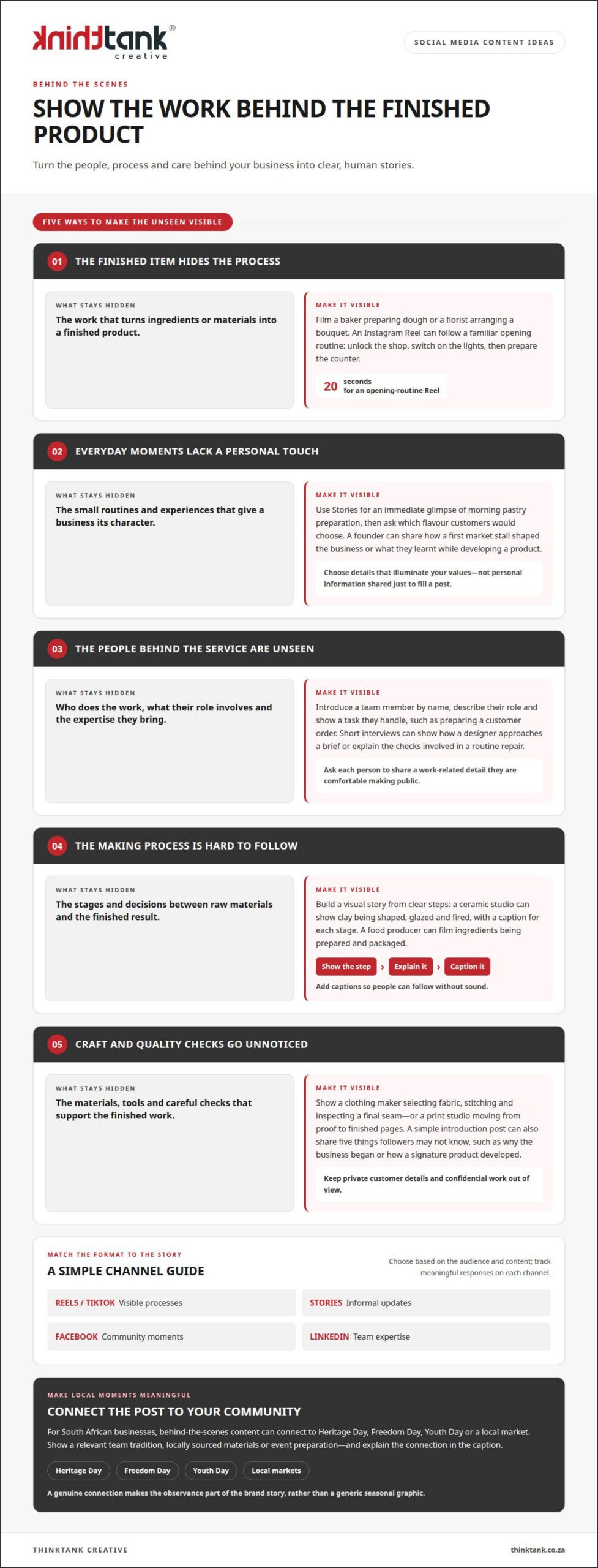
Show the work behind the finished product. A short clip of a baker preparing dough or a florist arranging a bouquet gives the audience a closer view of the process. For Instagram, a 20-second Reel of the opening routine can capture a familiar sequence: unlocking the shop, switching on the lights and preparing the counter. The detail makes the scenes recognisable, while the routine gives viewers a reason to watch through.

Stories can make these moments feel immediate. A café might share the morning’s pastry preparation, then add a poll asking which flavour customers would choose. Personal experiences can add context: a founder could explain how a first market stall shaped the business or what they learnt while developing a product. Choose details that illuminate the brand’s values, rather than sharing personal information just to fill a post.

Introduce the people behind the service, too. A team post could name a staff member, describe their role and show one task they handle, such as preparing a customer order. Short interviews can reveal useful details: a designer might explain how they approach a brief, while a mechanic describes the checks involved in a routine repair. Ask each person to share a work-related detail they are comfortable making public.

How-it’s-made posts turn a sequence of steps into a clear visual story. A ceramic studio could show clay being shaped, glazed and fired, with captions explaining each stage. A food producer might film ingredients being prepared and packaged. Keep the camera focused on the process, and add captions so viewers can follow without sound. These examples help people see the care and decisions behind the finished product.

Production content can also feature tools, materials and quality checks. A clothing maker could show fabric selection, stitching and a final seam inspection; a print studio could show a design moving from proof to finished pages. Avoid revealing private customer details or confidential work. For a simple introduction post, share five things about the business that followers may not know, such as why it began or how a signature product developed.

On Instagram, Facebook, TikTok and LinkedIn, choose formats that suit the story: Reels or TikTok clips for visible processes, Stories for informal updates, Facebook posts for community moments, and LinkedIn posts for team expertise. The most engaging option depends on the audience and the content, so track meaningful responses on each channel.

South African businesses can connect behind-the-scenes posts to Heritage Day, Freedom Day, Youth Day or a local market. Show a relevant team tradition, locally sourced materials or event preparation, and explain the connection in the caption. A genuine link makes the observance part of the brand story, rather than a generic seasonal graphic.

2. Cross-promotion across social platforms and email

Give each platform a role, then connect content so interested customers can follow the story. A business could publish a product highlight on Instagram, share a useful excerpt from its blog on Facebook, and send subscribers an email with further details. Cross-promotion works best when each version suits its platform, rather than repeating identical copy everywhere.

For a South African campaign, use content you own or have permission to share, protect identifiable customer information, and make promotional incentives clear. Keep product descriptions and advertising claims accurate. These practices help a professional plan content responsibly across social channels and email.

Choose formats that make the offer easy to understand. An infographic can explain a service process or compare product features, while a podcast excerpt can introduce an expert opinion. A blog post can provide fuller detail, with social posts highlighting a useful takeaway and directing interested followers to the relevant page. A customer quote can add a human perspective, provided you secure permission before sharing it.

Promotions should offer a clear reason to act. A retailer might highlight a seasonal product, while a service business could explain what an introductory offer covers. Contests and giveaways can encourage participation and invite people to join an email list. For example, a business could offer a 15-minute coaching call as a prize, then promote the entry details across its platforms and email. The campaign should state the entry conditions plainly and make the next step easy to find.

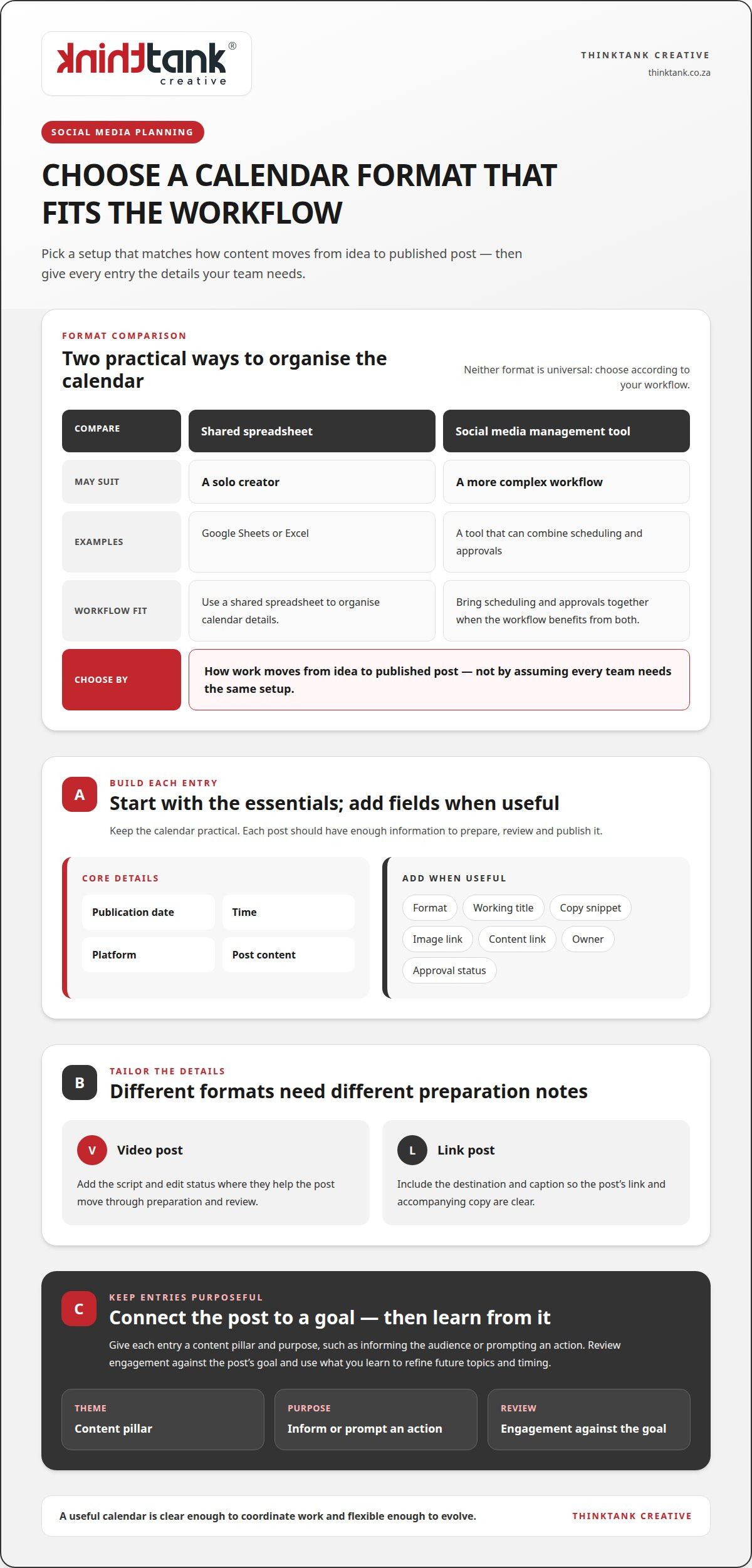
Posting frequency should reflect your audience’s habits, each platform’s purpose and the content you have available. A professional can review channel performance and production capacity, then set a sustainable cadence rather than applying the same schedule everywhere. A content calendar brings the plan together: it maps campaign dates, platform formats, email sends, product highlights and review points. It also leaves room to respond to relevant news or customer questions.

To measure performance and return on investment, align metrics with the campaign goal. Reach and interaction can indicate whether content attracts attention; tracked links, enquiries and sales can show whether that attention leads to action. Comparing campaign results with the resources invested gives the business a clearer view of value. Use the findings to inform the next calendar, including which messages to refine or reuse.

For businesses that need a coordinated plan across social platforms and email, professional social media marketing can connect content choices to business objectives.

3. Follower recognition and customer testimonials

Make customers part of the story, not just the audience. A thoughtful reply to a positive post shows followers that their feedback matters. For example, a coffee shop could thank a customer who shared a photograph of their takeaway cup, then ask permission before featuring it. This turns a real interaction into content while keeping recognition personal and respectful.

User-generated content is unsponsored social media content shared by a business or its followers across social platforms. It might include customer photos, short videos or a post describing a service experience. A professional can identify relevant posts, confirm permission to reuse them and add a brief caption explaining the context. This gives prospective customers a genuine view of how people experience the business.

Reviews can provide useful social proof when they are shared with care. A post might quote a customer praising a local clothing shop’s helpful fitting service, alongside the review’s original meaning and attribution. Keep the wording accurate, avoid implying that one person’s experience represents everyone’s, and respond constructively to criticism. A considered reply can show how the business handles concerns, not only compliments.

Testimonials work in several formats. A short quote can sit on a branded graphic, while a video can let a customer explain what they valued in their own words. For a home bakery, a testimonial might describe the ordering process and the presentation of a celebration cake. Choose feedback that illustrates a specific strength, rather than publishing praise without useful detail.

Customer support questions can also become helpful posts. A professional can review FAQs and recurring questions recorded by sales or support teams, then shape clear answers into captions, carousel posts or short videos. For instance, a local salon could explain how to prepare for an appointment, while avoiding customer names or private details. This turns repeated enquiries into accessible information for followers.

Recognition can mark community milestones as well as individual contributions. When a business reaches 1,000 followers, a thank-you post can celebrate the people who helped build its community. Another idea is a shoutout to its top five fans, with a specific reason for recognising each person. Thoughtful details make the acknowledgement feel sincere instead of like a standard promotional graphic.

A content plan should balance reviews, customer photos, support answers and direct appreciation. Rotate formats, match each post to a relevant product or service, and invite followers to contribute their experiences. For example, a garden centre could ask customers to share photos of plants bought there, then feature selected submissions and thank each contributor. This creates a continuing conversation grounded in real customer voices.
Social media content ideas for small businesses that connect

4. Educational tips and tutorials

Teach one useful skill at a time, and make each post easy to apply. A hardware shop could publish a short video showing how to use a new drill safely for a basic household task. A bookkeeper might explain an invoice term in a caption, then add an example using a fictional transaction. Clear, focused lessons give followers a practical reason to save or share a post.

For businesses with limited time and budget, a social media professional can build posts from existing expertise, common questions and simple demonstrations. A hair salon could turn an appointment question into a short tip, while a garden centre could explain how to identify dry soil. These ideas need useful knowledge and a clear format, not elaborate production.

Quick tips work well when they solve one small problem. A Pretoria vehicle workshop could share a checklist for preparing a car before a long drive, while a Durban guesthouse might explain how to pack for a coastal weekend. A professional can shape each tip around the audience’s needs, then use concise captions and showing-focused visuals to make the advice straightforward.

Some topics deserve a sequence rather than a single post. A professional could plan a five-day mini-course around a business speciality, with each lesson building on the previous one. For example, a nutrition practice might cover meal planning, ingredient labels and preparation routines. A seven-day mini-course in a Facebook group can create a longer learning journey and give participants space to discuss each lesson.

Useful resources can make tutorials more actionable. A property maintenance firm could share a seasonal home-care checklist, then explain one task in a short video. A stationery shop might demonstrate a simple weekly planning method using a notebook and pen. Show how the resource supports a real activity, rather than displaying products without context.

Life tips can connect expertise to everyday routines. A local optician could explain how to organise a work desk for comfortable screen use, while a coffee roaster might show how grind size affects a home brew. A social media professional can adapt these subjects into a carousel, a short video or a caption-led post, depending on the detail and audience.

Interactive prompts can turn education into participation. A career coach could ask followers to write down three work goals and aim to achieve at least one within a week. Follow-up content could offer a planning tip and invite people to share progress. This gives the series a clear purpose, supports engagement and makes success visible through audience responses.

5. Competitor research and content creation

Research competitors to find unanswered audience needs, not posts to reproduce. A social media professional can review public content from similar South African businesses, noting recurring themes, formats and questions in comments. For example, if local estate agents mainly post property listings, a useful gap might be practical explanations of viewing preparation or rental terminology. The opportunity lies in adding a distinct perspective, not copying their wording or visuals.

Start with the business goal and target audience. A Durban homeware shop might want more enquiries about custom orders, whilst a Johannesburg accountant may need to explain services clearly. The professional can select relevant competitors, assess how they present similar offers, and identify topics their own audience asks about. This keeps research focused on business relevance instead of collecting examples without a clear purpose.

Look beyond visible likes. Comments can reveal what followers find confusing, and repeated questions can point to content worth developing. If several posts about skincare attract questions about product order, a beauty retailer could create an original routine guide. If Instagram competitors rely on polished product images, a brand might stand apart by talking through materials, care or practical use in short videos.

Turn findings into a content brief. It should connect an audience need with the brand’s expertise, the intended format and a clear next step. For instance, a Cape Town tour operator could address questions about choosing a neighbourhood through a local guide carousel. A follow-up post might explain one area in greater depth. The professional keeps the message grounded in the business’s own knowledge and voice.

Competitor research also informs posting choices. If other businesses publish frequently but repeat the same message, you do not need to match their volume. Instead, plan varied, purposeful posts and use performance data to refine themes. Reach, saves, comments and enquiries each reveal different signals. The most useful measure depends on whether the content aims to inform, build awareness or prompt contact.

Keep research current through regular review, especially when customer questions or business priorities shift. A simple working record can capture a competitor’s topic, format, audience response and the content gap it suggests. Turn those observations into original ideas, check that examples fit the brand, and avoid treating another business’s popularity as proof that the same approach will work.

Use competitor insight as a starting point for distinctive creative work, not a template. Develop original content with tailored creative design that reflects your business’s own expertise and identity.

ThinkTank Creative: Social Media Marketing

ThinkTank Creative offers Social Media Marketing for businesses that want a more considered, consistent online presence. Turn to a social media professional when planning posts takes time, content feels disconnected from your brand, or competitor research could help inform a fresh direction. A tailored approach can bring behind-the-scenes stories, customer recognition, tutorials and promotional content together around your business goals and audience.

Strong social content also needs a cohesive visual identity. Creative design and Logo and Corporate Identity Design can align your posts with your wider brand, while Website Design and Development can support a consistent journey from social discovery to your online presence. The right combination depends on what your business needs to communicate.

To discuss social media marketing for your business, contact ThinkTank Creative.

Build a social presence that grows with your business

Your social presence can become a clearer expression of what your business stands for as your priorities and audience develop. Treat planning as an ongoing connection between brand strategy and customer insight: each conversation can reveal what people value, what they need explained and where your next opportunity lies. That perspective keeps social media content ideas for small businesses connected to real business direction, rather than simply filling a publishing schedule.

A professional can help translate those insights into a coherent approach, aligning social content with the wider customer journey. ThinkTank Creative brings social media marketing together with creative design and website development, so the experience can feel consistent from first discovery to further engagement. The right next step is a conversation about your goals, your audience and the role social media should play in your growth.

Contact ThinkTank Creative today to discuss a considered direction for your business. Your next stage of growth can begin with a clear, collaborative plan.

Frequently Asked Questions

Why should you use different types of social media posts?

Different post types let a business inform, entertain and invite action without making every update feel like an advert. A mix of formats can also suit different audience preferences: one follower may watch a brief demonstration, while another prefers a concise written tip. For social media content ideas for small businesses, variety gives each post a distinct purpose and helps the brand communicate beyond a single product or promotion.

How can a social media professional create engaging product and service posts for your business without making them sound too promotional?

Start with the customer’s need, then show how a product or service fits into a real situation. For example, a stationery business could demonstrate how a particular notebook helps organise meeting notes, instead of relying on repeated sales language. Clear captions, useful context and a restrained invitation to learn more keep the focus on value. Make the benefit understandable without overstating what the offer can do.

What user-generated content and customer testimonial ideas can small businesses use?

Invite customers to share how they use a purchase, what they enjoyed about an experience or what problem it helped them address. A craft shop might feature a customer’s finished project made with supplies from the shop, while a service business could publish a short testimonial about the experience from enquiry to completion. Ask permission before reposting, credit the contributor as agreed, and preserve the meaning of their original words.

Which content formats get the most engagement on Instagram, Facebook, TikTok and LinkedIn?

The article doesn’t identify a single format as generating the most engagement. It suggests Reels for Instagram, TikTok clips for visible processes, Stories for informal updates, Facebook posts for community moments and LinkedIn posts for team expertise, then recommends tracking responses on each channel.

How often should a small business post on each social media platform?

Post regularly, using a sustainable cadence based on your audience’s habits, each platform’s purpose and the content you can produce. Avoid relying on posting to Instagram only once a month, and use a content calendar to plan consistently.
How to Handle Negative Comments on Social Media with Care

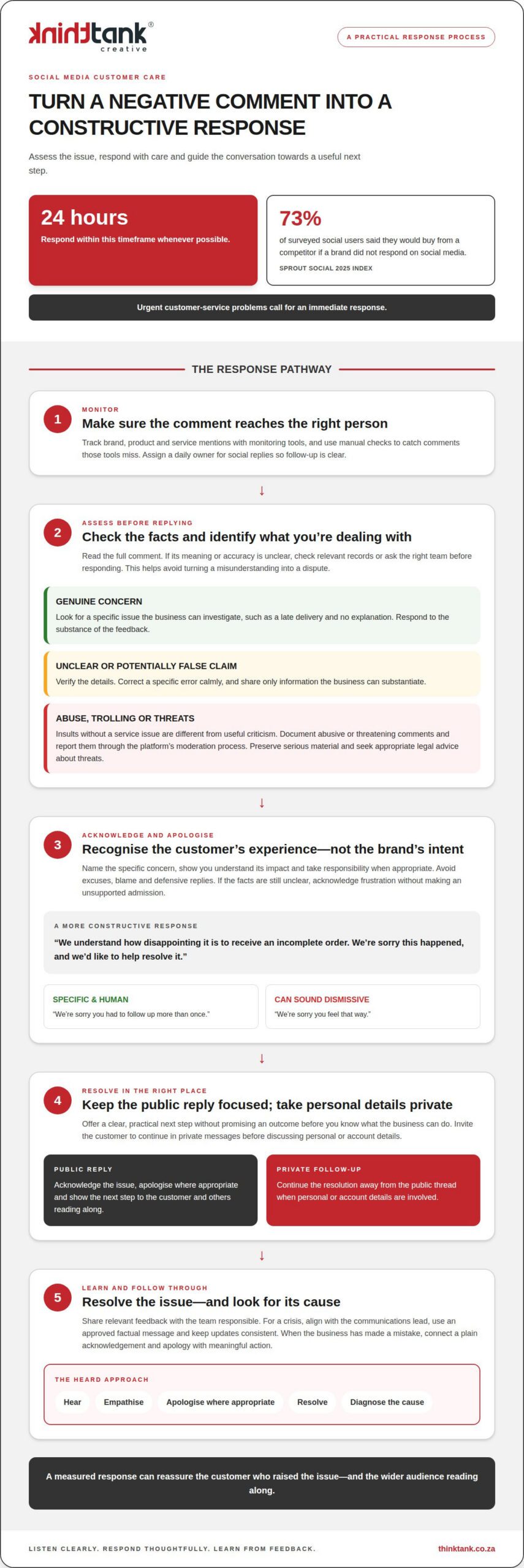
A negative comment isn’t just criticism to contain; it’s a visible chance to show how your business listens. Knowing how to handle negative comments on social media starts with responding within 24 hours whenever possible, acknowledging the customer’s frustration and offering a constructive next step.

It’s understandable to want to defend your brand or hide an uncomfortable complaint. A measured response can reassure the person who raised the issue and the wider audience reading along. Learn how to apologise without making excuses, decide when to move a conversation to private messages, and distinguish genuine feedback from abuse or trolling. Negative comments can also reveal what customers need and help strengthen your social media presence.

Key Takeaways

  • Acknowledge the customer’s frustration, apologise sincerely where appropriate and offer a clear next step.
  • Respond promptly and thoughtfully, checking the facts before addressing a complaint in public.
  • Distinguish useful criticism from abuse or trolling so each comment receives a suitable response.
  • Keep the public reply focused, then invite the customer to continue privately before discussing personal or account details.
  • Use comments as a source of customer insight that can help shape stronger service and brand communication.

How does a social media professional respond to a negative comment?

A professional begins by assessing the comment, checking relevant facts and choosing whether to respond, ignore or remove it. When deciding how to handle negative comments on social media, they consider whether the person has raised a genuine concern, posted spam or made an abusive attack. If the meaning is unclear, they can check records or ask the relevant team before replying. This reduces the chance of turning a misunderstanding into a dispute.

Prompt monitoring helps comments reach the right person. Businesses are advised to respond within 24 hours whenever possible, while urgent customer-service problems call for an immediate response. Monitoring tools can track brand, product and service mentions, but manual checks help catch comments those tools miss. Assigning a daily owner for social replies makes it clearer who is responsible for follow-up.

A public response also speaks to people who are reading without commenting. In the Sprout Social 2025 Index, 73% of surveyed social users said they would buy from a competitor if a brand did not respond on social media. This makes each complaint an opportunity to show concern and approach customer service with care, rather than treating the comment as an interruption.

Airbnb, Nike and Starbucks offer useful examples of how replies can be tailored. For an Airbnb booking complaint, a professional could recognise the disruption and invite the customer to discuss reservation details privately. For a Nike product concern, they could ask for relevant item information before explaining the next step. For a Starbucks service complaint, they might apologise for the experience and ask which visit needs attention. These are example responses, not quotations from the brands.

When a company has made a mistake, the professional should acknowledge it plainly, apologise and explain the next step without blaming the customer. Starbucks closed 8,000 stores for racial-bias training in 2018 after the wrongful arrest of two men. That was a company response, not a social-media reply. The relevant lesson is to connect acknowledgement with meaningful action.

In South Africa, defamatory, threatening or abusive online comments can raise legal concerns, depending on their content and context. Preserve serious material and seek appropriate legal advice about threats, rather than publicly declaring that a law has been broken.

For false claims, check the facts, correct the specific error calmly and share only information the business can substantiate. Knowing how to handle negative comments on social media also means having a crisis escalation process: align with the communications lead, use an approved factual message and keep updates consistent. Document threatening or abusive comments and report them through the platform’s moderation process.

2. Acknowledging customer frustration and apologising

A thoughtful response recognises the customer’s experience rather than defending the brand. Read the full comment, identify the frustration and respond to that specific concern. For example: “We understand how disappointing it is to receive an incomplete order. We’re sorry this happened, and we’d like to help resolve it.” This acknowledges the impact without assuming facts that still need checking.

Before apologising for a specific mistake, assess the feedback. Compare the customer’s account with relevant order records, service notes or team information to establish what happened. If the complaint is valid, acknowledge the error directly and explain the next step. If details remain unclear, recognise the customer’s frustration without making an unsupported admission.

A sincere apology avoids excuses, blame and defensive phrasing. “We’re sorry you had to follow up more than once” recognises a stated experience; “We’re sorry you feel that way” can sound dismissive. Name the concern, take responsibility where appropriate and offer a practical route towards resolution. Don’t promise an outcome before the business knows what it can do.

This sequence reflects the HEARD technique: hear the customer, empathise, apologise where appropriate, resolve the issue and diagnose its cause. If a customer reports a damaged product, for instance, acknowledge the inconvenience, discuss a suitable resolution and pass the incident to the team reviewing fulfilment. Addressing the immediate complaint matters, and understanding its cause can help prevent similar experiences.

Legitimate criticism deserves a response that takes its substance seriously. If a customer points out an incorrect opening time in a post, thank them, correct the information and apologise for the confusion. If the original post is wrong, correcting or removing it and explaining the change shows accountability. A short, specific reply is more constructive than arguing about the customer’s tone.

For a consistent approach across public replies and direct conversations, social media marketing support can help shape a response process that reflects the brand’s voice and treats feedback as useful information.

3. But Why Negative Comments?

Distinguish criticism from trolling by assessing what the commenter says, not just how it feels to read. A customer who writes, “The delivery arrived late, and I wasn’t told why,” identifies a service issue the business can investigate. A comment that only insults someone’s appearance or intelligence offers no comparable detail. This distinction helps you respond to useful feedback and moderate abuse appropriately.

Constructive criticism often describes a specific experience, raises a product or service concern, or requests a change. For example, “The booking page wouldn’t accept my address” points to a possible website problem. Trolling typically aims to provoke, ridicule or attract attention through personal attacks rather than resolve a consumer issue. One sharp or angry comment alone doesn’t establish intent, so consider its content and context before acting.

A practical review can ask three questions: Does the comment describe a verifiable experience? Does it contain a question or actionable concern? Does it address a business issue or attack a person? A complaint about unclear pricing merits investigation, while repeated insults aimed at an employee may need moderation. These checks help prevent legitimate criticism from being dismissed as trolling just because its tone is uncomfortable.

Moderation should support a constructive community without hiding genuine dissatisfaction. Leave a specific complaint visible, respond to the concern and record recurring themes for the relevant team. Spam, abusive language or baseless personal attacks can be hidden or removed under the channel’s moderation approach. Log the action too, so the team can see what was moderated and why.

Perspective matters. One hostile commenter doesn’t represent every consumer, and a public argument can give a troll the attention they seek. If someone posts, “Your staff are all useless,” don’t answer with a sarcastic comeback. Avoid engaging with the insult, moderate it if appropriate, and focus on substantive comments from customers seeking help.

If criticism combines a real issue with inflammatory language, separate the two. A comment such as “Your support is hopeless; my account still won’t open” includes an actionable account problem. Address the access issue through an appropriate channel while moderating any abusive language. This approach neither rewards provocation nor ignores a consumer who may need customer service.

Consistent moderation can encourage useful participation and protect a brand’s reputation. A response matrix helps the team distinguish service complaints, factual errors, spam and personal abuse, then apply the same principles across channels. It also reduces reactive replies: pause, classify the comment and choose a proportionate action, rather than letting a troll set the tone.

How to Handle Negative Comments on Social Media with Care

4. Moving complaint resolution to private messages

Move a complaint to a private channel when resolving it requires personal details, account access or a detailed exchange. A public comment can identify the concern, but it isn’t the place to request an order number, email address or account information. First acknowledge the issue publicly, then explain how the customer can continue safely.

That public hand-off matters to the wider audience. A silent direct message may leave other readers wondering whether the business noticed the complaint. Instead, write: “We’re sorry you’ve had trouble accessing your account. Please send us a direct message so we can look into this with you.” This shows the business is responding without exposing private details.

Make the next step specific. If a customer reports a missing delivery, ask them to send a direct message with the information needed to locate the order. If they describe a billing concern, invite them to use the business’s designated private support channel. Don’t ask them to post personal details publicly, and don’t assume a direct message has reached them unless the platform shows a reply.

A considered workflow helps each hand-off remain clear:

Keep the public message focused on the action, not a lengthy explanation. If a customer’s booking details need checking, invite them to send a direct message so you can review the relevant information privately. If the issue can’t be resolved immediately, give a realistic timeframe and provide updates through the agreed channel. Avoid promising a resolution before the facts are clear.

Don’t use private channels to hide criticism. A public reply shows that the concern has been seen, while the private conversation supports a more detailed exchange. If a customer doesn’t move channels, keep the public discussion courteous and restate the next step, rather than posting sensitive questions or repeatedly sending unsolicited messages.

After the private exchange, a concise public follow-up can reassure the audience that the business addressed the concern. Keep it general, such as, “We’ve followed up with you directly and are working through the next steps.” Don’t share the customer’s account details, complaint history or outcome without permission. This supports the individual customer while respecting everyone reading the conversation.

5. Why social media comments matter for businesses

A social media comment is both a customer-service interaction and a public signal. A question about a delayed delivery, for example, can reveal a problem affecting more than one customer. Logging recurring concerns gives the relevant team specific evidence to investigate. Comments can therefore surface patterns that other feedback channels miss, not just express satisfaction or frustration.

Each public exchange also shows the audience how a business behaves when something goes wrong. A clear reply to a billing concern can demonstrate attentiveness, while silence may leave readers without context. The response can help the original customer and inform others considering the same service. Comment management is part of the customer experience, not merely a task for the social media queue.

Positive comments matter too. A customer who praises helpful staff or an easy booking process gives the business a concrete example of what is working. Acknowledge the compliment and share the insight with the relevant team. Repeated praise may point to strengths worth preserving, while recurring complaints can show where processes or information need attention.

Recommendations carry particular weight in that public setting. A reported 88% of global consumers trust earned media, such as recommendations from friends and family, more than any other form of advertising. A comment thread is not automatically a personal recommendation, but it can contain real customer experiences that prospective buyers read alongside brand messaging. Thoughtful engagement helps provide context around those experiences.

Retention is another reason to take concerns seriously. Acquiring a new customer costs five to 25 times more than retaining an existing customer. Resolving a complaint won’t ensure someone stays, but a useful response gives the business an opportunity to address the experience before the relationship ends. If the issue needs investigation, a clear update can show that it remains in progress.

Turn comments into practical insight by recording the issue, its channel and the action taken. Repeated questions about delivery areas, for example, may show that a website needs clearer information. More complaints about appointment changes may point to a communication gap. Reviewing these themes helps teams prioritise improvements instead of treating every comment as an isolated event.

Make comment management part of a wider customer-care approach: acknowledge useful feedback, escalate recurring concerns and update customers when an issue is being addressed. To build a more considered approach to audience engagement, explore social media marketing support.

ThinkTank Creative: Social Media Marketing

ThinkTank Creative provides Social Media Marketing for businesses seeking a more considered approach to audience engagement and brand communication. If comments go unanswered, responses feel inconsistent or recurring complaints are difficult to manage, professional support can bring social activity into closer alignment with your brand’s voice and priorities.

Social media works alongside the wider customer experience. Website Design and Development and Creative design can support a consistent presence across the channels where customers encounter your business. The right focus depends on your goals, the conversations taking place and the role social media should play in your marketing.

If you’d like to explore a more considered approach to your social media, contact ThinkTank Creative.

Build a more responsive brand presence

Let each public conversation inform how your brand communicates and serves its audience. Knowing how to handle negative comments on social media can become part of a wider listening practice, helping your team spot recurring concerns, refine messages and make customer interactions more consistent. The next step is to turn those insights into a clear direction for your social presence.

ThinkTank Creative can work with your business on a cohesive digital presence, bringing social communication into alignment with your wider brand and website. Shape the focus around your priorities, from the conversations customers are having to the experience you want them to recognise across your channels.

When you’re ready to explore a considered approach for your brand, contact ThinkTank Creative. With a clear strategy and thoughtful execution, your social presence can keep moving forward.

Frequently Asked Questions

But why negative comments?

Negative comments can reveal a gap between what a business promises and what customers experience. A complaint about unclear delivery information, for example, may show that a product page needs better guidance. These conversations also show prospective customers which concerns matter to existing customers. Reviewing the themes can help improve messaging, service design and the customer journey, rather than treating each critical comment as an isolated reputation problem.

How does a social media professional handle trolls?

Avoid turning a provocative comment into a public argument. Assess whether it contains a real question or customer issue, then respond to the useful substance. Repeated personal attacks, spam or abuse can be handled through the platform’s moderation features and the brand’s documented policy. A measured approach protects the community’s tone and helps the team avoid replies written in frustration.

How should a social media professional respond to a negative comment?

Respond to the specific concern with calm, clear language and a relevant next step. If a customer says a service disruption interrupted an appointment, for example, recognise the disruption and share a verified update about what happens next. Avoid speculation, blame or promises the business cannot support. A response guide helps team members maintain a consistent voice across channels.

Quick definition: what is comment triage?

Comment triage means sorting incoming comments by type and priority, then assigning an appropriate action. You might classify a product question for a customer-service response, a factual error for correction and spam for moderation. This makes busy feeds easier to manage and helps urgent or sensitive issues reach the right person without overlooking ordinary feedback.

Should a social media professional reply publicly or privately?

Reply publicly when the answer can help the original commenter and other readers, such as when correcting an inaccurate opening time. Move the detailed conversation to a private channel if it involves an individual booking, payment or account. The public reply should still make clear that the concern has been noticed. This keeps useful information visible while protecting personal details from the wider audience.

What reply scripts can a social media professional use for common complaint types?

Scripts can give a team a starting point without making replies sound automated. For a late delivery: “We’re sorry your order hasn’t arrived as expected. Please message us with your order details so we can investigate.” For incorrect information: “Thank you for pointing this out. We’ve corrected the post.” For a service issue: “We’re sorry this affected your experience. We’re reviewing what happened and will update you.”

What constitutes a negative comment?

A negative comment expresses dissatisfaction, criticism or concern about a business, product, service or interaction. It might be a detailed complaint, a brief statement such as “This wasn’t what I expected”, or a critical reaction to a post. Its tone can range from disappointed to angry. The professional should consider the comment’s meaning and context before deciding whether it needs a customer-service response or moderation.

What do consumers expect when they complain on social media?

Consumers generally expect a business to notice their concern, treat it respectfully and explain what can happen next. Someone reporting an incorrect invoice, for instance, needs a clear route to have it reviewed, not a generic promotional reply. If an investigation takes time, an update can clarify that the issue is being handled. Direct, relevant communication helps customers understand what to expect from the conversation.

Social Media Engagement: Ideas for More Interaction

A like is only one part of the conversation. Social media engagement includes the interactions that build community and customer loyalty, from comments and shares to thoughtful replies. To understand how to increase social media engagement, look beyond reaction counts: consider what prompts people to respond, how each platform shapes interaction and how you measure the rate.

Posting more often is not the only answer. Relevant content and genuine two-way communication give people a reason to take part. This guide covers practical ways to invite interaction, including questions, polls and community content, and how to keep your brand voice consistent. You’ll also learn how engagement differs across platforms and how to calculate a basic engagement rate using likes, comments, shares and followers, so you can assess performance more clearly.

Key Takeaways

  • Measure meaningful interactions, not just likes, to understand whether your content is building community and customer loyalty.
  • Use audience insights to shape relevant posts, then invite participation with polls, thoughtful questions and community contributions.
  • Adapt your content to each platform, as formats and typical engagement levels differ across social networks.
  • Keep your brand voice recognisable in posts and replies, while sharing stories that make your business feel more human.
  • Calculate a basic engagement rate by dividing likes, comments and shares by your follower count, then multiplying by 100.

1. What is Social Media Engagement?

Social media engagement describes how people interact with content and a brand. It includes likes, comments, saves, replies, mentions and shares, but the count alone doesn’t show what those actions mean. A detailed comment or a customer sharing a useful post may signal stronger interest than a quick reaction. Treat engagement as evidence of a conversation, not simply a popularity score.

Start by defining the audience you want to reach. Consider location, age group, language, interests and the problems your product or service addresses. In South Africa, language preferences and interests can vary across customer groups, so one message may not suit everyone. Use available audience analytics to examine demographics, content interactions and follower behaviour. Compare those patterns with the questions customers raise in comments and messages.

Native analytics tools include Meta Business Suite, Instagram Insights, LinkedIn analytics, TikTok analytics and X analytics. They provide platform-specific information about reach and interactions. The cost of paid analytics and social-listening tools in South Africa varies by provider, features and account needs.

Buying followers or using bots and engagement pods can make performance figures less representative of genuine audience interest. Engagement bait, such as asking for unrelated comments or shares, may generate activity without useful feedback. Focus instead on interactions from people who care about your subject, and assess whether their responses support your communication goals.

Choose platforms based on audience behaviour and content format. A professional service might use LinkedIn to share industry insights, while a visually focused brand could use Instagram to present product photography. TikTok suits short-form video, whereas Facebook can support community discussions and local updates. These are starting points, not fixed rules: compare interaction quality on each platform before deciding where to focus your effort.

Use social listening to understand what your audience discusses beyond your own posts. Review recurring questions, customer feedback, relevant mentions and the language people use to describe their needs. For example, repeated questions about delivery could inspire a clear explainer post. This helps uncover content opportunities and shows which topics prompt meaningful responses.

Tailor each post to an observed preference. If followers save practical checklists, create another useful guide; if they share customer stories, invite them to contribute their experiences. Look for recurring themes in comments and user-generated content, then adapt your examples, format and tone. This is a practical foundation for learning how to increase social media engagement: listen, publish with purpose and use responses to shape what comes next.

2. Using polls, questions, competitions, and user-generated content

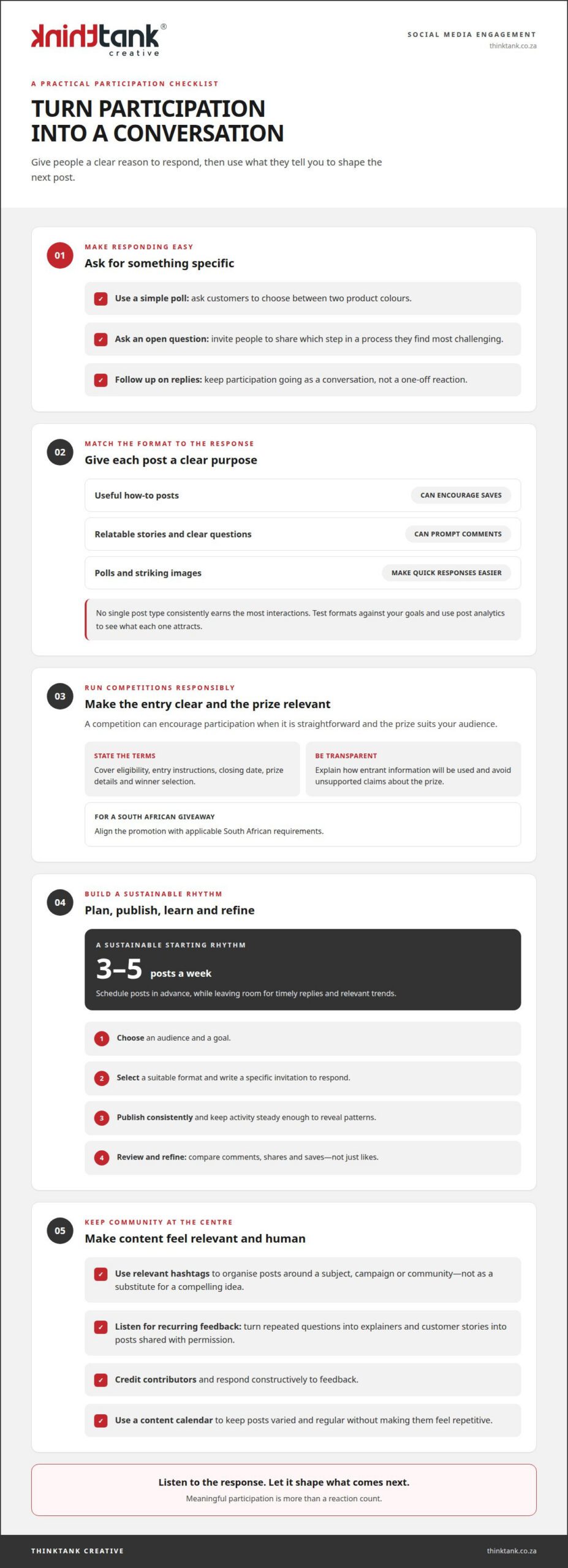
Give people an easy, specific reason to respond. A poll asking customers to choose between two product colours is simpler to answer than a broad request for opinions. Open questions work well when they invite useful experiences, such as asking which step in a process people find most challenging. Follow up on answers so participation becomes a conversation, not a one-off reaction.

No single post type consistently earns the most comments, shares, saves and reactions. Useful how-to posts can encourage saves, while relatable stories and clear questions can prompt comments. Polls and striking images can make quick responses easier. Test formats against your goals, then use post analytics to see which interactions each one attracts.

Competitions can encourage participation when entry is straightforward and the prize suits your audience. For a South African giveaway, publish clear terms covering eligibility, entry instructions, closing date, prize details and winner selection. Align the promotion with applicable South African requirements, explain how entrant information will be used, and avoid unsupported claims about the prize.

Use hashtags to organise relevant posts, not as a substitute for a compelling idea. Choose tags connected to the subject, campaign or community, then check whether they attract relevant conversations. Customer feedback can guide future content too: a recurring question might become a short explainer, while a customer story could inspire a post shared with permission.

There isn’t one best posting time for every South African audience. Use platform analytics to identify when your followers are active, test different time slots and compare the resulting interactions. A sustainable starting rhythm is three to five posts a week. Schedule them in advance, while leaving room for timely replies and relevant trends.

Build and test a strategy in a clear sequence: choose an audience and goal, select a suitable format, write a specific invitation to respond, publish consistently, then review the results and refine the next post. For example, compare a product-choice poll with a practical tip by looking at comments, shares and saves, not just likes. Maintain a consistent level of activity to reveal patterns.

Authenticity matters more than manufacturing activity. Share customer contributions with permission, credit the creator, and respond constructively to feedback. A content calendar can keep these posts varied and regular without making them feel repetitive. For tailored planning and creative execution, explore social media marketing.

3. Differences in engagement across platforms

Compare like with like: each platform has different audiences, formats and interaction habits. Typical median engagement rates are approximately 6.2% on LinkedIn, 5.6% on Facebook, 5.5% on Instagram, 4.6% on TikTok, 4.0% on Pinterest and 2.5% on X. These figures offer context, not targets for every South African account. A business should compare its own posts with similar content on the same platform.

A rate between 1% and 6% is generally considered good, depending on platform, industry and other factors. That broad range makes context essential: a specialist B2B account on LinkedIn serves a different purpose from a retailer connecting with consumers on Instagram. Look at comments, shares and other meaningful actions alongside the rate. A smaller audience that responds to relevant posts may be more valuable than a larger, less active following.

Format also changes the picture. Instagram Reels generate approximately 36% more reach than carousels, whilst carousels earn approximately 12% more engagement than Reels. LinkedIn document or PDF carousel posts have a median engagement rate of 21.77%. These comparisons suggest that reach and interaction are separate outcomes. Choose a format based on whether the post needs to attract new viewers or encourage deeper responses.

Platform algorithms influence which content appears in people’s feeds, but their signals and ranking systems differ and change. A useful strategy is to create posts suited to each platform, then observe how followers respond. For instance, a LinkedIn document can present a detailed process, while an Instagram carousel can break a visual guide into clear steps. Replying to comments also keeps the conversation active: replies present were associated with an estimated 30% engagement lift on LinkedIn and 42% on Threads.

Give each channel a defined audience and purpose. LinkedIn can support professional discussion; Instagram can showcase visual storytelling; TikTok centres on short-form video; Pinterest helps people discover visual ideas; and X supports concise, timely conversation. Facebook can bring community updates and discussions together. These roles are starting points, not rigid rules. Let audience behaviour and the content itself determine where each post belongs.

Review platform analytics separately instead of blending every interaction into one figure. Track reach, comments, shares and saves for comparable posts, then note the format and subject. If Instagram Reels attract more reach but carousels prompt more saves, keep both for their distinct purposes. This gives your social media strategy a practical basis: focus on platforms that help your business connect with the right people, and adapt creative choices to audience responses.

Social Media Engagement: Ideas for More Interaction

4. Maintaining an authentic and consistent brand voice

A recognisable voice makes each post feel connected to the same brand, whether it appears on Facebook, Instagram or LinkedIn. Define a few practical traits, such as warm, informed and direct, and use them to guide captions, customer replies and product announcements. An approachable brand, for example, can explain a service clearly without jargon or exaggerated promises.

Turn those traits into a short voice guide. Include preferred wording, the level of formality, topics the brand can speak about and examples of suitable replies. If a customer raises a concern on Facebook, the response should sound as considered as a product-launch post. Consistency doesn’t mean copying identical captions across platforms; it means expressing the same values in formats suited to each audience.

Authenticity comes from showing the people and decisions behind the brand. Share an employee’s perspective, a customer story or the steps involved in creating a product. These stories give followers something specific to discuss and help explain what the business stands for. Ask permission before featuring customer contributions, and represent their words and experiences accurately.

Plan a content calendar around recurring themes, such as customer questions, expertise, team stories and product information. Scheduling drafts in advance helps maintain a steady presence while leaving space for timely updates and genuine replies. Before publishing, check that the wording, visual style and invitation to respond match the brand’s voice guide. A calendar supports consistency; it shouldn’t make every post feel formulaic.

Keep the relationship active after publishing. Monitor comments and messages, respond within 24 hours where possible, and use feedback to inform future communication. A thoughtful reply can acknowledge a customer’s point, answer their question and invite a useful next step. If criticism appears, address the issue calmly rather than switching to a defensive tone that conflicts with the brand’s usual manner.

Give the approach time to develop. Consistent posting and interaction often take 1 to 3 months to show engagement results, so review patterns across that period rather than judging the voice by one post. Look for recurring questions, constructive conversations and audience responses to different story types. If a message feels unlike the brand, revise it before publishing; if a particular tone prompts meaningful discussion, carry that learning into the next campaign.

5. Defining and calculating social media engagement

Engagement can be counted as interactions or expressed as an engagement rate. The count shows how many likes, comments and shares a post received. The rate puts those actions in context, helping you compare performance against audience size. These measures answer different questions, so decide whether you need a total activity figure or a proportional view.

For a basic follower-based rate, add likes, comments and shares, divide the total by your follower count, then multiply by 100. For example, a post with 200 engagements and 5,000 followers has a 4% engagement rate: (200 ÷ 5,000) × 100. Keep the formula consistent across the posts you compare.

Some reports calculate engagement using reach rather than followers. Reach-based rates show interactions relative to the people who saw a post; follower-based rates compare them with your account audience. The denominators are not interchangeable. Label the formula beside each result, or an apparent change may reflect a different calculation rather than a stronger audience response.

Set the measurement period and content scope before reviewing results. You might calculate a rate for each post, then compare similar posts from the same platform over a consistent period. Separate organic posts from paid promotion, and note the format, topic and call to action. A visual guide, short video and hashtag-led announcement may each invite different interactions.

Interpret the numbers in light of each post’s purpose. A useful tutorial may earn saves, while a discussion prompt may attract comments. If your calculation includes only likes, comments and shares, it won’t represent every valuable response. Track relevant measures such as saves or link clicks separately, and use customer feedback to understand why an interaction happened.

Use the result to guide your next decision, not simply to rank posts. If a post receives a lower rate, review its audience fit, clarity, timing and format. Then test one change, such as a more specific question or a stronger opening visual. Record the change and compare the next results using the same formula. This feedback loop turns measurement into a practical way to refine content.

For a measurement-led approach to planning and improving your social media presence, get support with social media marketing.

ThinkTank Creative: Social Media Marketing

ThinkTank Creative provides Social Media Marketing to help businesses build a considered presence and create content that invites meaningful interaction. Turn to this support when posting feels inconsistent, engagement is difficult to interpret or your social channels need a clearer connection to your wider brand.

A focused approach can bring audience insights, platform choices, content planning and performance measurement into one coherent strategy. Branding & Creative Design can help align your visual expression with your brand, while Website Design & Development can support a consistent experience beyond social media. The work is shaped around your business objectives, audience and preferred direction.

Ready to bring more structure and purpose to your social media? Contact ThinkTank Creative to discuss your goals.

Turn interaction into lasting momentum

Make your next step deliberate: choose one audience response you want to understand better, then shape upcoming content around that opportunity. The question of how to increase social media engagement becomes more valuable when it leads to clearer decisions, stronger conversations and a closer connection between your brand and its community. Keep learning from how people respond, and let those insights guide your next creative move.

As your approach develops, align social media activity with the wider experience people have of your business. ThinkTank Creative can support that direction through Social Media Marketing, Creative design, and Website Design and Development. If you’re ready to turn your ideas into a considered strategy, contact ThinkTank Creative to discuss your strategy. A thoughtful next step can set the foundation for more purposeful interaction and continued growth.

Frequently Asked Questions

What is Social Media Engagement?

Social media engagement describes how people respond to and participate in a brand’s activity on social platforms. A customer might comment with a product question, share a useful post with a colleague or mention a business in their own update. These actions signal different kinds of interest. Consider what each response reveals about customer needs instead of treating every interaction as equally valuable.

What does social media engagement include, and how is engagement rate calculated?

Engagement can include likes, comments and shares, alongside platform-specific actions such as saves, replies or mentions. For a basic follower-based rate, add likes, comments and shares, divide by the follower count, then multiply by 100. A post with 200 engagements and 5,000 followers has a 4% rate. Keep the same formula when comparing posts, and label which interactions your calculation includes.

What are the best ways to increase engagement on Instagram, TikTok, Facebook, LinkedIn and X?

Match the format to the platform and the response you want. On Instagram, test a carousel that guides viewers through a process; on TikTok, make a short video answering a common question. Facebook can host a community discussion, LinkedIn can invite professional perspectives, and X can carry a concise prompt about a timely topic. Review responses on each channel, then develop the formats that attract relevant conversations.

How often should businesses post on social media to increase engagement?

A practical starting point is three to five posts a week, adjusted to your team’s capacity and audience response. For example, a local service business could schedule educational posts and customer updates throughout the week rather than publishing several rushed messages in one day. A regular rhythm helps audiences know what to expect. Review the quality of replies and shares, then adapt the schedule to keep posting useful and sustainable.

How can businesses use hashtags, captions, questions and calls to action to boost engagement?

Make each element support one clear idea. Use hashtags relevant to the subject, open the caption with a specific benefit, then ask a question people can answer from experience. For example, a café could ask which seasonal drink customers would like to see return. Finish with a direct invitation, such as “Tell us your pick below.” Avoid unrelated tags or requests for reactions that don’t contribute to the conversation.

How can brands encourage user-generated content, community participation and replies?

Invite customers to share how they use a product or service, then feature suitable contributions with permission and clear creator credit. A gardening business could ask followers to post progress from a home project, giving others a topic to discuss. Respond with a specific observation or follow-up question. Acknowledging people by name, where appropriate, helps their participation feel valued and gives the community a reason to return.

What are typical social media engagement rate benchmarks by platform and industry?

Typical median engagement rates are approximately 6.2% on LinkedIn, 5.6% on Facebook, 5.5% on Instagram, 4.6% on TikTok, 4.0% on Pinterest and 2.5% on X. A rate between 1% and 6% is generally considered good, depending on platform, industry and other factors. Treat these figures as context, not fixed targets: compare similar content on the same platform and account for audience size and purpose.

What are the best times to post on social media in South Africa?

There is no single best posting time for every South African audience. Use platform analytics to find when your followers are active, test different time slots and compare interactions.

Social Media Posting Times in South Africa by Platform

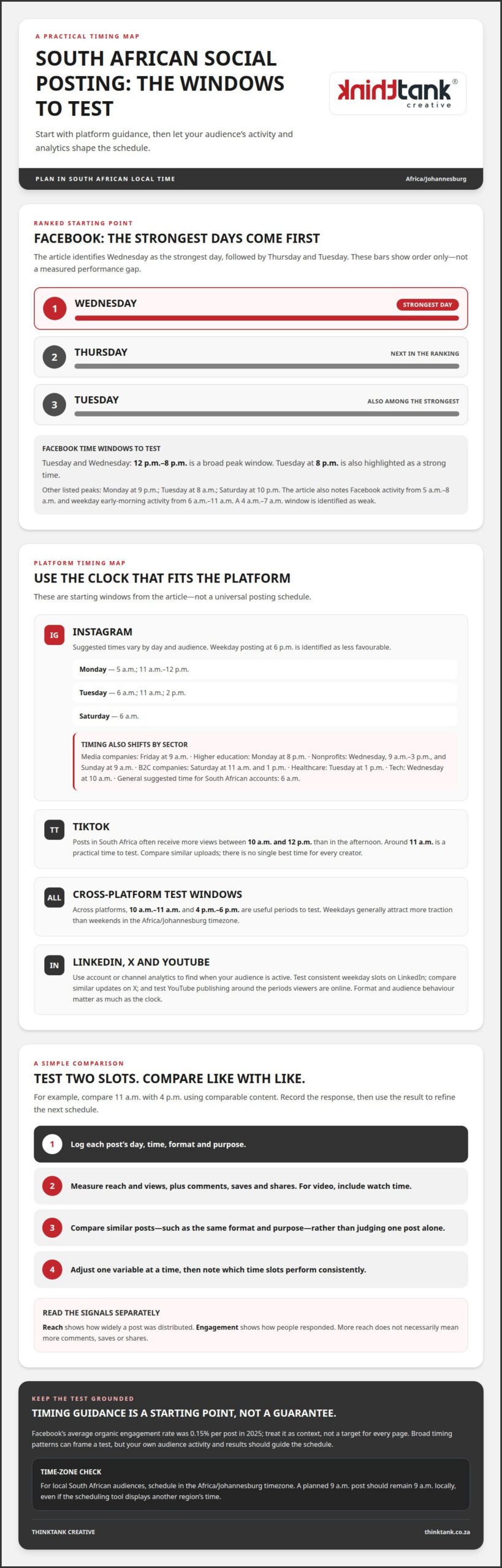
Tuesday and Wednesday, from 12 p.m. to 8 p.m. South African time, are a useful starting window for Facebook posts. The best times to post on social media in South Africa still vary by platform and audience, with Tuesday at 8 p.m. also identified as a strong time to test.

It’s understandable to want a clear schedule: posting at the wrong time can limit the chance for good content to be seen. Treat suggested times as a starting point, then refine your schedule using your audience’s activity and your own analytics.

This guide covers recommended posting times by platform and day, explains how to adapt them for different audiences, and shows how to use engagement data to build a schedule for your brand. It also accounts for South African local time, so you can plan posts for the people you want to reach.

Key Takeaways

  • Use platform- and audience-specific timing rather than relying on one universal posting schedule.
  • Compare Instagram’s recommended weekday and weekend windows with your audience’s own activity patterns.
  • Assess posts through meaningful engagement signals, including views, watch time, comments, saves and shares.
  • Test posting days and times consistently, then use the results to refine your schedule.
  • Plan around South African local time and account for time-zone differences when reaching audiences elsewhere.

What is the best time to post on social media in 'Africa/Johannesburg' timezone?

For Facebook, Tuesday and Wednesday from 12 p.m. to 8 p.m. form a broad peak window. Tuesday at 8 p.m. is also identified as a strong time. Across platforms, 10 a.m. to 11 a.m. and 4 p.m. to 6 p.m. are useful periods to test. Weekdays generally attract more traction than weekends in the Africa/Johannesburg timezone. These patterns help identify the best times to post on social media in South Africa, but your audience’s activity should guide the final schedule.

Instagram recommendations differ by weekday and audience. Monday suggestions are 5 a.m. and 11 a.m. to 12 p.m.; Tuesday suggestions are 6 a.m., 11 a.m. and 2 p.m. Saturday’s suggested time is 6 a.m. Media companies’ Instagram content performs best on Fridays at 9 a.m. Higher education content performs best on Mondays at 8 p.m. Nonprofits see strong windows on Wednesdays from 9 a.m. to 3 p.m., and Sundays at 9 a.m. Weekday Instagram posting at 6 p.m. is identified as less favourable.

TikTok posts in South Africa often receive more views between 10 a.m. and 12 p.m. than during the afternoon. Around 11 a.m. is a practical starting point for testing. There is no single best time for every TikTok creator, so compare performance across similar uploads.

For LinkedIn, start with the periods when your audience is active, as shown in account analytics. Test a consistent weekday slot, then compare impressions and engagement across posts. On X, schedule comparable updates at different times when your audience is active and assess the response. On YouTube, check channel analytics to see when viewers are online, then test publishing around those periods. Format and audience behaviour matter as much as the clock.

South African businesses reaching local audiences should schedule in the Africa/Johannesburg timezone. This keeps a planned 9 a.m. post at 9 a.m. locally, even when the scheduling tool displays another region’s time.

To find the best times to post on social media in South Africa for your page, run a simple comparison. Choose two candidate slots, such as 11 a.m. and 4 p.m., and publish comparable content in each. Record reach, views, comments, saves and shares; compare like with like, rather than judging one post alone. Facebook’s weekday early-morning activity has also been noted between 6 a.m. and 11 a.m., while 4 a.m. to 7 a.m. is identified as a weak window. Treat these platform patterns as starting points, then let page performance shape your next schedule.

Using social media analytics to improve engagement

Use analytics to turn publishing times into testable decisions. Record each post’s publishing time, weekday, format and audience response. Then compare similar posts, such as two product demonstrations published in different time slots. This separates timing effects from differences in subject or creative execution. Facebook’s average organic engagement rate was 0.15% per post in 2025. Treat this as context, not a guaranteed target for every page or post.

Look for patterns across your own account before changing the schedule. Sprout Social identifies weekends as Facebook’s weakest days overall, while weekday performance can vary by audience. Buffer’s analysis found Facebook engagement tends to fall between 12 p.m. and 5 p.m. These broad patterns help frame a test, but they don’t show how your followers behave. Compare weekday results with weekend results using the same content type and measurement period.

Measure reach and engagement separately. Reach shows how widely a post was distributed; engagement shows how people responded. A post can reach more people without earning more comments, saves or shares. Set a baseline for your account by comparing posts with similar formats and goals. For example, assess awareness posts by reach and views, then compare discussion posts by comments and shares. Use the same measure for each comparison.

Format matters too. Socialinsider’s benchmarks found Reels were the only Facebook content format to increase engagement in Q1 2026. That makes format an important variable in timing tests: compare Reels with Reels, rather than crediting a time slot for a format difference. For video, include watch time alongside views. For other posts, track comments, saves and shares to understand whether the content prompted useful action.

Build a simple review routine around each publishing test:

Reviewing these signals together helps distinguish a timing pattern from a one-off result. An analytics-led social media publishing strategy can connect content planning with performance measurement, making each schedule adjustment more deliberate.

Best day and time to post

Wednesday is the strongest Facebook posting day, followed by Thursday and Tuesday. Weekdays generally attract more social media traction in South Africa, but the best day depends on the platform, audience and content. Treat these patterns as a starting point, not a universal schedule for every account.

For Facebook, daily peak hours can sharpen that starting point. Monday’s listed peaks are 7 p.m., 9 p.m. and 10 p.m., with 9 p.m. the strongest. Tuesday’s are 7 a.m., 8 a.m. and 7 p.m., with 8 a.m. the peak. Saturday’s listed hours are 6 a.m., 9 p.m. and 10 p.m., with 10 p.m. highest. Hootsuite’s data also places Facebook activity between 5 a.m. and 8 a.m. Use these morning windows as tests alongside weekday evening activity.

Instagram timing shifts with sector. South African B2C companies see their best engagement on Saturdays at 11 a.m. and 1 p.m. Healthcare companies perform best on Tuesdays at 1 p.m., while tech companies see strong engagement on Wednesdays at 10 a.m. A general suggested time for South African Instagram accounts is 6 a.m. These differences show why business type and audience habits matter as much as platform-wide averages.

Which days of the week get the most social media engagement in South Africa? Wednesday, Thursday and Tuesday are the leading Facebook days in Buffer’s ranking, while Instagram results vary by sector. For example, B2C Instagram engagement peaks on Saturday, so a weekday-only schedule could miss that audience.

Choose a posting day according to the action you want people to take. A B2C brand could test Saturday at 11 a.m. against 1 p.m.; a healthcare page could compare Tuesday at 1 p.m. with another suitable weekday slot. Keep the topic and format as consistent as possible, then compare reach and interactions. This helps show whether timing, rather than a different creative approach, shaped the response.

Treat the algorithm as one factor in distribution, rather than a reason to chase every reported peak. A morning slot may suit one audience, while an evening post may better match another’s routine. Choose a small set of day-and-time combinations, publish consistently, then use your account’s performance to refine the schedule. For a Facebook page, Wednesday is a sound first test. For Instagram, choose a sector-specific window that best matches your audience.

Social Media Posting Times in South Africa by Platform

Local-time and time-zone considerations

Schedule for the clock your South African audience uses. The Africa/Johannesburg timezone is the reference for local posting recommendations, so a Tuesday slot listed at 8 p.m. means 8 p.m. there. If a dashboard or imported chart displays another timezone, its clock time may not match the local recommendation. Confirm the schedule’s timezone before setting a post to publish.

Time differences can shift recommended windows. Some charts may need a one-hour adjustment to account for timezone and daylight-saving differences. That matters when applying a global report to a South African account: a displayed 10 a.m. peak might need to be interpreted against the report’s stated timezone before scheduling. Preserve the original time and timezone in your planning notes, then convert the slot for your target audience.

Use a consistent conversion method for every scheduled post. First, identify the timezone used by the recommendation. Next, identify the timezone selected in your publishing tool. Then convert the intended local posting time before scheduling. For example, if your target is Tuesday at 8 p.m. in Africa/Johannesburg, make sure the tool’s displayed time represents that local moment, not simply the same clock reading elsewhere.

Separate local and international audiences rather than forcing them into one schedule. A South African post planned for 4 p.m. should reach local followers at that time. If a campaign also targets people in another timezone, create a separate publishing slot based on their local activity. This keeps the South African schedule anchored to local behaviour while allowing international posts to follow their intended audience’s clock.

Keep a timezone record beside each performance result. Include the platform, intended location, scheduled time and timezone, then compare engagement only after confirming the records use a consistent local reference. A Tuesday post recorded as 8 p.m. Africa/Johannesburg should not be compared casually with a report showing 8 p.m. in another timezone. That distinction helps prevent a scheduling conversion from being mistaken for an audience preference.

Before publishing, use this short time-zone check:

For a campaign aimed at a South African audience, keep the final calendar in South African local time. If you use an international chart, check its timezone first, then convert the suggested window to Africa/Johannesburg. This makes a Tuesday peak or another recommended slot actionable without confusing the chart’s reporting time with the time your audience sees the post.

Scheduling posts across time zones

Start with the audience’s local clock, not the location of the person scheduling. For South African followers, plan posts in Africa/Johannesburg time. A post intended for 9 a.m. locally should reach that audience at 9 a.m., even if the person preparing it works elsewhere.

For a campaign serving audiences in South Africa and other countries, create separate time slots for each location. One publishing time might be morning for one group and evening for another. Separate schedules help each audience see the same campaign at a time that fits its local routine.

Before scheduling, establish which timezone the platform or planning calendar displays. Compare that setting with the timezone used by the timing recommendation. If a chart gives a peak at 10 a.m. in another timezone, don’t enter 10 a.m. automatically. Convert the intended moment to the target audience’s local time first.

Some charts may need a one-hour adjustment to account for timezone and daylight-saving differences. Preserve the source timezone alongside any converted slot, so the original recommendation remains clear. For example, record both the source’s 10 a.m. suggestion and the resulting Africa/Johannesburg schedule time. This makes later review more reliable than keeping only a clock reading.

Use a repeatable scheduling workflow for every platform:

Keep records for each platform and audience segment. For example, a South African Facebook post and an international Instagram post might use the same campaign artwork but need separate local publishing slots. Label each calendar entry with its platform, market, timezone and intended posting time. This helps your team distinguish the scheduled time from a converted display time.

When comparing results, group posts by audience location and local time. A South African post published at 9 a.m. should not be treated as equivalent to an overseas post published at 9 a.m. unless both audiences experienced the same local timing. Compare similar content within each market, then adjust the relevant schedule based on its own engagement.

For a coordinated campaign, get support with social media planning so publishing calendars align with audience locations and local timing.

ThinkTank Creative: Social Media Marketing

ThinkTank Creative’s Social Media Marketing service helps businesses build a more cohesive social media presence. It’s a natural next step when your team needs support aligning platform-specific timing with consistent content and a clear brand identity.

Social media works best as part of a considered brand experience. Creative design and Logo and Corporate Identity Design help keep campaign visuals recognisable across posts, while Website Design and Development can support the journey from social content to your online presence. The right combination depends on your goals and the role social media plays in your wider marketing.

To shape a more coordinated social media approach, contact ThinkTank Creative to discuss your goals.

Make your next publishing cycle more intentional

Make your social media calendar a working plan, not a fixed set of times. Use the best times to post on social media in South Africa as a starting point, then let audience responses guide what you publish next. Your campaign can evolve as your content, objectives and audience behaviour change.

Next, connect posting times with the wider experience your brand creates. Social Media Marketing, Creative design and Website Design and Development can each support a more coherent journey from a post to meaningful interaction with your business. ThinkTank Creative can shape that work around your brand and marketing priorities.

Bring your goals and the questions you want your social media activity to answer. A considered conversation can help clarify the direction of your next campaign and how its content should work together.

Contact ThinkTank Creative to discuss a more cohesive approach to your social media presence. Build on what you’ve learned, keep refining your direction, and give your next publishing cycle a purposeful start.

Frequently Asked Questions

What are the best days and times to post on Facebook?

Wednesday, Thursday and Tuesday rank as Facebook’s strongest days in the available weekday ranking. Tuesday and Wednesday from 12 p.m. to 8 p.m. are broad posting windows, while Tuesday at 8 p.m. is a specific time to test. For a practical comparison, schedule similar posts on Wednesday and Thursday, then assess their responses using the same measures and time period.

Can a business enjoy greater profits by timing their social media posts?

Better timing can help a post reach people when they’re active, but publishing time alone doesn’t determine profit. The offer, creative, audience fit and path to purchase all affect whether engagement leads to a sale. To assess commercial impact, use tracked links or campaign-specific codes, then compare enquiries or purchases with the posts that generated them.

Does time of day matter when posting?

Yes. Publishing when your intended audience is active gives a post a better opportunity to be seen promptly. However, suitable times vary by platform, audience and content. A morning post may suit one audience, while an evening slot may better match another’s routine. Compare similar posts published at different times to find what fits your followers’ behaviour.

Does time-zones matter when scheduling social media posts?

Yes. A scheduling tool may display a different timezone from the one in your posting plan. For South African audiences, use Africa/Johannesburg as the local reference and confirm that the scheduled time reflects it. If a recommendation uses another timezone, convert the suggested time before scheduling. Keep the original timezone in your records so later comparisons remain meaningful.

Does timing on Facebook matter?

Timing can influence whether a Facebook post appears when followers are available to engage, but it’s only one part of performance. Format and content also affect the response. For example, compare similar posts published at different times, then measure reach and interactions separately. This helps you avoid mistaking wider distribution for stronger audience engagement.

When is the best time to post on Instagram in South Africa?

Six a.m. is a recommended starting time for South African Instagram accounts, but suitable slots vary by sector. For example, healthcare content performs best on Tuesdays at 1 p.m., whilst tech content sees strong engagement on Wednesdays at 10 a.m. Choose the window closest to your audience and content, then assess results against comparable posts rather than relying on one upload.

Why is it important to publish content at the right time on social media?

Timing helps align a post with periods when its intended audience is likely to be active, giving useful content a better opportunity to attract attention and interaction. For example, publishing a campaign announcement during a relevant audience window may make it easier for people to see and respond promptly. A good schedule also supports consistency without treating every platform alike.

What are the best times to post on Instagram in South Africa?

For a general starting point, test 6 a.m. on Instagram, then compare it with times suited to your industry. Media companies’ content performs best on Fridays at 9 a.m.; nonprofits see strong windows on Wednesdays from 9 a.m. to 3 p.m. and Sundays at 9 a.m. Treat these as audience-specific clues, and compare like-for-like posts before changing your ongoing schedule.

How to Build a Social Media Content Calendar From Your Ideas

A social media content calendar should do more than mark dates. It brings together what you’ll post, where and when it will appear, and the details needed to prepare each piece of content. Learning how to create a social media content calendar starts with organising your ideas around your audience, goals and capacity to publish consistently.

If social media planning often feels like a scramble, a clear calendar can organise your ideas without making content feel rigid. It helps you see what’s coming, balance different post types and leave room to respond when priorities shift.

This guide explains what to include in your calendar and how it differs from a broader content plan. You’ll set goals, choose platforms and a realistic posting frequency, then schedule posts and track performance to refine your approach over time.

Key Takeaways

  • Set clear, measurable social media goals before turning ideas into scheduled posts.
  • Focus on platforms where your audience is active and you can publish quality content consistently.
  • Choose a posting rhythm that fits your resources, then refine it using audience behaviour.
  • Give each calendar entry the practical details needed to prepare, review and publish the content.
  • Track performance against your goals and use the results to shape your next round of posts.

What is a Social Media Content Calendar?

A social media content calendar sets out what you’ll publish, where and when. A content plan establishes strategy and themes, while an editorial calendar maps broader priorities across months or quarters. Learning how to create a social media content calendar means connecting audience needs and clear goals with practical publishing details.

Set SMART social media goals: specific, measurable, achievable, relevant and time-bound. Choose content pillars, such as product education, customer stories and useful advice, to give posts recurring themes.

  1. Start with audience behaviour. Identify who you want to reach, what they need and which platforms they use. For younger consumers aged 18-25, TikTok or Instagram may be more effective than Facebook. Use audience insights, comments and engagement patterns to guide platform choices, rather than assuming every channel deserves equal attention.
  2. Choose platforms you can serve well. Select 2-3 platforms where potential customers are active and you can publish quality content consistently. Consider each format: a short video, carousel or written update may communicate the same idea differently. Focusing your efforts makes it easier to maintain a coherent workflow and review engagement meaningfully.
  3. Set a realistic publishing rhythm. Use audience activity and available time to decide how often to post on each platform. Start with a schedule your team can sustain, then compare posting times and engagement. If LinkedIn brings relevant interactions but another platform stays quiet, focus more effort on the audience showing interest.
  4. Choose a template that supports decisions. Organise the calendar in Google Sheets, Excel or a social media management tool. A shared spreadsheet may suit a solo creator, while a more complex workflow may benefit from a tool that combines scheduling and approvals. Choose based on how work moves from idea to published post.
  5. Customise the fields. Start with publication date, time, platform and post content. Add fields for format, working title, copy snippet, image link, content link, owner and approval status when useful. A video post might need a script and edit status, while a link post needs its destination and caption.
  6. Connect ideas to goals and review. Give each entry a content pillar and purpose, such as informing the audience or prompting an action. Keep the template flexible enough to accommodate changing priorities. Review engagement against each post’s goal, then use what you learn to refine future topics and timing. That’s how to create a social media content calendar that can evolve with your audience.

Benefits of planning social media content

Planning gives you room to coordinate campaigns, prepare graphics and meet deadlines. But planning too far ahead can leave messages out of step with changing priorities, audience concerns or event details. Keep entries further out flexible.

  1. Use the calendar to coordinate work. Assign each campaign post a purpose, format, owner and deadline. For example, a launch announcement may need a caption, product graphics and a review before publication. Recording these dependencies together helps the team spot missing assets early, rather than discovering them on launch day. Add notes when a post relies on input from another team.
  2. Plan around key dates and events

    Mark relevant holidays, industry events and business milestones in the calendar, then connect each date to an audience need. A seasonal campaign might require advance graphics, an announcement and a follow-up post. Check event details and business priorities as publication approaches, and avoid filling every key date with promotional content. Leave room for timely updates if circumstances change.

  3. Allow lead time for campaigns

    Begin planning six to eight weeks before an anchor moment, such as a launch or event. Work backwards from publication, mapping idea development, copy, graphics, review and scheduling. This gives contributors clear deadlines and reveals dependencies early. Make campaign themes visible in advance, but keep final wording adaptable if audience needs or plans shift.

  4. Record useful campaign notes. Add the campaign objective, intended audience, key message, required assets and approval status to relevant calendar entries. For a launch, notes might identify a teaser, announcement and follow-up, each with its own purpose. These details show collaborators how individual posts support the wider campaign and reduce repeated conversations about responsibilities and next steps.
  5. Keep the plan flexible and useful. Schedule at least a month ahead where practical, while reviewing the calendar regularly for changes. Treat far-off entries as themes or placeholders, not locked copy. A local event, updated business priority or audience response may call for a change. A clear review point helps protect deadlines without forcing unsuitable content into the schedule. For support aligning campaigns and content, explore social media campaign planning.

Scheduling, publishing, and tracking performance

Turn each approved calendar entry into a publish-ready post, then measure its performance against a clear objective. A consistent workflow helps keep posts across channels accurate, timely and aligned with campaign goals.

  1. Add posts and publishing slots

    Assign each post a publication date, time, channel, format and status. For example, a teaser reel can be scheduled for Monday at 10:00, followed by a launch announcement on Tuesday at 11:00. Add the final copy and creative asset to each slot, and leave enough time for review before publishing. Check that planned posts don’t compete for attention or repeat the same message across channels.

  2. Upload the calendar to publishing software

    Transfer calendar entries into your chosen publishing software, using its import option if the template supports it. Match each field carefully: put publication time in the schedule, copy in the caption, and the correct asset with its post. Preview queued content before confirming it, checking the channel, date, time and formatting. A media calendar template remains a useful shared reference throughout the workflow.

  3. Hand approved posts off clearly. Mark posts as approved only after copy and creative are ready, then make the publishing responsibility visible. Keep approval steps lean, since each extra layer can slow delivery. Set an approval workflow with a 24-hour feedback period so contributors know when to respond. If feedback arrives late, update the slot rather than publishing content that hasn’t received approval.
  4. Track results against the post’s purpose. Record the measure that matches each objective, such as engagement for a conversation post or visits for a launch announcement. In one campaign example, the goal was 100 visits to the launch page during launch week; posts brought 80 visits the following Monday. That comparison shows the gap clearly and gives the next review a practical starting point.
  5. Use performance to refine the next schedule. Review results by post, format and channel, then note what earned attention or prompted action. Compare similar posts rather than drawing conclusions from a single result. For instance, if a video and a carousel supported the same campaign, assess both against the same goal. Carry useful observations into the next calendar and adjust future slots, creative or messaging accordingly.

How to Build a Social Media Content Calendar From Your Ideas

Setting posting frequency

Choose a publishing rhythm that suits audience interest, platform behaviour and available resources. Treat platform recommendations as a starting point, then use your own results to shape future posts.

  1. Set a sustainable baseline. Decide how much time your team can give to planning, creating, reviewing and publishing. A solo marketer might begin with fewer, stronger posts rather than commit to daily content across several channels. Allow time to produce captions and creative assets, not just to publish. Document the rhythm in your calendar so collaborators can plan around it.
  2. Use platform guidance as a reference. Suggested starting frequencies include 3-5 Instagram posts per week, 5-7 Reels per week and 7-15 Stories per week. Other recommendations include 10-20 X posts per week, 5-10 Threads posts per day and 5-7 TikTok posts per week. Google Business Profile has a suggested range of 1-3 posts per week, whilst YouTube has 1-2. These are examples, not a universal rule.
  3. Match frequency to audience interest. Review when people interact with your posts, which formats attract meaningful responses and what questions appear in comments. If LinkedIn generates useful conversations but X posts receive little engagement, prioritise the channel that reaches your audience. A few relevant LinkedIn posts each week may serve that audience better than numerous posts that go unseen elsewhere.
  4. Set a test period and measure consistently. Record the chosen frequency for each platform in your calendar, then track engagement against each post’s purpose. Compare similar formats and topics over the same review period. If posting more often coincides with weaker responses or strained production, adjust the schedule. If a cadence supports interaction and remains manageable, keep it.
  5. Build a balanced weekly pattern. Give each slot a role, such as education, conversation or promotion, instead of repeating one format. For example, a weekly schedule could pair a practical advice post with a customer question and a product update. Vary captions and creative formats to give followers reasons to engage. Leave room for timely updates rather than filling every slot in advance.
  6. Revisit the schedule with collaborators. Share the planned cadence with everyone responsible for writing, design and approvals. Check whether each person can manage the workflow before committing to additional posts. Record changes and the reason for them, such as shifting audience interest or a campaign requirement. This helps the team make deliberate adjustments instead of increasing frequency without a clear purpose.

What a social media content calendar includes

Build each calendar entry to move a post from idea to publication without losing its purpose. A useful template combines scheduling details with the creative and practical information needed for consistent delivery.

  1. Record the publishing essentials. Give every post a publication date, time and platform. Add a working title and content type, such as an Instagram carousel or LinkedIn article. These fields help collaborators scan the schedule quickly and distinguish posts with similar themes. Include the intended audience or campaign where it helps explain why a post belongs in that slot.
  2. Make the creative easy to find. Add the draft caption, copy snippet and links to final visual assets. For an Instagram carousel, note the image sequence and where the caption will appear; for a LinkedIn update, attach the relevant graphic or document. Use clear, consistent asset names so the person preparing a post can match the right file to its calendar entry.
  3. Track status and ownership. Include a status such as idea, in progress, awaiting approval, approved or published. Assign an owner for the caption, visual or final scheduling task when several people contribute. For example, a designer can see which graphic needs review, while the publisher can identify approved posts ready to go.
  4. Connect each post to its purpose. Add a content pillar, campaign name and objective where these details guide the work. A customer tip might support an education theme, while a launch post serves a campaign objective. This context helps the team assess whether the calendar has a coherent mix rather than a sequence of unrelated updates.
  5. Customise the template to the workflow. Start with essential columns, then add fields only when they meet a practical need. A small team may need dates, platforms, captions, visuals and status; a collaborative campaign may also need approval notes and content links. A crowded template can hide deadlines, so remove unused fields and group related details together.
  6. Keep the calendar usable as plans evolve. Use a shared spreadsheet or publishing tool as the current source of truth, and update a post’s status when it changes. A postponed LinkedIn announcement should show its revised date; an Instagram visual awaiting approval should remain marked as in progress. Review entries regularly to keep the planned schedule consistent with published content.

For a calendar that connects content, creative and publishing needs, develop a social media content strategy with considered support.

ThinkTank Creative: Social Media Marketing

ThinkTank Creative helps businesses turn social media ideas into a considered, consistent publishing approach. Its Social Media Marketing service supports planning, content development and campaign coordination, giving each post a clear role in your wider communication.

Consider this support when maintaining a calendar alongside daily business demands becomes difficult, or when your content needs stronger alignment with your brand. Creative design can shape visual assets, while Logo and Corporate Identity Design can help create a cohesive identity across social channels. For a broader digital experience, Website Design and Development can connect social content with a well-designed online destination.

Bring your goals, audience and current ideas together, then contact ThinkTank Creative to discuss social media marketing support.

Make your next idea count

A calendar becomes more valuable when it helps your team make better decisions, not simply fill available dates. Treat each new idea as a chance to learn what your audience responds to and sharpen the direction of future content. Learning how to create a social media content calendar is an ongoing process as your priorities and audience interests evolve.

Choose one upcoming idea and give it a clear purpose before it enters your workflow. As you develop the content, keep your brand’s wider communication in view, so each post contributes to a recognisable, considered presence. Small, deliberate refinements can help your approach grow alongside the business.

If you’d like a collaborative partner to strengthen your social media approach, contact ThinkTank Creative. Take the next step with confidence and build a calendar that gives your ideas room to develop.

Frequently Asked Questions

How do I create a content calendar template?

Start with a blank spreadsheet and build columns around your team’s decisions. Include a campaign or content theme, draft owner, review date, publication slot and final destination link. For example, a post promoting a downloadable guide needs a destination link and someone responsible for checking it. Test the template with a small batch of planned content, then remove fields that don’t help anyone take action.

How many posts per week should I publish on each platform?

Use platform suggestions as a practical starting point, then adjust to your audience and production capacity. Current examples include 3-5 Instagram posts, 5-7 TikTok posts, 10-20 X posts and 1-2 YouTube posts per week. Threads guidance suggests 5-10 posts per day, whilst Google Business Profile suggests 1-3 weekly. These are not mandatory quotas; the useful frequency is one your team can sustain and assess.

What’s the difference between a content calendar and an editorial calendar?

A content calendar manages individual deliverables, while an editorial calendar sets broader themes and priorities across months or quarters. For example, an editorial calendar might mark a seasonal campaign for a quarter; the content calendar then assigns its posts, formats and publishing slots. Keeping both views helps teams connect long-term direction with the practical work due each week, without treating every future post as final copy.

What is a social media content calendar and what should it include?

A social media content calendar is a working schedule for planned posts across selected platforms. Include each post’s date, publishing time, format, working title, draft copy and relevant asset or destination link. A campaign tag and status can clarify context, while an owner field shows who will move the post forward. For a community question, for instance, note the response prompt and who will monitor replies.

What steps are involved in creating a social media content calendar?

First define your audience and the outcome each platform should support. Choose content themes, select suitable channels and set a realistic publishing rhythm. Then build a template, add post ideas and production details, assign owners, and schedule approved work. After publishing, compare results with the original objective and use what you learn to adjust the next cycle. For example, a campaign focused on page visits needs a link and a measure related to visits.

How often should you post on each social media platform?

There isn’t one frequency that suits every account; audience behaviour and available resources should guide it. For example, suggested ranges include 5-7 Instagram Reels and 7-15 Instagram Stories per week, alongside the platform’s other posts. Treat each format separately, since Stories and feed posts serve different purposes. Review whether the cadence supports useful interactions, and change it if production becomes difficult to sustain or audience responses shift.

How do you choose the best social media platforms for your audience?

Choose platforms where your intended audience is active and your team can create content suited to their expectations. Use existing enquiries, customer conversations and engagement patterns to identify where people already interact. For instance, a business whose audience engages with professional advice might test LinkedIn content before committing effort to several channels. Focus on a manageable selection, then assess the quality of responses rather than judging a platform by activity alone.

What tools and templates can you use to plan a social media content calendar?

Google Sheets and Excel work well for shared schedules, while social media management tools can support a more integrated publishing workflow. Choose based on how your team drafts, reviews and schedules posts. A spreadsheet may suit a small team that needs clear ownership; a tool may help when posts pass through several approval stages. Whichever you choose, keep one current calendar and make changes visible to everyone involved.