Managed Website Support Services for Business Websites
A business website needs regular care after launch. Managed website support services can bring together routine checks, software updates, backups, content changes and work to maintain performance and search visibility. The right plan matches these tasks to the website and the business behind it.
A website is useful only while it remains accurate, secure and easy to use. Maintenance helps catch issues such as broken links, outdated content and software that needs attention, while ongoing support can make site management more manageable for your team. This guide explains what maintenance can include, why security matters and how WordPress updates fit into a support plan. It also shows how to compare packages by your site’s complexity, required work and the level of ongoing attention your business needs.
Key Takeaways
- Match daily, weekly, monthly and quarterly checks to the work your website needs, from backups and monitoring to content and usability reviews.
- Keep software current and monitor security issues to help reduce risks linked to outdated components and weak access practices.
- Look for common performance and usability problems, including slow-loading pages, broken links and layouts that are difficult to use on mobile.
- Plan WordPress, theme and plugin updates carefully, testing major changes before they reach the live website.
- Choose a support package by aligning its maintenance tasks with your website’s complexity, priorities and business goals.
What does website maintenance include?
Website maintenance keeps a site current, relevant and working as intended. A practical plan combines regular checks with content, design and performance improvements that suit the website’s purpose.
Maintenance schedules
Set tasks at daily, weekly, monthly and quarterly intervals. Daily or weekly checks may cover uptime, performance, backups, security alerts, urgent patches, comment moderation, and domain and SSL expiry dates. Monthly work can include security scans, mobile and speed testing, software-update testing and content changes. Quarterly reviews can assess SEO, broken links, functionality, analytics, accessibility and usability.
Use this schedule to compare a support plan with your site’s actual needs. An active publishing site, for example, may need frequent content checks, while a smaller brochure site may prioritise quarterly functionality and usability reviews. Plan seasonal audits ahead of high-traffic periods, such as a product launch.
DIY, hybrid and professional support
With a DIY approach, your team schedules and completes every task, from checking links to updating pages. Hybrid support divides responsibilities: staff can handle routine content edits while a professional manages technical checks or complex changes. Professional support can bring maintenance, design and digital marketing guidance together, which may suit teams without the time or skills to manage every task themselves.
Onboarding starts by documenting the site’s purpose, platform, current issues and required access, then agreeing responsibilities and a maintenance schedule. Under the support contract, set out who owns the website, hosting account and data; keep ownership and account access clear for your business. Cancellation or changes follow the contract’s terms, so review its notice period, scope-change process and handover arrangements before signing.
Content, design and performance upkeep
Review service descriptions, contact details and calls to action whenever business information changes. Check that layouts are consistent across pages, images support the message and navigation leads visitors to useful content. SEO upkeep can address missing meta tags, duplicate content and keyword use, all of which can affect search rankings and organic traffic.
Use analytics reviews to identify pages that attract visits but do not guide users towards the next step. Then prioritise a specific improvement, such as revising a service page or simplifying its navigation. Evaluate accessibility against WCAG 2.2 guidance and review usability quarterly to biannually.
Costs and budgeting factors
Website build, hosting and maintenance are separate budget lines, even when one contract groups them together. A build’s complexity, integrations, content requirements and design scope influence its cost; hosting depends on the site’s technical and traffic needs. Maintenance costs depend on task frequency, website complexity, content volume and the level of specialist support required. The price depends on the case and is given after a quote request, with scope, workload and hosting requirements shaping the estimate.
Compare package descriptions for included tasks, exclusions, reporting and how additional work is handled. A clear breakdown helps you budget for routine upkeep separately from a redesign or feature addition.
Why is Ongoing Website Security and Malware Protection Important?
Security takes more than installing software once. Regular monitoring, timely updates and clear response steps help protect website data, visitors and reliable access.
Security monitoring and software updates
Monitoring can flag unusual activity, suspicious file changes, failed sign-in attempts and alerts from website software. Pair these checks with uptime monitoring, which identifies when visitors cannot reach the site. A useful process records the issue, its impact, the action taken and any follow-up required.
Outdated software, weak passwords and missing SSL certificates are common website security issues. Keep the content management system, themes and plugins under review, and apply relevant updates through a controlled process. Test important changes before they reach the live website, especially if they affect forms, payments or sign-in functions.
South African websites that handle personal information should account for POPIA responsibilities. Support arrangements should clarify who can access that information, how it is handled and who responds to a security incident.
Without ongoing maintenance, an outdated component or compromised account can expose information, change website content or interrupt access. Visitors may lose confidence if pages show suspicious material, forms stop working or the site becomes unavailable.
Malware protection and security testing
Malware protection combines preventative measures with checks for signs of compromise. Security scans can help identify suspicious files or known vulnerabilities, while access controls and strong, unique passwords reduce opportunities for unauthorised entry. SSL helps protect information exchanged between a website and its visitors, but does not replace broader security checks.
Security testing assesses how a site behaves under examination, rather than simply confirming that a scan has run. Testing may focus on exposed components, access permissions and forms that collect information. Ask for findings to be recorded with their severity, recommended fix and resolution status, so your business can prioritise meaningful action.
Certifications can indicate that an organisation follows a defined security assessment framework, but their relevance depends on scope. Certification for an organisation’s general systems does not automatically prove that every website feature has been tested. Look for clear descriptions of what was assessed and how website-specific findings are handled.
Security and performance are connected: malicious code or unauthorised scripts can affect loading and functionality. Updates can also introduce conflicts, so controlled testing helps identify problems before visitors encounter them. When an issue interrupts service, monitoring helps establish when the disruption began and whether access has been restored.
A practical security routine brings together software updates, monitoring, testing and documented follow-up. A considered website maintenance and support plan can help organise these tasks around the website’s role and the information it handles.
What are Website Support Services?
Website support combines technical checks, testing and improvements to help a site work reliably. The focus is practical: identify what disrupts visitors, then prioritise fixes by impact.
Common performance and usability issues
A broken link can lead visitors to a 404 Not Found page instead of useful information. Large image files, unoptimised code and poor server performance can also slow loading. On mobile, small text, hard-to-tap controls and layouts that don’t adapt to screen sizes make pages difficult to use.
Start by testing key journeys, such as finding a service, completing a contact form and reaching its confirmation. Check these on mobile and desktop, then record the page, issue and steps needed to reproduce it. This gives the support team clear evidence for prioritising repairs.
In South Africa, website agencies, web-development firms and specialist support providers offer managed website support services. Their work can include technical troubleshooting, performance checks and improvements to website functionality.
Reducing performance issues and downtime
Performance work starts by locating the cause, rather than changing several elements at once. Review image sizes, page scripts and server responses, then test the affected page again. If a contact form loads slowly, check its scripts and integrations alongside the page itself.
Uptime monitoring helps identify when a website becomes inaccessible, while regular functionality checks can reveal faults before they disrupt essential activities. Keep a record of incidents, affected pages and fixes. This history can help identify recurring problems, such as a form failing after a particular change.
Set priorities according to user impact: a failed enquiry form may need attention before a minor spacing issue. Clear escalation steps help the team identify the problem, assign responsibility, apply a fix and test the live page afterwards.
Quality assurance checks whether a change works across the site, not just on the edited page. Test navigation, forms, buttons and page layouts after significant updates. Major changes to complex websites can be tested in a staging environment before they go live.
For speed optimisation, compare the same page before and after each adjustment. Compress oversized images, remove unnecessary code and retest mobile layouts. A measured sequence makes it easier to see which change helped and avoid fixes that create new usability problems.
When comparing support options, look for defined testing activities, incident records and a clear process for addressing faults. This helps you understand how performance problems are investigated, corrected and reviewed over time.

WordPress, theme and plugin updates
WordPress websites rely on connected components: the core content management system, active theme and installed plugins. Updates can improve software, add functionality or address technical issues. Since a plugin may interact with the theme or another plugin, review compatibility and purpose before changing a live site.
Use a deliberate update sequence. First, list the WordPress version, active theme and plugins, then check each component’s update notes and dependencies. Prioritise security-related updates, remove plugins the website no longer uses, and apply remaining changes in a controlled order. After each change, check key pages and functions, such as navigation, enquiry forms and checkout steps.
Updates can affect a site’s appearance or behaviour. A theme update might alter a page layout, while a plugin change could affect a form or booking feature. Record the current configuration and changes made, so the team can identify which component may be involved if an issue appears. For major updates to complex websites, test in a staging environment before applying changes to assess their effect.
Content updates keep information accurate as the business changes. Review service descriptions, staff details, contact information and calls to action against current business needs. For a minor change, such as a revised telephone number, check the relevant page and footer so visitors do not encounter conflicting details. Layout adjustments should preserve readable text, clear navigation and consistent branding.
Blog post updates need editorial and technical attention. Refresh an article when a service description, process or supporting detail changes, and check its headings, internal references and images at the same time. If a page title or URL changes, review links to the old address and update relevant references. This keeps the article aligned with the information readers need.
Separate routine content edits from technical fixes when planning support. Replacing a paragraph differs from diagnosing a broken plugin or repairing a page that no longer displays correctly. A clear task description should name the affected page, explain the intended change and identify the result to check, such as a working contact form.
Set update responsibilities according to the site’s platform and your team’s capacity. For a WordPress site, staff can handle approved text edits while someone familiar with its configuration manages software changes. Documenting update dates, completed work and outstanding issues creates a useful maintenance record and helps organise future website changes.
Website management packages tailored to business needs
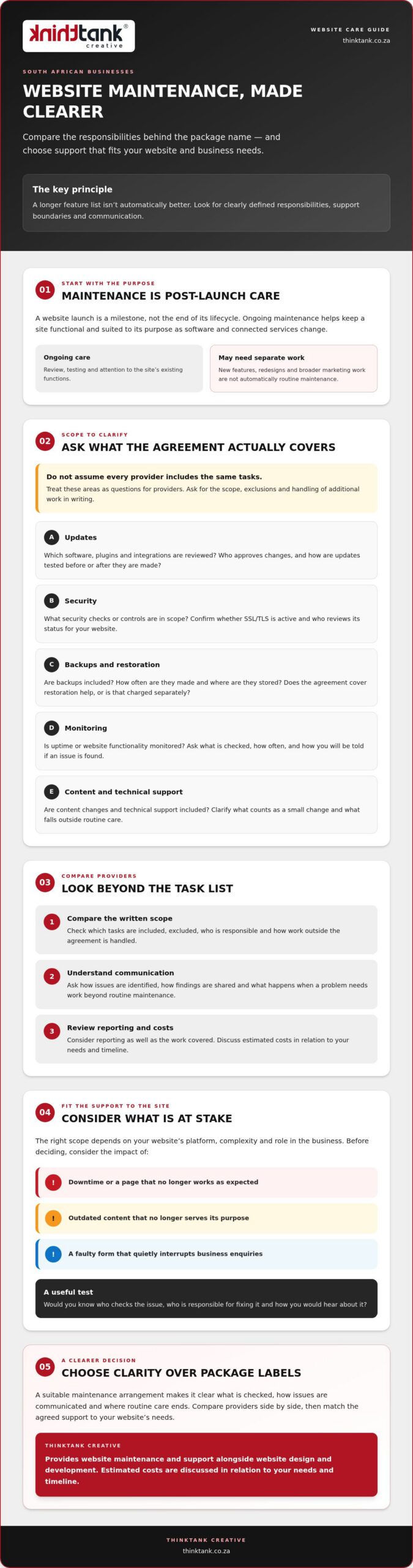
Choose a provider whose package suits your website’s platform, priorities and internal capacity. Compare the actual tasks, reporting and processes included, rather than relying on package labels alone.
Start with a short needs list: identify your content management system, essential visitor journeys, regular publishing tasks and recurring technical issues. A WordPress site with frequent blog updates may need a different mix from a small service website with occasional content changes. This baseline helps you compare managed website support services against practical requirements.
Packages may combine software updates, backups, security checks, content changes, performance testing and technical fixes. Link each task to a business need. For example, a site that relies on enquiry forms should include checks that they submit correctly. A publishing site may need regular editorial updates and link reviews.
Scope matters. Check how the package handles routine work, urgent faults, larger changes and requests outside the agreed tasks. A minor text correction differs from adding a new section or integrating a booking feature. Clear definitions help your team plan work and understand which activities need separate approval.
Choose a reporting approach that makes completed work visible. Useful reports can record support issues, website uptime and performance, ongoing problems and actions taken. Review these alongside analytics, such as which pages attract visitors and whether key journeys work as intended. A report should help prioritise the next improvement, not merely list completed tasks.
To choose managed website support, compare written scopes, reporting, communication processes and how technical changes are tested. Look for a clear account of responsibilities, access, ownership and contract changes, so your business retains control of its website and hosting arrangements.
Tailoring support also means balancing professional help with work your team can manage. Staff may handle approved text edits, while a technical specialist manages software changes and troubleshooting. For each task, agree who supplies content, who approves changes and how the finished page will be checked.
Review the package whenever your website’s role changes. A new service, campaign or online booking journey can introduce different content and functionality needs. Reassess the task list, identify gaps and adjust the scope before those changes become routine work.
Build a package around your real priorities, then refine it as the website evolves. Discuss a website support plan that reflects the work your business needs.
ThinkTank Creative: Website Design and Development
ThinkTank Creative can help when your website needs a considered redesign, new functionality or a stronger connection to your brand. Its Website Design and Development service shapes a site around your business goals, audience and content, rather than treating maintenance as disconnected fixes.
If your website’s visual identity also needs attention, creative design and Logo and Corporate Identity Design can bring greater consistency to its pages and supporting materials. Social Media Marketing can complement the website by aligning its presence across digital channels.
Turn to ThinkTank Creative when your current site no longer reflects your services or planned changes call for a broader design and development approach. Contact ThinkTank Creative to discuss your website’s next step.
Shape the next stage of your website
Give your website a clear role in the next stage of your business. Managed website support services can form part of a wider digital direction, helping your online presence develop alongside your goals rather than remain static. Consider what you want visitors to understand, feel and do, then let that vision guide future improvements.
ThinkTank Creative brings Website Design and Development, Social Media Marketing and creative design together to help businesses build a cohesive digital presence. This broader perspective can help when your website needs to move beyond routine upkeep and better reflect your brand or ambitions.
Start a conversation about the direction you want your website to take. Contact ThinkTank Creative to explore a considered next step, and move forward with confidence.
Frequently Asked Questions
What Does A Website Management Company Do?
A website management company coordinates agreed work to keep a business website functional and aligned with its purpose. Managed website support services may include technical tasks, content changes and tracking unresolved issues. When a new service launches, for example, the team can coordinate a page update and check its navigation. Agreeing responsibilities upfront helps staff know which requests to submit and who approves changes.
How Quickly Can Updates, Fixes, or Content Changes be Completed?
Completion time depends on the request’s complexity, priority, required access and approval process. Changing a short paragraph differs from diagnosing a broken form or rebuilding a page layout. To help work progress smoothly, describe the affected page, intended change and business impact. Include any required text or images, and name the person authorised to approve the finished work.
How often are backups taken?
Website backups are commonly scheduled daily or weekly, with frequency shaped by how often the site changes and the importance of recent data. A site receiving frequent orders has different recovery needs from a mostly static information site. Clarify what a backup covers, how restoration works and whether a restore is tested. Restoring a site returns it to an earlier state, but does not identify the original fault.
What if my website is hacked or stops working?
Follow the incident process agreed with your support provider and share what you observed, when it began and which pages are affected. If you still have access, avoid uncoordinated changes that could complicate diagnosis. The response may involve investigating suspicious activity, fixing the underlying issue and restoring the site if needed. A backup can return a website to an earlier state, but the cause still needs separate investigation.
What do website support packages include?
Website support packages can combine technical upkeep with practical help for a site’s ongoing needs. Managed website support services may include software updates, content changes, troubleshooting, performance checks and search optimisation, depending on the agreed scope. For example, a business might request a service page update, then have its links and enquiry route reviewed. Define routine tasks and how larger changes are scoped and approved.
How much do website support services cost in South Africa?
The price depends on the case and is provided after a quote request. For managed website support services, costs are shaped by website complexity, platform, required maintenance tasks, content workload and hosting arrangements. A small site needing occasional edits differs from one with custom features and frequent changes. Compare written scopes carefully to distinguish routine support from separately scoped development or redesign work.
What response times and service-level agreements do providers offer?
Response times and service-level agreements vary by provider and contract. Check how the agreement defines priority, when its response clock starts, which communication channel to use and how updates are shared. A response confirms that a request has been received, but does not necessarily mean the fault is fixed. Also review the escalation process for an issue affecting an important customer journey, such as submitting an enquiry.
What website maintenance, security, backups, and updates are included?
Included work depends on the package’s written scope. Check whether it names the website platform and components covered, such as the content management system, theme and plugins. Clarify whether backups include site files and relevant data, and how restoration is arranged. Security scans, software changes, content edits and technical troubleshooting should also be described clearly. This makes it easier to identify gaps before a new feature or campaign adds work.