A website launch is a beginning, not a finish line. If you’re wondering what to do after your new website goes live, start by checking that it works as intended, then set a regular rhythm for monitoring and improvement. A site can look polished but still have broken links, forms that fail to submit or pages that search engines can’t find.
It’s natural to want to promote your new website straight away. First, run a few practical checks to catch issues early and make the experience smoother for visitors. You don’t need to do everything at once. A clear order makes the next steps easier to manage.
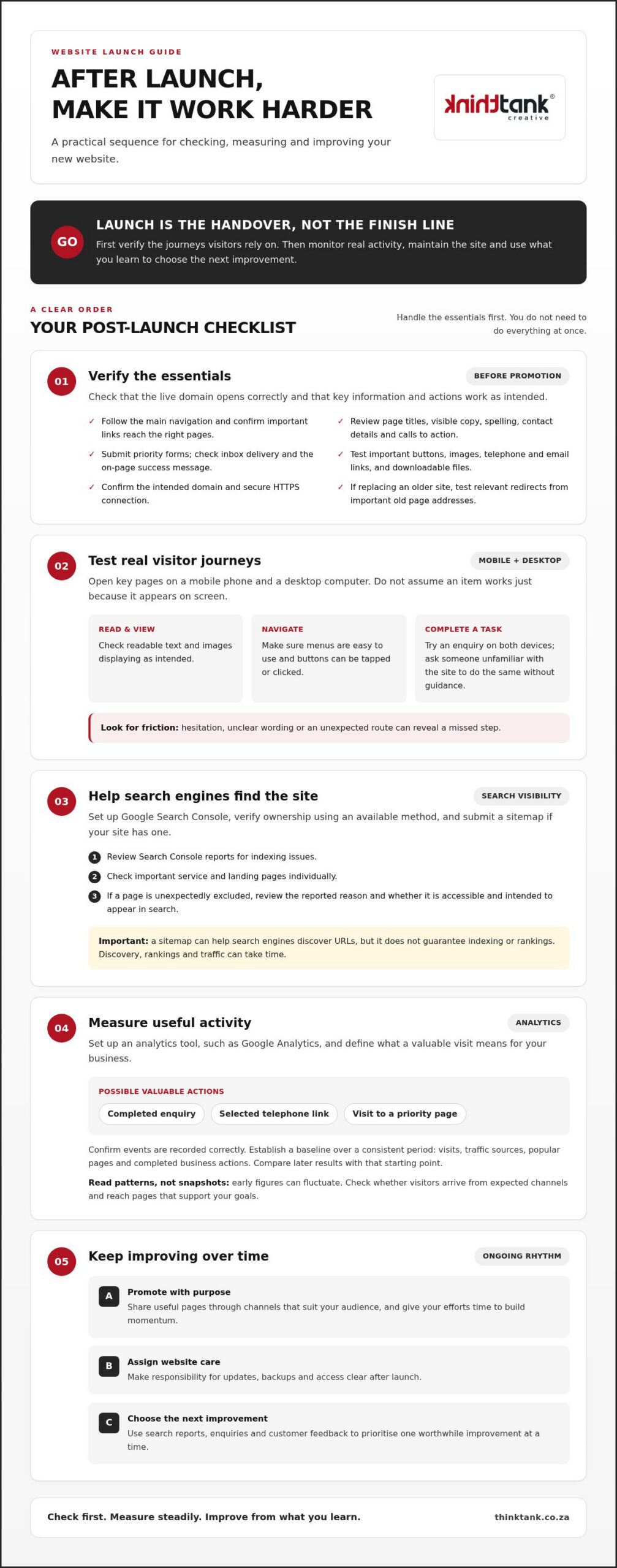
This checklist covers testing key pages and functions, checking search visibility, setting up performance tracking and planning ongoing maintenance. It also explains how promotion and regular review can help your website support your business over time. Treat launch as the handover, then use what you learn from real visitors to shape what comes next.
Start with the essentials: does the live domain open correctly, can visitors find the pages they need, and do the main actions work? Test common journeys, such as finding a service, calling your business or sending an enquiry. A polished homepage is only part of the picture. A broken contact form or an unclear route to key information can undermine the whole experience.
Use this first review to catch launch-critical issues, not to perfect every detail. Check page titles, visible copy, spelling, contact details and calls to action. These checks also help establish a clear foundation for Search engine optimization, which makes a site easier for search engines and people to understand.
Open your key pages on a mobile phone and a desktop computer. Check that text is readable, images display as intended, menus are easy to use, and buttons can be tapped or clicked. Test telephone and email links, along with downloadable files. Don’t assume something works just because it appears on the page.
Launch principle: verify critical visitor journeys before promoting the site. A quick, independent test can reveal unclear wording or a missed step that’s easy to overlook when you already know how the website is meant to work.
Submit each important form yourself. Confirm that the message reaches the intended inbox and that the visitor sees a clear success message after sending it. Check that the confirmation explains what happens next without promising a response time your business hasn’t committed to.
If the new site replaces an older one, test redirects from important old page addresses where relevant. Confirm that the website uses its intended domain and loads securely over HTTPS. Then review this pre-promotion checklist:
Once these essentials are in place, you’ll have a more reliable base for sharing the website and learning from visitor behaviour. If you’re working with a web partner, include these checks in the launch handover so responsibilities and outstanding issues are clear.
After the live site passes its essential checks, set up ways to monitor how search engines access it and what visitors do. Search visibility and audience activity are different signals. One helps you understand whether pages are appearing in search, while the other shows how people use the website after arriving.
Set up Google Search Console and verify ownership using one of the methods currently offered during setup. If your site has a sitemap, submit it through the platform and review its reports for indexing issues. A sitemap can help search engines discover URLs, but it doesn’t guarantee that every page will be indexed.
Check important pages individually, especially core service pages and key landing pages. If a page is unexpectedly excluded, review the reason reported in Search Console and investigate whether the page is accessible and intended to appear in search. Follow Google’s current guidance, as its interface and verification options may change.
Remember: submitting a sitemap helps search engines discover pages, but it doesn’t promise rankings. Search engines decide whether and where pages appear, and discovery, rankings and traffic can take time. Keep monitoring rather than treating submission as a one-off guarantee.
Set up an analytics tool, such as Google Analytics, and decide what counts as a valuable visit for your business. Depending on your goals, useful actions might include a completed enquiry, a selected telephone link or a visit to a priority page. Confirm that these events are recorded correctly before using them to assess marketing activity.
Establish a baseline by recording visits, traffic sources, popular pages and completed business actions over a consistent period. Then compare later results with that starting point. Early figures can fluctuate, so avoid drawing firm conclusions from a brief snapshot. Look for patterns: are visitors arriving from the channels you expected, and are they reaching the pages that support your goals?
For a helpful introduction to interpreting reports, explore the existing guide, Understanding your website analytics report. Apply its principles to your own objectives rather than tracking every available metric. A short, relevant set of measures is easier to review and more likely to guide a practical next step.
These tools work best as part of an ongoing process. If you’d like support connecting search visibility with website performance, explore SEO and website support.
Promotion works best when it connects the right audience with a useful next step. Instead of sharing every page everywhere, choose channels that match your customers, your offer and the time you can consistently devote to them. A focused plan is easier to manage and gives you clearer signals about what’s working.
Start with audiences you already reach. Share a relevant service or landing page through your social channels or an email update, and explain what visitors can do next, such as exploring an offering or sending an enquiry. A useful link with a clear purpose is more helpful than simply announcing that the website is live.
Use customer questions to shape ongoing content. If people often need help comparing options or understanding how a service works, create a page or post that answers those questions and points to a relevant next step. A considered publishing schedule can keep your content useful. The guide How to Create a Content Marketing Plan can help you organise topics over time.
Choose channels according to your objectives and capacity:
You don’t need to use every channel at once. Select one or two that fit your plan, then review the response before expanding your activity. This makes it easier to learn without creating more work than your team can sustain.
Publishing a website or sharing a page doesn’t guarantee immediate rankings, enquiries or sales. Search visibility takes time to develop, and campaign results depend on factors such as audience fit, the offer and the visitor experience. Set a clear objective for each activity, then measure it against meaningful actions, not attention alone.
For example, a social post might aim to bring people to a service page, while an email campaign might encourage readers to complete an enquiry. Review which channels attract relevant visits and which lead to actions your business values. Use those findings to refine your approach rather than judging success by a single short-term result.
If you’d like support aligning promotion with your goals, explore digital marketing support, including SEO, social media marketing, email marketing and PPC advertising.
A live website needs clear ownership as well as technical upkeep. Decide who is responsible for software updates, backups, access permissions and reporting issues. If a web partner is involved, make sure the handover explains what they manage and what your team needs to handle. Knowing who to contact and what information to provide can make problems easier to resolve.
Set a routine that reflects how your website is built, how often it changes and the guidance for its platform and components. Include update checks, backup reviews, functional testing and monitoring for availability, speed and broken links. Keep a simple record of completed checks, outstanding work and who is responsible. This makes maintenance manageable without assuming every site needs identical tools or timing.
Backups are most useful when they can be restored. Confirm that copies are being created as intended and periodically check that the restoration process works, following the relevant platform or provider guidance. After significant updates, test key pages and functions so you can identify problems. Agree where issues should be reported and how they’ll be prioritised instead of leaving escalation unclear.
Maintenance also covers the information visitors rely on. Review important service details, contact information, opening hours and calls to action when business details change. Remove or update content that no longer reflects what you offer. Keep an organised record of who can edit the site, and remove accounts that are no longer needed.
Use strong, unique credentials for website accounts and grant access according to each person’s role. Check current recommendations from your platform and relevant security providers before changing technical settings, as requirements can vary depending on how the site is configured. Avoid sharing login details informally, and make sure everyone involved understands the agreed process for access and reporting issues.
To plan ongoing care, you may also find Annual Website Maintenance: Budgeting in ZAR for 2026 useful if it’s published. A maintenance plan should reflect your site’s needs and responsibilities, not an arbitrary checklist. Knowing what to do after your new website goes live includes assigning an owner for routine care and improvements.
For support with ongoing website care, explore website maintenance and support.
Choose your website’s next improvements using evidence, not guesswork. Bring analytics, search reports, enquiries and customer feedback together to understand what visitors need and where their experience may be falling short. A drop-off on a key page, repeated questions from prospective customers or feedback that an important detail is hard to find can each point to an opportunity.
Look for patterns rather than reacting to a single comment or short-term change in traffic. Are visitors reaching a priority page but not taking the next step? Are similar questions appearing in enquiries? Ask customers or colleagues where the site feels unclear, and listen for moments when they hesitate or can’t find what they need. The guide Improving Website User Experience: 2026 Strategic Guide can help you consider the experience from a visitor’s perspective.
Prioritise possible changes with three practical questions: could this make an important task easier for customers, is there evidence supporting the change, and do you have the resources to implement it well? For example, if visitors struggle to find a contact option and feedback confirms the issue, clarifying that route may be more valuable than changing several design details at once.
Use a simple cycle: review the evidence, prioritise one change, then measure its effect. Before making an update, note the issue you’re addressing and the relevant measure, such as completed enquiries or visits to a key page. After implementation, compare the same measure over a suitable period and record what changed. This helps you assess whether the adjustment appears useful and gives future decisions a clear reference point.
Consider support when maintenance, technical issues or planned changes exceed your team’s capacity. ThinkTank Creative’s website work includes testing, launch, training and support, with ongoing website maintenance and support available after project completion. That continuity can help you plan changes while keeping the site’s upkeep in view.
As you decide what to do after your new website goes live, keep the process manageable: use visitor evidence to select a priority, make a considered change and review what follows. If you’d like to discuss website support or improvements, share your needs and timeline with ThinkTank Creative so the conversation can focus on the right next steps.
A successful launch is the starting point for stronger digital performance. First, verify that essential pages and visitor journeys work. Then help search engines discover your site, promote relevant pages through suitable channels and establish a manageable maintenance routine.
Knowing what to do after your new website goes live also means paying attention to what happens next. Review search and analytics data alongside enquiries and customer feedback, then prioritise one useful improvement and measure its effect. An evidence-led approach helps you refine the experience without trying to change everything at once.
ThinkTank Creative was founded in 2001, and its website process includes testing, launch, training and support. If you’d like a collaborative partner for your website’s next stage, discuss your website’s next steps with ThinkTank Creative.
Your website is live. Keep learning from it and improving it, using each considered step to create room for what comes next.
Start by checking that your live website works for visitors. Open key pages on mobile and desktop, follow the navigation, test important links and submit an enquiry form to confirm it reaches the right inbox. Check the details visitors rely on, including contact information and calls to action. These practical checks come before promotion in what to do after your new website goes live.
Set up Google Search Console and verify that you own the website using a method currently supported by Google. If a sitemap is available, submit it through Search Console, then review its reports for indexing issues. You can also inspect important page addresses individually. Submission helps Google discover URLs, but it doesn’t guarantee that every page will be indexed or appear prominently in search results.
There’s no guaranteed timeframe for a new website or page to appear in Google Search. Discovery and indexing can take time, and being indexed doesn’t guarantee a particular ranking or amount of traffic. Use Search Console to check the status of important pages and investigate unexpected exclusions. Make sure pages you want found are accessible and follow Google’s current guidance, then continue monitoring rather than repeatedly resubmitting without cause.
Google Analytics isn’t essential for a website to function, but an analytics tool can help you understand how visitors use it. Set one up if you want to monitor visits, traffic sources, popular pages or actions such as completed enquiries. Check that important events are being recorded correctly before relying on the reports. Choose measures that relate to your business goals rather than tracking figures without a clear purpose.
Yes, you can start promoting once you’ve checked that key pages and visitor journeys work. Share relevant landing pages through suitable social channels or email, and make the next step clear to visitors. Choose channels that suit your audience, offer and available capacity. Promotion can bring visitors, but publishing alone doesn’t guarantee rankings, leads or sales. Monitor whether each channel attracts relevant visits and meaningful actions.
Without ongoing maintenance, updates may be missed, backups may go unchecked and website issues can go unnoticed. Outdated content can also leave visitors with inaccurate information. The specific risks depend on how your site is built and managed, so establish who is responsible for updates, access, backup checks and reporting problems. A suitable routine helps you spot issues and keep essential functions and information current.
There isn’t one schedule that suits every website. Review software and component updates according to the platform’s current guidance, and check key functions, backups and content as part of a routine that reflects your site’s needs. Update business details promptly when they change. A simple maintenance record can help you track what was checked, what needs attention and who is responsible without making the process unnecessarily complicated.
For help planning your website’s next steps, contact ThinkTank Creative to discuss your website needs and timeline.


