How to Fix a Slow Loading WordPress Site: A 2026 Strategic Guide
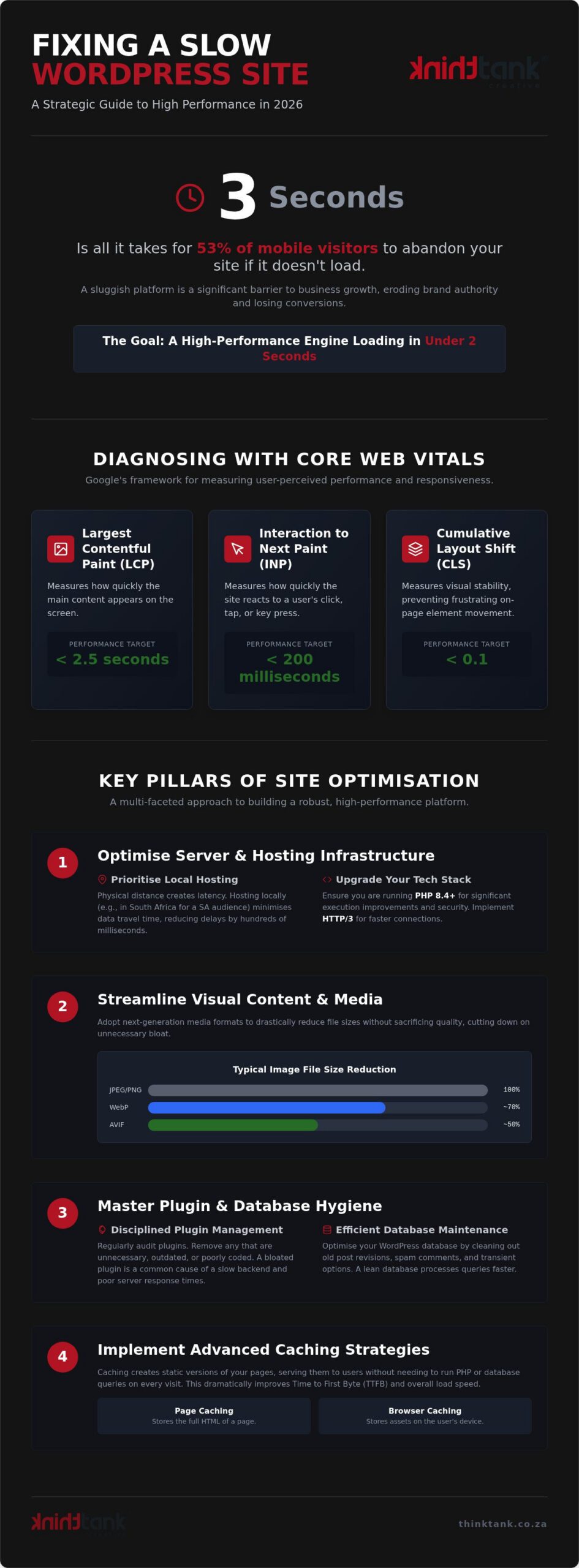
Fifty-three per cent of mobile visitors will abandon your brand's digital experience before it even begins if your page takes longer than three seconds to load. It's a sobering reality that highlights the thin margin between a successful conversion and a lost opportunity. You've likely felt the frustration of high bounce rates and poor search visibility whilst your competitors seem to glide effortlessly to the top of the rankings. It's clear that a sluggish platform isn't just a technical glitch; it's a significant barrier to your business growth.
We're here to help you reclaim your competitive edge. This strategic guide details exactly how to fix a slow loading wordpress site by aligning technical precision with sophisticated design principles. You'll learn to master the nuances of the WordPress 7.1 environment, from optimising for the latest Interaction to Next Paint (INP) standards to leveraging the power of PHP 8.4. We'll move from the anxiety of complex optimisations to the quiet assurance of a high-performance engine that loads in under two seconds. Let's transform your site into a stable, secure platform that reflects the excellence of your brand and supports your long-term vision.
Key Takeaways
- Gain a precise understanding of Core Web Vitals, including the latest Interaction to Next Paint (INP) standards, to diagnose exactly where your user experience is faltering.
- Explore our strategic methodology on how to fix a slow loading wordpress site by optimising server infrastructure and leveraging national expertise for superior performance.
- Elevate your site's performance by streamlining visual delivery and adopting next-generation media formats like WebP and AVIF to reduce unnecessary bloat.
- Implement a disciplined approach to plugin hygiene and database maintenance, ensuring your platform's backend remains lean and efficient.
- Discover how professional maintenance and advanced caching strategies can sustain a high-performance engine, allowing you to focus on growth whilst we manage the technical complexity.
Diagnosing Performance Bottlenecks and Core Web Vitals
High-performance websites aren't built by accident; they're the result of meticulous planning and technical precision. In the digital economy of 2026, speed has evolved from a technical luxury into a fundamental pillar of professional user experience (UX). When you're investigating how to fix a slow loading wordpress site, you must first view performance through the lens of your audience's expectations. A site that lags behind the national two-second benchmark doesn't just lose traffic; it erodes the brand authority you've worked so hard to establish. We believe that every millisecond shaved off your load time is an investment in your brand's reputation and its ability to convert visitors into loyal clients.
Understanding Core Web Vitals in 2026
Google's Core Web Vitals provide a structured framework for measuring how users actually perceive your site's responsiveness. Largest Contentful Paint (LCP) tracks how quickly the main content appears, aiming for a target of 2.5 seconds or less to ensure your visitors aren't left staring at a blank screen. Cumulative Layout Shift (CLS) measures visual stability, preventing the frustrating experience where buttons or text jump around as the page loads. Whilst Interaction to Next Paint (INP) has succeeded First Input Delay (FID) as the primary metric for responsiveness, both focus on how quickly your site reacts to a user's click or tap. Core Web Vitals represent the gold standard for 2026 SEO.
Setting Up Your Performance Audit
Before you can implement a solution, you need a clear, data-driven map of your current infrastructure. Utilise professional diagnostic tools like Google PageSpeed Insights, GTmetrix, and Pingdom to establish a baseline across multiple global locations. These platforms provide a detailed "Waterfall" chart, which is a chronological view of every script, image, and style sheet your site requests. By analysing this chart, you can pinpoint specific delays within the WordPress architecture, such as a bloated plugin or a slow server response. This level of precision is essential for moving beyond generic fixes toward a bespoke optimisation strategy.
Whilst DIY audits are a useful starting point, our Website Maintenance and Support team often steps in to handle the heavy lifting. We adopt the philosophy that "We Do It All So You Don't Have To", managing the technical complexities so you can focus on your core business. As part of our rigorous development process, we ensure that speed is baked into the custom design rather than being an afterthought. If you require a tailored performance strategy to elevate your digital presence, an estimated cost is provided after discussion to ensure the solution matches your specific growth objectives.
Optimising Server Infrastructure and Hosting Latency
Your server is the silent engine of your digital presence. If the foundation is weak, even the most polished front-end will struggle to perform. When considering how to fix a slow loading wordpress site, many businesses overlook the physical reality of data transmission. Speed isn't just about code; it's about the distance that data must travel between your server and your user's device. We believe that a high-performance platform begins with a robust hosting strategy that prioritises low latency and professional-grade resources.
The Impact of Local vs International Hosting
Physical distance creates latency. If your primary audience is based in South Africa but your server sits in North America or Europe, you're adding hundreds of milliseconds of delay to every request. Choosing a host with a local South African presence ensures that your content reaches your audience with minimal resistance. This is particularly vital for custom website design south africa, where high-quality visual assets require dedicated resources. Cheap shared hosting plans often force you to compete for CPU cycles with thousands of other sites, leading to unpredictable performance dips. Moving to a VPS or managed WordPress environment provides the stability and scalability your business growth demands.
Upgrading Your Technical Stack
Modern performance requires modern tools. By September 2026, running any version of PHP below 8.3 is a significant risk to both speed and security. PHP 8.4 offers substantial execution improvements that allow your server to process requests more efficiently. We also recommend implementing HTTP/3 to facilitate faster handshakes and improved multiplexing. This technical synergy ensures that your server-side optimisations complement your front-end efforts. It's a common misconception that a few plugins can solve everything, but WordPress site performance and bloat often stem from an inadequate technical stack trying to carry too much weight. For those seeking national reach, integrating a Content Delivery Network (CDN) further reduces the load on your origin server by caching content at edge locations across the country.
Building a high-performance platform is a collaborative journey. Our 5-stage development process places server optimisation at the heart of our strategy, ensuring your site remains agile as you scale. We adopt a "We Do It All So You Don't Have To" approach to technical maintenance, providing you with the peace of mind that your infrastructure is secure. If you're ready to move beyond generic templates toward a bespoke solution, our Website Maintenance and Support team is here to guide the transition. We provide an estimated cost after discussion to ensure our services align perfectly with your business requirements.
Streamlining Visual Content and Media Delivery
Visual excellence defines the modern digital experience. However, unoptimised media assets remain the primary reason businesses struggle with how to fix a slow loading wordpress site. We believe that aesthetic brilliance and technical efficiency should exist in a perfect synergy; high-resolution imagery must enhance the user journey without causing friction. By adopting a disciplined approach to media delivery, you transform your site from a heavy, static brochure into a fluid, responsive platform that respects your visitor's time and data.
Professional Image Optimisation Workflow
Precision begins before you even touch the upload button. Every image must be resized to its exact display dimensions to avoid forcing the browser to perform unnecessary scaling tasks. Whilst legacy formats like JPEG and PNG served us well for decades, the transition to WebP and AVIF is now mandatory for high-performance platforms. These modern formats offer superior compression, allowing you to maintain bespoke visual quality at a fraction of the file size. For a full-width hero image, you should aim for a file size under 150KB to ensure immediate visual impact without delaying the page load.
- Resizing: Match the pixel dimensions to your site's specific UI/UX layout before uploading.
- Compression: Utilise lossy compression for photographs and lossless for graphics with sharp lines to balance quality and speed.
- Lazy Loading: Implement native lazy loading to ensure off-screen images only load as the user scrolls, preserving critical initial bandwidth.
Managing Video and External Embeds
Self-hosting large video files is a common mistake that quickly exhausts server resources and creates massive latency for your visitors. We always recommend utilising professional hosting platforms like YouTube or Vimeo, which are engineered for high-speed global delivery. Understanding how to fix a slow loading wordpress site also requires a holistic view of third-party scripts. Elements like Google Maps or social media feeds can trigger multiple requests that stall your site's rendering. To mitigate this, we implement "facading" techniques, where a static placeholder image appears first, and the heavy script only executes when the user interacts with the element.
At ThinkTank Creative, we integrate these meticulous optimisations into our 5-stage development process. We adopt a "We Do It All So You Don't Have To" philosophy, refining every asset to ensure your custom design remains agile and competitive. Performance is never a secondary thought; it's a core component of our craftsmanship. If you're looking to elevate your site's media strategy, an estimated cost is provided after discussion to ensure our services align perfectly with your business goals.
Mastering Plugin Hygiene and Database Maintenance
Curate your digital tools with the same precision you apply to your business operations. A common misconception when investigating how to fix a slow loading wordpress site is that you need more tools to solve the problem. In reality, performance excellence often requires a disciplined "less is more" philosophy. Every active plugin adds a layer of complexity and potential script bloat that can drag down your Core Web Vitals. We advocate for a lean, purposeful architecture where every element serves a specific strategic goal.
The Plugin Audit: Quality over Quantity
Execution speed is frequently compromised by "plugin overlap", where multiple tools perform similar functions or load unnecessary CSS and JavaScript on every single page. A professional audit identifies these redundancies, allowing you to replace several single-purpose plugins with one high-quality, well-coded solution. This streamlined approach reduces the number of external requests your site makes, directly improving your Interaction to Next Paint (INP) scores. Understanding how to maintain a wordpress website involves regular reviews to ensure your technical stack remains agile and secure.
Database Cleaning and Optimisation
Your database is the heart of your site's information retrieval, but it can quickly become cluttered with "orphaned" data from uninstalled plugins, thousands of post revisions, and expired transients. This bloat forces your server to work harder to find the information it needs, slowing down every query. By limiting post revisions to a manageable number, such as three or five, you prevent the database from swelling unnecessarily. Scheduling automated optimisations ensures that your tables remain defragmented and efficient, providing a stable foundation for your business growth.
Bespoke craftsmanship is the ultimate antidote to performance issues. Whilst generic "all-in-one" themes promise versatility, they often arrive with massive amounts of unused code that permanently throttles your speed. Our custom development process eliminates this weight, providing a tailored platform built specifically for your brand's requirements. We adopt a "We Do It All So You Don't Have To" approach, managing these intricate technical details so your team can focus on high-level strategy. Secure your platform's future with our professional Website Maintenance and Support; we provide an estimated cost after discussion to ensure our methodology matches your scale.
Implementing Advanced Caching and Professional Support
Caching represents the pinnacle of digital efficiency, acting as a strategic bridge between complex server-side logic and the immediate needs of your audience. When you're determining how to fix a slow loading wordpress site, implementing a robust caching strategy is often the final step in achieving that elusive sub-two-second load time. By storing "static" versions of your content, you eliminate the need for the server to execute heavy PHP scripts for every request, ensuring a fluid experience even during significant traffic surges. We view caching not as a simple plugin setting, but as a multi-layered architecture designed to ensure your site remains resilient and responsive.
The Three Layers of Effective Caching
A truly high-performance platform utilises three distinct layers of caching to maintain its competitive edge. Browser caching involves setting precise expiry headers for static assets, which allows returning visitors to retrieve your site's architecture from their local device rather than your server. Page caching elevates this efficiency by generating static HTML versions of your dynamic content, effectively bypassing the PHP execution process for every session. Amongst the most sophisticated techniques is object caching, utilising Redis or Memcached to store the results of intricate database queries, which ensures that even the most complex interactive elements respond with absolute precision.
Why Professional Maintenance Beats DIY Fixes
Whilst caching offers transformative speed benefits, a DIY approach often results in "broken" layouts or the display of outdated content. We believe that professional oversight is the cornerstone of a stable, high-growth platform. Our team manages the intricate balance of performance through our rigorous "Program, Development, and Testing" stages, ensuring every technical adjustment is verified before it impacts your audience. We adopt a "We Do It All So You Don't Have To" philosophy, allowing our innovative creativity to secure your digital presence whilst you focus on high-level strategy.
Speed is a moving target that requires meticulous, ongoing attention to detail. Our Website Maintenance and Support services are engineered to protect your investment and provide a foundation for long-term scalability. We provide an estimated cost after discussion to ensure our bespoke approach aligns perfectly with your specific technical requirements and business goals. If you're ready to transform your site into a high-performance engine for growth, Contact ThinkTank for a professional website audit today.
Elevating Your Digital Performance for Future Growth
Mastering how to fix a slow loading wordpress site is a journey that moves beyond simple technical tweaks toward a holistic vision of brand excellence. By aligning your server infrastructure with streamlined media delivery and a disciplined maintenance schedule, you create a platform that doesn't just load faster but actively supports your business growth. We believe that a high-performance website is a direct reflection of your professional standards; it's the stable foundation your audience expects in 2026.
Since 2001, our award-winning design team has utilised a rigorous 5-stage development process to ensure every project achieves its full potential. As a national agency with deep South African expertise, we understand the specific nuances of local latency and technical optimisation. We adopt a "We Do It All So You Don't Have To" approach, providing the quiet assurance you need to focus on your core objectives whilst we manage the technical complexity. An estimated cost for our bespoke support is provided after discussion to ensure the perfect fit for your requirements. Enquire about our Website Maintenance and Support services today and let's transform your digital presence together.
Frequently Asked Questions
How do I know if my WordPress site is slow?
You can confirm your site's performance by utilising professional diagnostic tools such as PageSpeed Insights or GTmetrix. A high-performance platform should ideally load in under two seconds to meet modern user expectations. If your visitors report sluggish behaviour or if your bounce rates are climbing, it's a clear signal that your infrastructure requires attention. We recommend running these tests from a local South African server to get the most accurate reflection of your national audience's experience.
Will deleting plugins really speed up my website?
Deleting unnecessary or redundant plugins is a critical step when learning how to fix a slow loading wordpress site. Every active plugin adds extra scripts, styles, and database queries that can throttle your server's execution speed. By conducting a lean audit and removing "plugin overlap", you reduce the technical weight on your platform. We often replace multiple single-purpose tools with one custom-coded solution to ensure your site remains agile, secure, and professional.
What is the best hosting for a fast WordPress site in South Africa?
For businesses serving a national audience, the best hosting is a managed WordPress environment with local South African servers. Physical proximity reduces latency, ensuring your data doesn't have to travel across oceans to reach your visitors. Whilst cheap international shared plans might seem attractive, they often lack the dedicated CPU and memory resources required for a fast, stable platform. We prioritise robust infrastructure that supports your business growth and provides a seamless user journey.
Can a slow website affect my Google rankings in 2026?
Yes, site speed is a non-negotiable ranking factor for Google in 2026. Search engines prioritise platforms that deliver a superior user experience, which is measured through Core Web Vitals. If your site is sluggish, you'll likely see a decline in search visibility compared to faster competitors. High bounce rates caused by slow loading times also signal to Google that your content isn't meeting user needs, which impacts your organic performance and erodes your brand's authority. Pairing a fast platform with a strategy built around how to do keyword research for a south african audience ensures your optimised site is also targeting the right local search terms.
What are Core Web Vitals and why should I care?
Core Web Vitals are a set of specific metrics, including Largest Contentful Paint (LCP) and Interaction to Next Paint (INP), that Google uses to quantify user experience. You should care because these scores directly influence your SEO rankings and conversion rates. A site that scores well in visual stability and responsiveness builds immediate trust with your audience. We integrate these standards into our 5-stage development process to ensure your platform meets the highest technical benchmarks.
How much does it cost to fix a slow loading WordPress site?
The investment required to optimise your platform depends entirely on its current technical state and your specific growth objectives. Every project is unique, involving different server configurations, plugin counts, and media assets. At ThinkTank Creative, we believe in a tailored approach rather than templated pricing. An estimated cost is provided after a detailed discussion of your timeline and requirements, ensuring that our professional maintenance and support services align perfectly with your business's long-term vision.
Do I need a developer to fix my site speed or can I use a plugin?
Whilst basic caching plugins can offer marginal improvements, they often fail to address deeper server-side bottlenecks or database bloat. Professional intervention is usually required for complex tasks like script minification, HTTP/3 implementation, and custom UX/UI optimisations. Our "We Do It All So You Don't Have To" philosophy means we handle the intricate technical heavy lifting. We move beyond simple plugin fixes to create a stable, high-performance engine that is built specifically for your brand's excellence.
How often should I perform speed maintenance on my site?
Speed maintenance should be a continuous part of your digital strategy rather than a one-off event. We recommend performing a comprehensive audit at least once a month to check for database clutter, plugin updates, and media bloat. Regular maintenance ensures that your platform remains agile as you add new content or features. By partnering with an award-winning team for ongoing support, you ensure your site stays fast, secure, and ready to support your business growth. Complementing your maintenance routine with a clear process for understanding your website analytics report allows you to translate performance improvements into measurable commercial outcomes.