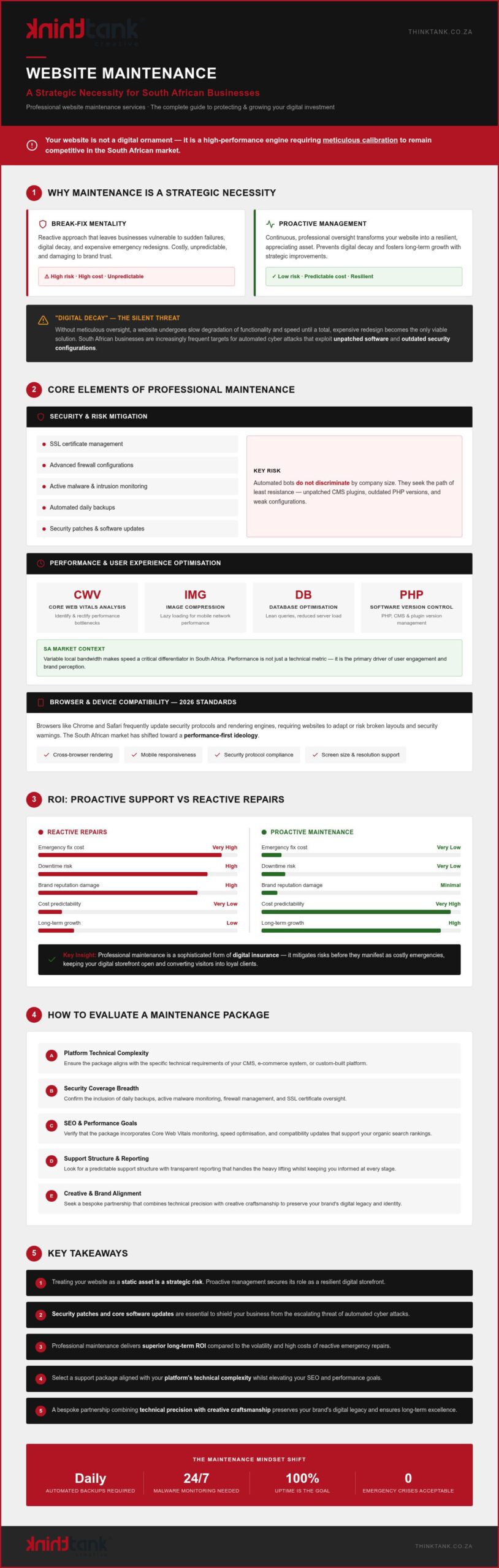
How to Maintain a WordPress Website: The 2026 Strategic Checklist
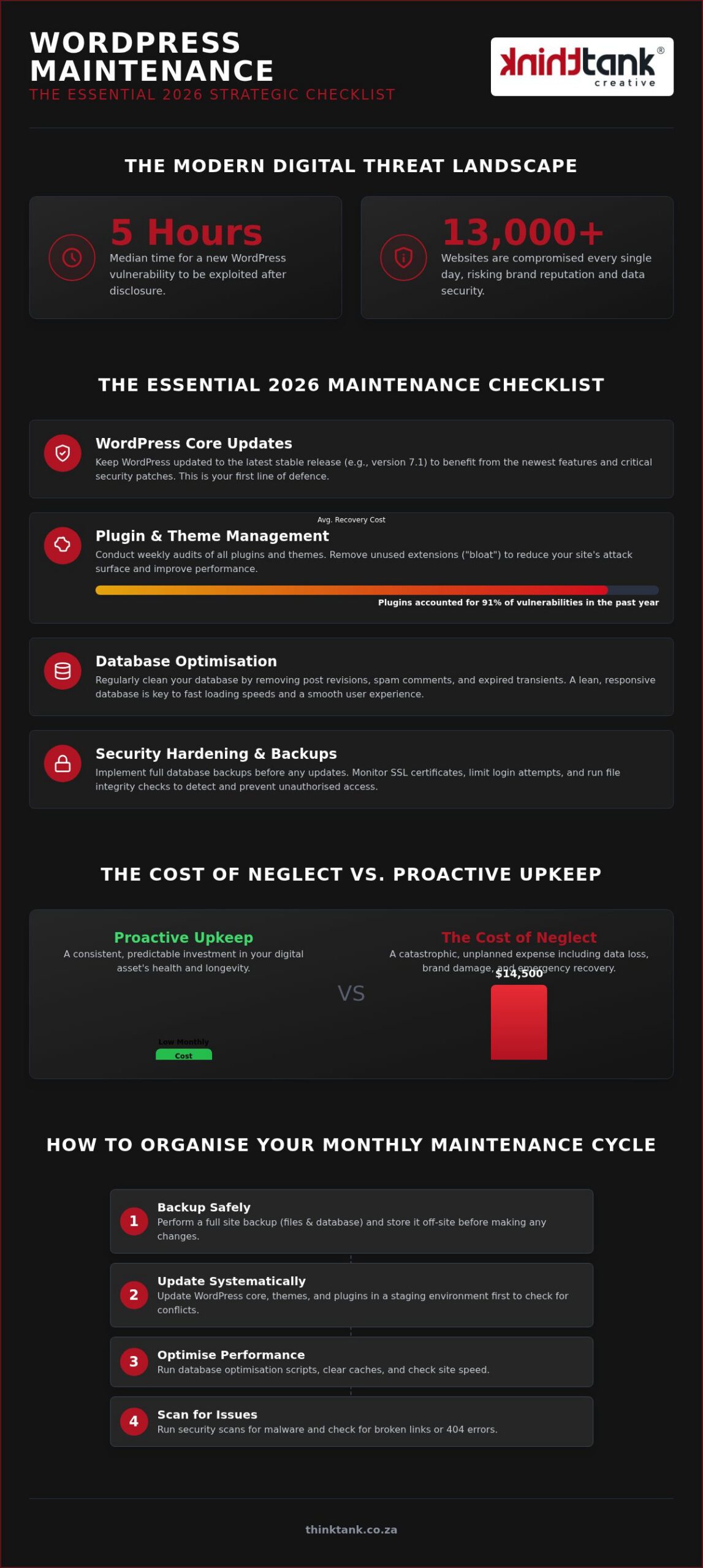
Did you know that the median time for a new WordPress vulnerability to be exploited is now just five hours after disclosure? With over 13,000 websites compromised every single day, maintaining a passive digital strategy is a risk your brand can't afford to take. Learning how to maintain a wordpress website with precision is no longer a back-office chore; it's a strategic necessity that protects your most valuable digital asset and ensures your brand remains resilient in an evolving marketplace.
We recognise the underlying anxiety that often accompanies technical upkeep, from the fear of a "White Screen of Death" after a routine update to the frustration of sluggish loading speeds. You deserve the peace of mind that comes from a stable, high-performing platform that supports your growth rather than hindering it. This guide promises to transform your maintenance routine into a streamlined, professional operation that safeguards your security and search rankings throughout 2026. We'll explore a comprehensive checklist that details the essential cadence for WordPress 7.1 updates, security scans, and performance optimisation required to keep your site at the forefront of your industry.
Key Takeaways
- Recognise why consistent maintenance serves as a cornerstone for brand reputation and SEO performance, ensuring your digital storefront remains both professional and functional.
- Discover exactly how to maintain a wordpress website using a 2026 strategic checklist that prioritises core updates, plugin audits, and essential security patches.
- Learn how to implement a safe update protocol by utilising staging environments and full database backups to eliminate the risk of unexpected site downtime.
- Evaluate the strategic trade-offs between manual DIY tasks and professional managed support to identify the most efficient route for your business's digital expansion.
- Master a methodical monthly maintenance cycle that organises your technical requirements into a predictable schedule, providing long-term stability for your digital assets.
Why WordPress Maintenance is Essential for Strategic Business Growth
Your website serves as the definitive digital storefront for your brand. As the most versatile content management system globally, WordPress powers everything from boutique portfolios to enterprise platforms, but its flexibility requires vigilant care. Mastering how to maintain a wordpress website ensures that your first impression remains polished whilst preventing the catastrophic downtime that erodes consumer trust. A site that functions flawlessly across every browser and device reflects a brand that is meticulous, dependable, and ready for growth.
Security is the silent guardian of your brand identity. In an era where 13,000 sites are compromised daily, a single breach can lead to malicious defacement that takes years to rectify in the minds of your clients. Beyond protection, there's a direct correlation between technical health and search engine visibility. Google prioritises stable, fast-loading sites, meaning that your SEO retention depends heavily on the behind-the-scenes optimisations you perform today.
To better understand these fundamental principles, watch this helpful video:
The ROI of Proactive Website Upkeep
Proactive care is an investment in your company's future value. Whilst a monthly maintenance programme requires a consistent commitment, it pales in comparison to the industry estimate of $14,500 to recover a hacked small business website. Regular performance tweaks don't just keep the lights on; they directly impact your conversion rates by ensuring a frictionless user journey. By protecting the integrity of your initial development, you extend the lifespan of your digital asset and ensure every lead generation opportunity is captured.
Avoiding the "Hidden Costs of Neglect"
Ignoring updates creates a compounding technical debt that becomes increasingly expensive to resolve. When you skip core or plugin updates, you're essentially building your business on a crumbling foundation. This neglect manifests as slow loading speeds, which is particularly damaging for South African users accessing your site via varying mobile connectivity. To explore how these technical failures impact your bottom line, read our guide on The Hidden Cost of Neglect: Traffic and SEO Retention. Keeping your site lean and updated is the only way to ensure your brand remains competitive in a fast-paced digital landscape.
The Essential 2026 WordPress Maintenance Checklist
Safeguard your digital infrastructure with a meticulous approach that transcends basic troubleshooting. Learning how to maintain a wordpress website effectively requires a structured methodology that addresses every layer of your site's architecture. As of August 2026, staying current with WordPress 7.1 is non-negotiable for security, yet updates must be handled with precision to avoid compatibility conflicts. This strategic checklist serves as your roadmap for maintaining a high-performance, resilient platform.
- WordPress Core Updates: Transitioning to the latest stable release, currently version 7.1, ensures you benefit from the newest AI integration frameworks and security patches.
- Plugin and Theme Management: Audit your extensions weekly, as plugins accounted for 91% of vulnerabilities in the past year; remove any "bloat" that doesn't serve a core business function.
- Database Optimisation: Regularly clear overhead, redundant revisions, and expired transients to ensure your backend remains lean and responsive.
- Security Hardening: Monitor SSL certificate validity, limit login attempts, and conduct file integrity checks to detect unauthorised changes before they escalate.
For those seeking an even more granular breakdown of these technical requirements, this comprehensive WordPress maintenance checklist offers a deep dive into the specific audits your developer should perform. Our team at ThinkTank Creative specialises in website maintenance and support that aligns your technical health with your broader business objectives.
Performance and Speed Audits
Maintain your competitive edge by rigorously testing your Core Web Vitals against 2026 search engine standards. High-resolution media must be optimised through modern compression formats to reduce server load, particularly for mobile users. Ensure your hosting environment is configured for PHP 8.x or higher, as outdated server environments significantly hinder the performance benefits of the latest WordPress releases. Consistent speed audits prevent the slow degradation of user experience that often leads to increased bounce rates.
Security and Data Privacy (POPI Act)
Protecting user data is a legal imperative that requires constant vigilance over your site's collection points. In 2026, South African businesses must ensure that every digital touchpoint, from contact forms to user cookies, strictly adheres to the POPI Act to avoid significant legal and reputational repercussions. Regularly verify that your backup schedule is fully functional and that all sensitive data is stored in encrypted, secure environments. This methodical approach to privacy ensures your brand remains a trusted partner in the eyes of your clients whilst fulfilling your statutory obligations.
Manual Maintenance vs Managed Support: A Strategic Comparison
Deciding how to maintain a wordpress website is a pivotal choice that defines the operational efficiency of your business. For many South African entrepreneurs, the initial instinct is to manage technical tasks internally to reduce immediate overheads. However, a strategic analysis reveals that the true time-cost of DIY maintenance often exceeds the investment in professional support. Understanding the website total cost of ownership in South Africa is essential before committing to either approach, as ongoing maintenance forms a significant portion of your long-term digital investment. Whilst modern dashboards offer "one-click" updates, these automated shortcuts lack the critical oversight of a staging environment, creating a high risk of site-wide failures that can paralyse your digital presence during peak hours.
Proactive monitoring is the hallmark of a professional maintenance strategy. Managed support identifies potential conflicts and vulnerabilities before they can be exploited, whereas manual checks are often reactive, occurring only after a problem has surfaced. Striking the right balance between internal control and professional expertise is essential for any brand that views its website as a living component of its identity rather than a static brochure.
The DIY Approach: Pros and Cons
Managing your own site offers a granular level of control that some technical-minded owners find appealing. Various automation tools can handle baseline tasks like spam filtering and basic backups for smaller, less complex sites. Yet, the learning curve is deceptively steep. When a major core update conflicts with a bespoke theme or a vital plugin, the burden of troubleshooting falls entirely on you. If you spend five hours resolving a CSS conflict or a database error, that is five hours lost to high-level business development. In this context, "free" maintenance becomes an expensive distraction that pulls you away from your core expertise.
The Managed Solution: Peace of Mind
Professional managed support transforms website upkeep from a reactive chore into a proactive growth strategy. By partnering with an award-winning development team, you gain access to a methodology that includes staging-tested updates and continuous security monitoring. This approach ensures that your e-commerce website development remains robust and high-performing amongst evolving browser standards. Instead of worrying about vulnerabilities, you receive strategic monthly reports that detail performance metrics and security health. This collaborative model provides the quiet assurance that your digital asset is being polished and protected by experts, allowing you to focus on the visionary work of scaling your brand.
How to Organise Your Monthly Maintenance Cycle
Organising your technical workflow into a predictable monthly cycle ensures that no detail is overlooked whilst maintaining the momentum of your brand's growth. When considering how to maintain a wordpress website, a methodical five-step approach is the gold standard for professional agencies. This rhythm creates a sense of reliability, mirroring the stability of your enterprise while allowing for the fluid energy of a creative platform. By following a structured sequence, you eliminate the guesswork and reduce the risk of unexpected downtime.
- Step 1: Perform a full site and database backup. Never initiate changes without a complete snapshot of your current environment, including all media files and your SQL database.
- Step 2: Clone the site to a staging environment. Use a private server to test updates safely, ensuring that new software versions don't conflict with your bespoke design.
- Step 3: Systematic updates. Apply patches to the WordPress core first, followed by your parent and child themes, and finally your active plugins in a controlled order.
- Step 4: Comprehensive testing. Manually verify that your contact forms, e-commerce checkout flows, and primary user journeys remain fully functional.
- Step 5: Push to live and final audit. Deploy the verified changes to your production server and perform a post-launch check to ensure every element is synchronised perfectly.
Our team at ThinkTank Creative provides expert website maintenance and support to manage this entire cycle for you, ensuring your digital asset remains elite in its execution without requiring your constant attention.
Testing and Quality Assurance
Rigorous testing is the only way to catch visual regressions and functional errors before your customers do. You must test your site across multiple browsers and mobile devices after every update, as browser behaviour can shift with new software releases. Plugin conflicts are a frequent reality; a simple update can easily disable a critical contact form or payment gateway without warning. We integrate a "Revision & Feedback" stage into our routine maintenance to ensure that any performance dips or layout shifts are addressed immediately, preserving the integrity of your user experience.
Backup Strategy and Disaster Recovery
A robust recovery plan distinguishes a resilient business from a vulnerable one. Local backups stored on your server are insufficient; you require off-site cloud storage to ensure data integrity during a server-wide failure. Simply having a backup isn't enough. You must regularly verify that these files are actually restorable by performing trial recoveries. Establishing a clear Recovery Time Objective (RTO) helps your business understand exactly how long it can afford to be offline. By treating backups as a strategic insurance policy, you safeguard your brand's continuity against any digital unforeseen circumstances.
Why ThinkTank Creative is Your National Partner for WordPress Excellence
ThinkTank Creative has navigated the digital evolution of South Africa since 2001, providing two and a half decades of technical excellence and creative innovation. We don't view your website as a static piece of code; instead, we treat it as a living, breathing component of your brand identity. Our "We Do It All So You Don't Have To" philosophy ensures that you can remain focused on your visionary goals whilst we handle the intricate complexities of your digital infrastructure. Choosing how to maintain a wordpress website should not be a burden on your internal resources, but rather a collaborative journey toward sustained growth.
Our role as a strategic partner is to provide quiet assurance in our expertise, moving beyond simple troubleshooting to offer bespoke craftsmanship in every update. We've seen the digital space transform over 25 years, and we remain energised by the potential for brand transformation through meticulous technical care. By positioning ourselves as an extension of your team, we ensure that your website remains elite in its execution and deeply aligned with your corporate values.
Our Bespoke Maintenance Methodology
Our approach to support is informed by our award-winning five-stage development process, ensuring that every maintenance task is performed with the same precision as an initial build. When you entrust us with the responsibility of how to maintain a wordpress website, you gain access to a seasoned team of designers and developers who monitor your site for performance dips and security threats. We understand that every business has unique requirements, which is why we provide a tailored, estimated cost for your specific needs following a detailed discussion of your objectives. This methodical approach ensures that your maintenance programme is bespoke rather than templated, offering the exact level of support your brand requires to thrive.
Elevating Your Brand Beyond Maintenance
A secure and fast website is the foundation upon which all other marketing efforts are built. We integrate our maintenance services with your broader SEO, PPC, and social media marketing strategies to create a holistic digital presence that commands attention. Your website should be a "smart" tool that makes your customers look smart, providing a seamless experience that reinforces your position as an industry leader. We are dedicated to ensuring your digital asset remains a powerful engine for lead generation and brand elevation. If you are Contact ThinkTank Creative today to secure your digital future, we invite you to start a conversation with our team about transforming your website into a resilient, high-performing asset.
Securing Your Digital Legacy in 2026
Mastering the complexities of how to maintain a wordpress website is the defining factor between a stagnant digital brochure and a high-performance business engine. We've explored the critical importance of regular core updates, the legal necessity of POPI Act compliance, and the undeniable efficiency of a managed maintenance cycle. By treating your website as a living asset rather than a static expense, you ensure your brand remains resilient against the evolving security threats of the 2026 landscape.
Since 2001, ThinkTank Creative has provided comprehensive end-to-end digital solutions that empower South African businesses to scale with confidence. Our award-winning in-house design team is dedicated to preserving your site's integrity whilst you focus on your core creative vision. We invite you to a discussion where we'll provide a tailored, estimated cost for your specific maintenance needs. It's time to move beyond reactive troubleshooting and embrace a proactive strategy that guarantees long-term stability and growth.
Secure your site with ThinkTank Creative's professional maintenance and support today. We look forward to partnering with you on your journey toward digital excellence and transformation.
Frequently Asked Questions
How often should I perform maintenance on my WordPress website?
You should perform a baseline maintenance check at least once a month to ensure your platform remains stable and secure. High-traffic e-commerce sites or those with complex custom functionality often require weekly audits to address the rapid release cycle of security patches. Consistent monitoring prevents technical debt from accumulating, ensuring your digital storefront always reflects the professional standards of your brand whilst maintaining peak performance across all modern devices.
Can I just use automatic updates for all my WordPress plugins?
Relying solely on automatic updates is a high-risk strategy that can lead to unexpected site failures or layout shifts. Whilst automation is convenient for minor patches, major updates often trigger compatibility conflicts between your bespoke theme and active plugins. A professional approach involves testing every update in a staging environment first. This methodology allows you to identify and resolve errors before they impact your live user experience or conversion rates.
What happens if I neglect my WordPress website maintenance for too long?
Long-term neglect leads to a compounding technical debt that manifests as sluggish loading speeds, broken features, and severe security vulnerabilities. Outdated software is the primary entry point for malicious attacks, with thousands of sites compromised daily due to unpatched exploits. Beyond security risks, a neglected site suffers from declining search engine rankings as Google's algorithms penalise platforms that provide a poor, unstable, or outdated user experience for their visitors.
Is a staging site really necessary for small WordPress updates?
Yes, a staging site is an essential component of a professional maintenance workflow regardless of the update's perceived size. Even a minor plugin patch can conflict with your site's unique CSS or custom PHP functions, potentially disabling critical elements like contact forms or payment gateways. Testing in a sandbox environment ensures that your production site remains live and functional, providing the quiet assurance that your digital asset is protected during every technical transition.
How much does professional WordPress maintenance cost in South Africa?
Professional maintenance costs vary significantly based on the complexity of your site's architecture and the frequency of support required for your South African business. Every digital project has unique demands, from basic corporate portfolios to enterprise-level e-commerce platforms. To gain a comprehensive understanding of all ongoing expenses, we recommend reviewing our detailed breakdown of the website total cost of ownership in South Africa, which provides a transparent three-year roadmap of all strategic costs. Rather than offering templated packages, we provide a tailored, estimated cost after a comprehensive discussion of your specific needs. This collaborative approach ensures you receive a bespoke support plan that delivers genuine value and long-term stability.
Will maintaining my website help improve my Google search rankings?
Regular upkeep directly supports your SEO retention by ensuring your site meets Google's stringent Core Web Vitals and performance standards. When you understand how to maintain a wordpress website with a focus on speed and security, you create a platform that search engines trust. A fast, error-free site reduces bounce rates and improves user engagement, which are critical signals that contribute to higher visibility and better organic traffic growth over time. Complementing your maintenance efforts with a robust technical SEO checklist for small business ensures that your site's underlying architecture is fully optimised for discovery in the AI-driven search landscape of 2026.
What should I do if my WordPress site breaks after an update?
If an update causes a site-wide failure, your first step should be to restore your most recent off-site backup to return to a stable state immediately. Once the live site is functional, you must replicate the error in a staging environment to diagnose the specific conflict between the new software and your existing theme. Identifying the root cause in a safe sandbox prevents further downtime and allows for a controlled, professional resolution that protects your brand's reputation.
Does WordPress maintenance include security monitoring for hacks?
Comprehensive maintenance programmes always include proactive security monitoring to detect unauthorised file changes, login attempts, and malware signatures before they escalate. Learning how to maintain a wordpress website involves more than just software updates; it requires vigilant hardening of your digital borders. By monitoring your SSL certificates and file integrity daily, you can identify and mitigate potential breaches, ensuring your digital asset remains a secure and trusted environment for your clients.